
Перейти к основному содержанию
Присоединяйся к сообществу ремонтников - Создай аккаунт

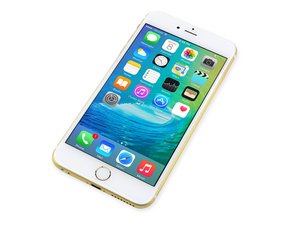
Дата выхода 25 сентября 2015 г. Модель A1687 / A1634. Ремонт данного устройства схож с предыдущими моделями, требующий отвертки и инструменты для вскрытия. Доступен в версиях GSM или CDMA; с 16, 64 или 128 ГБ памяти; в цветах: Серебристый, Золотой, «Серый космос» и «Розовое золото».

Why won't my screen work?

So... I fixed the 6s plus screen. Tested it first, it worked. Shut off phone, unplugged battery. Once the screen was reassembled and plugged in securely, the display did not work.

I thought maybe the screen was damaged, so I tried another screen. This one doesn't work either. Meanwhile, when I plug the phone into the computer, iTunes does recognize it, so it must be on... right? I must have messed up the connection with the mother board..? Any advice?

Ответ на этот вопрос У меня та же проблема

Это хороший вопрос?

Счет 0
Добавить комментарий

1 ответ

sounds exactly right, if you plug it into itunes and its detected then it means that the motherboard is working and that you simply have 0 display. Open the phone up and clear the ports on the motherboard for the display, make sure the gasket around those ports isnt getting caught when you seat the lcd screen ribbon cable, make sure the display port on the motherboard isnt damaged and is clear of debris. Also make sure you arent pinching the lcd ribbon cable on anything when you are closing it up.

Finally check your original screen if you still have it, i have seen sometimes on the pentalobe screw posts there are rubber boots that you need to move over to the new screen otherwise it shorts when you close it up. Hope this helps good luck!

Был ли этот ответ полезен?

Счет 0
Добавить комментарий

Добавьте свой ответ

brownkaleb14 буду вечно благодарен.
Статистика просмотров:

За последние 24 часов: 0

За последние 7 дней: 4

За последние 30 дней: 8

За всё время: 114
