
Перейти к основному содержанию

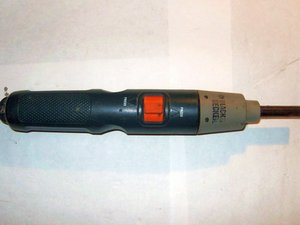
A 3.6 V screwdriver powered by Black and Decker. Repair requires only common tools.

How do I remove/replace batteries in BLACK and DECKER

I own a BLACK and DECKER PLUG-IN RE-CHARGEABLE HAND HELD SCREWDRIVER

DP240 TYPE 2.

IT would not charge/ or hold a charge in the end. Found the replacement batteries at BATTERIES PLUS BULBS, the tech said the company would not allow them to un-solder

the batteries , so I purchased the strapped batteries and will install them myself but I need help in safely removing the old batteries and installing them without damaging the circuit board or its components.

WIllie E Brown

Ответ на этот вопрос У меня та же проблема

Это хороший вопрос?

Счет 0
Добавить комментарий

1 ответ

Наиболее полезный ответ

Hello,

Follow these steps for replacing the Black and Decker.

  1. Firstly, Remove the screws.
  2. Remove the black sticker.
  3. Opening the plastic tool to pry cashing apart.
  4. Remove the plastic slider by picking it up off the screwdriver.
  5. Now, Remove the handle Screw and plastic tools.
  6. Using pliers or your fingers, remove the leads os the battery.

Был ли этот ответ полезен?

Счет 1

1 Комментарий:

Mine has a wire clip that holds the gear head to the motor/battery body. Find the 2 tiny holes below the lock/unlock icons. Insert a tiny wire or awl to push out the clip.

из

Добавить комментарий

Добавьте свой ответ

WILLIE E BROWN буду вечно благодарен.
Статистика просмотров:

За последние 24 часов: 3

За последние 7 дней: 16

За последние 30 дней: 74

За всё время: 2,901