
How to I break down a Logitech M600?
The Logitech M600 has no visible screws, and none under the slidey things.
Does anyone know if it’s safe t just work a blade around the top and prise it off?
Это хороший вопрос?
Счет
1

Репутация: 23
 2
2
The Logitech M600 has no visible screws, and none under the slidey things.
Does anyone know if it’s safe t just work a blade around the top and prise it off?
Это хороший вопрос?

Репутация: 67
2
The surface is glued. Use a hairdryer. Two of the three screws under the sensor
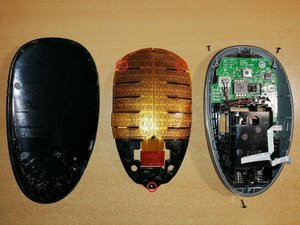
Был ли этот ответ полезен?
That's brilliant! Thanks. I am really glad that I didn't use brute force and ignorance. Clearly I would have stood a good change of killing it forever.
It's a great mouse, by the way.
I started with this, but I understood the reason before I could break

Репутация: 97
3
Here's a YouTube video of a full teardown of the m600. https://youtu.be/5sQ_b9j75Nw
Был ли этот ответ полезен?
this is a g600
Sorry, must of skipped the M. I would definitely try what the top comment suggested.
За последние 24 часов: 1
За последние 7 дней: 13
За последние 30 дней: 32
За всё время: 1,670

3 Комментариев
Hi @rouffian
I think there should be one screw holding.
Most probably in the battery compartment, under the label
из Augustine
I noticed in the pictures of a review for it, there is a little compartment of space next to the battery compartment that might have a screws inside it. Get a flashlight and look in those small side compartments next to the battery compartment.
из Landen S
I tried the trick where you pull out the batteries and turn it off and then tap the buttons for 30 seconds. That was pretty good, but I am still getting some unnecessary double-clicks, so I still want to gut it like a fish.
I have two of these mice, and one works perfectly, so I can clearly see the problem.
из Anthony Horwood