Введение
If you've tried replacing the batteries to your remote, and still experience issues. You can replace the remote control's motherboard with this guide.
You will be removing multiple screws with this fix. Be sure to keep the removed screws inside a container since they are very small and easy to misplace.
Выберете то, что вам нужно
-
-
Turn the remote control over to show its back and place your index finger in the tab. Squeeze gently to open the battery cover.
-
Lift the battery cover up to expose the batteries.
 Спросите у FixBot
-
-
-
Use your index finger to push the battery back and lift up to remove the battery.
-
Repeat the procedure for the second battery.
-
-
-
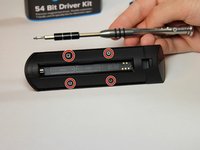
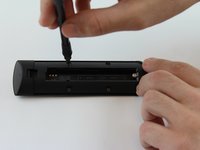
Locate the four 3.6 mm Phillips J#00 screws found under the back panel of the remote control and remove them.
-
-
-
-
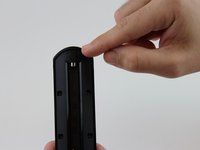
Locate the bottom of the remote control.
-
Place your thumb on the bottom part of the remote. Apply pressure as shown in the picture to release the back panel from the front of the case.
-
-
-
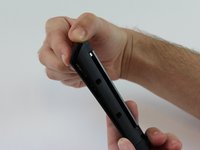
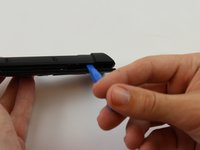
Insert a plastic opening tool in the gap and apply some force to disconnect the two pieces away from each other.
-
-
-
Unscrew the seven 2.4 mm Phillips J#00 screws that connect the motherboard to the case.
-
-
-
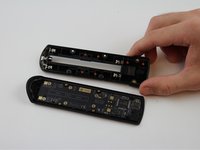
Place the plastic opening tool or your fingernail in the gap at the top end and lift the motherboard.
-








To reassemble your device, follow these instructions in reverse order.
Отменить: Я не выполнил это руководство.
6 человек успешно провели ремонт по этому руководству.

Команда

USF Tampa, Team 16-3, Wollert Fall 2015 Участник USF Tampa, Team 16-3, Wollert Fall 2015
USFT-WOLLERT-F15S16G3
4 членов
Автор 16 руководств
4 Комментарии к руководству
Hello,
step 5 is wrong! There are no pins but screws!
You need to disconnect the upper piece (infrared sensor) first. Underneath you will find two more screws. Then you can open the case easily.
The circuit board can not be fixed instead of replaced. Understand might be cheaper to replace
This was useful to me to find a location I could attach a lanyard to the remote. It is so small it keeps disappearing.
Step 4 is impossible! I tried it on the remote of our 1st generation Fire TV box. Maybe the incredible Hulk can do this, but normal human beeings NOT! I tried everything to get the f**ing Pieces apart, but it didn't work. So the remote will be thown into the trash. Absolutely unrepairable.
