Перейти к основному содержанию
Присоединяйся к сообществу ремонтников - Создай аккаунт

Android Recovery Menu - Galaxy S20

Видеообзор

  1. Android Recovery Menu - Galaxy S20, Switch off the phone: шаг 1, изображение 1 из 2 Android Recovery Menu - Galaxy S20, Switch off the phone: шаг 1, изображение 2 из 2
    • To switch off the phone press and hold the volume down and the power buttons to open the Power off menu.

    • Switch off the device.

  2. Android Recovery Menu - Galaxy S20, Connect the device to the PC: шаг 2, изображение 1 из 2 Android Recovery Menu - Galaxy S20, Connect the device to the PC: шаг 2, изображение 2 из 2
    • Connect the device to the PC.

    • NOTE: Connecting the device to a PC/Mac is only required if you are planning on applying an update over ADB or if you are putting files on the device.

  3. Android Recovery Menu - Galaxy S20: шаг 3, изображение 1 из 3 Android Recovery Menu - Galaxy S20: шаг 3, изображение 2 из 3 Android Recovery Menu - Galaxy S20: шаг 3, изображение 3 из 3
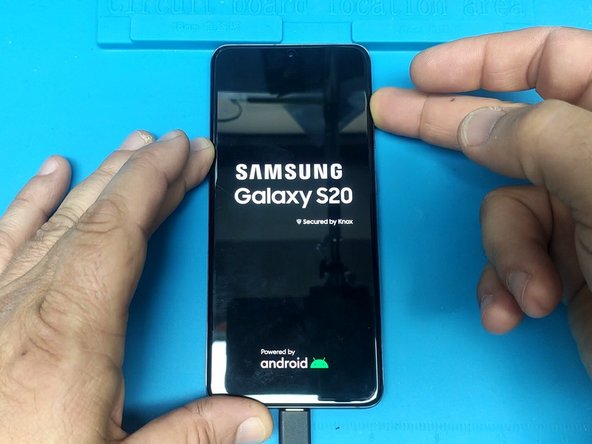
    • Press and hold the Volume up and the power on buttons.

    • When you see the Samsung logo release only the Power button.

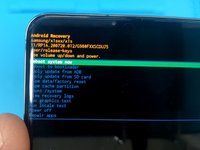
    • To use the Android Recovery menu use the Volume Up/Down buttons to navigate and the Power On button to select.

Заключение

To reassemble your device, follow these instructions in reverse order.

3 человек успешно провели ремонт по этому руководству.

ZFix

Участник с: 12/09/13

196 024 Репутация

Автор 330 руководств

Команда

Master Techs Участник Master Techs

Community

330 членов

Автор 1 452 руководств

4 Комментарии к руководству

thank u my mate fingers crossed

deb - Ответить

not doing anything yet

deb - Ответить

s20u 5533

352712248043145756

35400566043145456

fix

مه khogmanل - Ответить

SIR HIK ME IME S20U 352712248043145756


35400566043145456

مه khogmanل -

Добавить комментарий

Статистика просмотров:

За последние 24 часов: 19

За последние 7 дней: 91

За последние 30 дней: 350

За всё время: 34,893