Перейти к основному содержанию
Присоединяйся к сообществу ремонтников - Создай аккаунт

ArmorAll AA255 Power Cord Replacement

Выберете то, что вам нужно

  1. ArmorAll AA255 Power Cord Replacement, Lower Motor Housing: шаг 1, изображение 1 из 1
    • Remove the orange main housing unit from the vacuum bucket by pulling outward on the handle tabs while lifting upward as shown.

    Спросите у FixBot
  2. ArmorAll AA255 Power Cord Replacement: шаг 2, изображение 1 из 1
    • Remove the five 15mm PH2 screws.

    Спросите у FixBot
  3. ArmorAll AA255 Power Cord Replacement: шаг 3, изображение 1 из 1
    • Remove the 15 mm T20 screw. This screw is located nearest the power cord.

    Спросите у FixBot
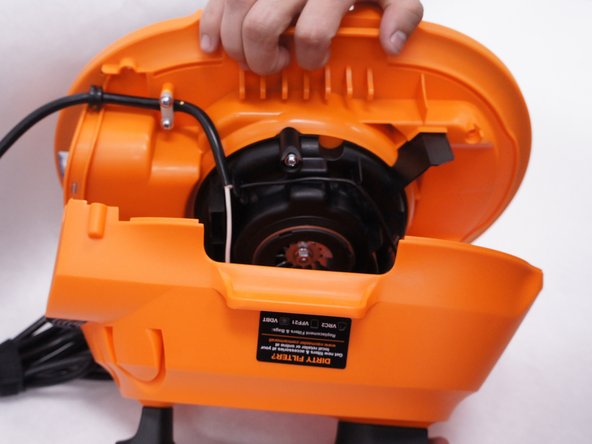
  4. ArmorAll AA255 Power Cord Replacement: шаг 4, изображение 1 из 2 ArmorAll AA255 Power Cord Replacement: шаг 4, изображение 2 из 2
    • Gently separate the upper and lower sections of the main housing.

    Спросите у FixBot
  5. ArmorAll AA255 Power Cord Replacement, Power Cord: шаг 5, изображение 1 из 1
    • Pull the black wire from the power cord out of the switch.

    • There are no clips or tabs that hold this wire in place. Just pull strongly to remove it.

    • Don't remove both black wires. Only the black wire that comes from the power cord itself needs to be removed. The one going to the motor can be left alone.

    Спросите у FixBot
  6. ArmorAll AA255 Power Cord Replacement: шаг 6, изображение 1 из 1
    • Remove the five 15mm screws from the plastic motor cover and power cord clamp using a PH2 screwdriver.

    Спросите у FixBot
  7. ArmorAll AA255 Power Cord Replacement: шаг 7, изображение 1 из 2 ArmorAll AA255 Power Cord Replacement: шаг 7, изображение 2 из 2
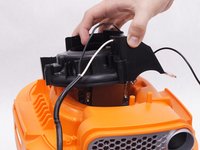
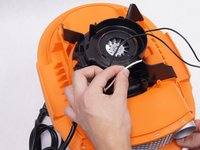
    • Remove the plastic motor cover.

    • Be sure to loosen the white wire from the notch in the plastic motor cover by pulling it upwards.

    Спросите у FixBot
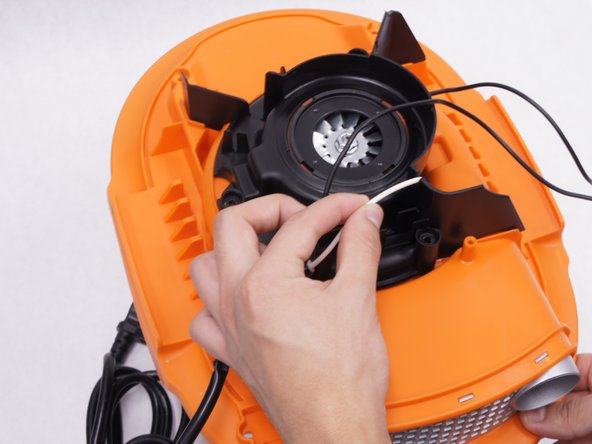
  8. ArmorAll AA255 Power Cord Replacement: шаг 8, изображение 1 из 2 ArmorAll AA255 Power Cord Replacement: шаг 8, изображение 2 из 2
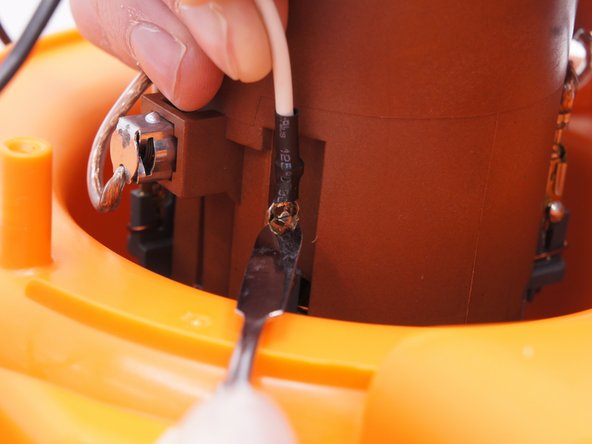
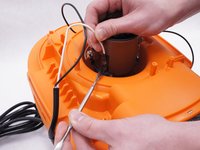
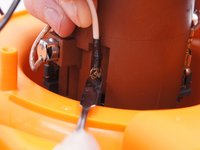
    • Detach the white wire from the motor by pulling upwards on the wire as you depress the small metal tab on the connector with a nylon spudger.

    • When working with electronics, it's important to choose a tool that's ESD-safe to avoid accidental damage to the device. The regular black nylon spudger or a plastic opening tool should be used whenever possible.

    Спросите у FixBot
Заключение

To reassemble your device, follow these instructions in reverse order.

3 человек успешно провели ремонт по этому руководству.

Abel Manring

Участник с: 02/10/16

263 Репутация

1 руководство автора

Команда

IUPUI, Team 2-1, Baechle Spring 2016 Участник IUPUI, Team 2-1, Baechle Spring 2016

IUPUI-BAECHLE-S16S2G1

4 членов

Автор 6 руководств

0 Комментарии к руководству

Добавить комментарий

Статистика просмотров:

За последние 24 часов: 0

За последние 7 дней: 13

За последние 30 дней: 75

За всё время: 1,456