Введение
If the LCD of your Canon Powershot Pro1, follow this guide. The LCD provides the user with several features; such as the ability to view pictures and changing settings. If your LCD is damaged, your images may appear distorted. In this case, it is important to replace your LCD screen. Be sure to use ESD safe tools and remove the battery prior to disassembly. Also, be careful when removing the cables. They are essential to the operation of the LCD.
Выберете то, что вам нужно
-
-
Locate the battery compartment cover on the right hand side of the camera. The cover features the text: “CF/BATT.OPEN”.
 Спросите у FixBot
-
-
-
There is an arrow beside the text. Using your hands, slide the cover in the direction of this arrow.
-
-
-
Pull the cover toward you. After doing so you will see the battery sitting inside the compartment.
-
-
-
-
Press the orange battery lock inside the compartment.
-
Remove the battery.
-
-
-
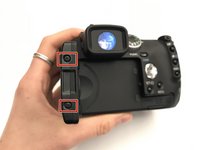
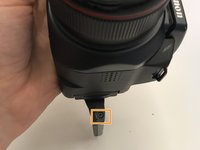
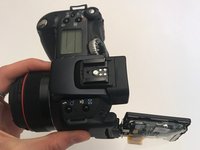
Remove the 1.2 mm Phillips #0 screws on the left and right side of the LCD.
-
Using the Phillips #000 screwdriver, remove the screws on the right (you need to rotate the screen to access the screws on the right, and you will see one on each corner).
-
-
-
Remove the back cover of the LCD screen (has “Canon” written on it).
-
-
Инструмент, используемый на этом этапе:Tweezers$4.99
-
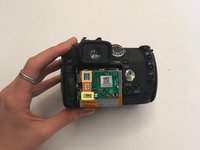
Now you will see an exposed circuit board and the backside of the LCD.
-
Fold back the plastic covering and remove the highlighted ribbon cables with tweezers.
-
-
-
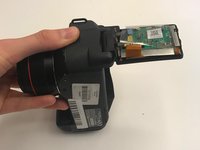
Using the nylon spudger, pry the LCD off the screen cover.
-
You can now separate the LCD from the camera.
-





To reassemble your device, follow these instructions in reverse order.

Команда

University of Alabama, Team S1-G1, Bedsole Fall 2019 Участник University of Alabama, Team S1-G1, Bedsole Fall 2019
UA-BEDSOLE-F19S1G1
3 членов
Автор 10 руководств
1 Комментарий к руководству
Hi, where do I get a replacement lcd screen for this is camera?
