Перейти к основному содержанию
Присоединяйся к сообществу ремонтников - Создай аккаунт

Dell Alienware 13 Base Panel Replacement

Выберете то, что вам нужно

  1. Dell Alienware 13 Base Panel Replacement, Base Panel: шаг 1, изображение 1 из 1
    • Working on an electrical device while plugged in can cause injury due to electrical shock. Ensure that all external power is disconnected from the device.

    • Close the device and turn the device over.

  2. Dell Alienware 13 Base Panel Replacement: шаг 2, изображение 1 из 1
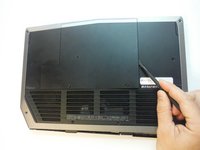
    • Remove (2) 5 mm Phillips head screws attaching the small access panel to the base using a Phillips # 1 screwdriver.

    • The (2) screws are attached to the base panel with retaining clips and won't completely detach from the panel.

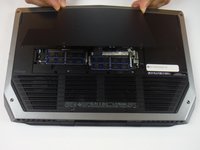
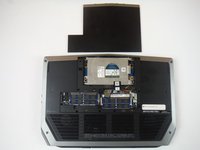
  3. Dell Alienware 13 Base Panel Replacement: шаг 3, изображение 1 из 3 Dell Alienware 13 Base Panel Replacement: шаг 3, изображение 2 из 3 Dell Alienware 13 Base Panel Replacement: шаг 3, изображение 3 из 3
    Инструмент, используемый на этом этапе:
    Heavy-Duty Spudger
    $4.99
Заключение

To reassemble your device, follow these instructions in reverse order.

2 человек успешно провели ремонт по этому руководству.

Adam Russell

Участник с: 09/26/16

898 Репутация

Автор 6 руководств

Команда

USF Tampa, Team 14-2, Eyestone Fall 2016 Участник USF Tampa, Team 14-2, Eyestone Fall 2016

USFT-EYESTONE-F16S14G2

3 членов

Автор 7 руководств

0 Комментарии к руководству

Добавить комментарий

Статистика просмотров:

За последние 24 часов: 1

За последние 7 дней: 5

За последние 30 дней: 27

За всё время: 742