Введение
This guide will help you replace the fan in your Dell Latitude 5500 laptop. The fan is necessary to cool the laptop. Without the fan operating properly, the laptop could overheat. If you believe your fan needs to be replaced, check the troubleshooting page first. If the fan is not operating properly, try to clean it first before resorting to a replacement.
Выберете то, что вам нужно
-
-
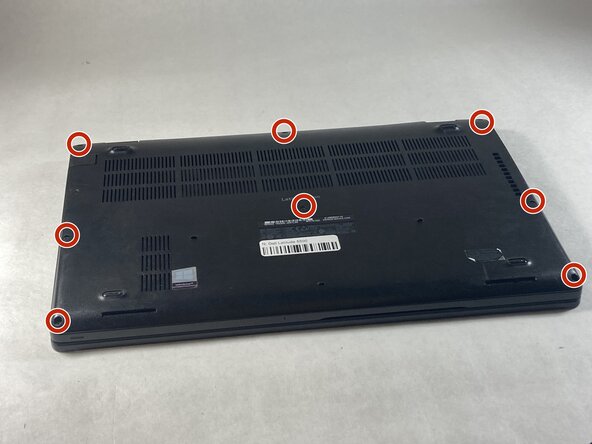
Use a Phillips #0 screwdriver to loosen the eight captive screws on the back panel.
 Спросите у FixBot
-
-
-
Use a Phillips #0 screwdriver to remove the single 6 mm screw on the right side of the battery.
-
-
-
-
Using hands or plastic prying tools, remove the flat-topped (low-profile) connector at the top of the battery.
-
Remove the battery.
-
-
-
Remove the two 5 mm screws on the fan using a Phillips #0 screwdriver.
-
-
-
Unplug the wire connecting the fan to the motherboard by pulling to the side.
-


To reassemble your device, follow these instructions in reverse order.

Команда

UMass Dartmouth, Team 6-6, Botvin Spring 2026 Участник UMass Dartmouth, Team 6-6, Botvin Spring 2026
UMASSD-BOTVIN-S26S6G6
3 членов
Автор 6 руководств
