Перейти к основному содержанию
Присоединяйся к сообществу ремонтников - Создай аккаунт

Dell Precision M4700 Memory Module Replacement

Выберете то, что вам нужно

  1. Dell Precision M4700 Memory Module Replacement, Battery: шаг 1, изображение 1 из 2 Dell Precision M4700 Memory Module Replacement, Battery: шаг 1, изображение 2 из 2
    • Slide the release latch to unlock the battery.

    • Flip and remove the battery from the computer.

    Спросите у FixBot

    Добавить комментарий

  2. Dell Precision M4700 Memory Module Replacement, Base Cover: шаг 2, изображение 1 из 2 Dell Precision M4700 Memory Module Replacement, Base Cover: шаг 2, изображение 2 из 2
    • Remove the screws that secure the base cover to the computer. Press the rubber tabs towards the rear of the computer to disengage the base cover.

    • Flip and remove the base cover from the computer.

    Спросите у FixBot

    Добавить комментарий

  3. Dell Precision M4700 Memory Module Replacement, Keyboard Trim: шаг 3, изображение 1 из 2 Dell Precision M4700 Memory Module Replacement, Keyboard Trim: шаг 3, изображение 2 из 2
    • Pry up the keyboard trim starting from the top-inner edge.

    • Pry up the bottom edge of the keyboard trim from the top-inner edge.

    Спросите у FixBot

    Добавить комментарий

  4. Dell Precision M4700 Memory Module Replacement, Keyboard: шаг 4, изображение 1 из 3 Dell Precision M4700 Memory Module Replacement, Keyboard: шаг 4, изображение 2 из 3 Dell Precision M4700 Memory Module Replacement, Keyboard: шаг 4, изображение 3 из 3
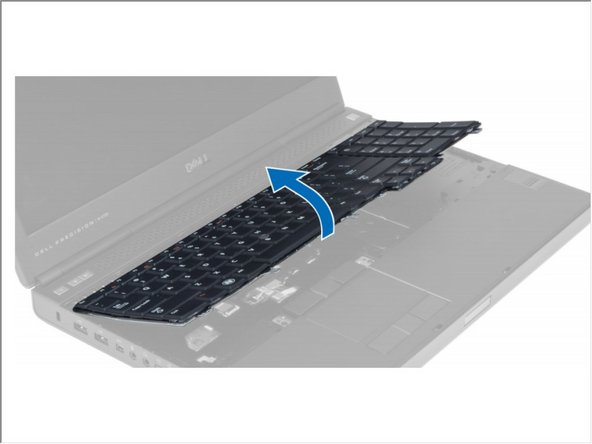
    • Remove the screws that secure the keyboard to the computer.

    • Starting from the bottom of the keyboard, separate the keyboard from the computer and flip the keyboard over.

    • Disconnect the keyboard-data cable from the system board and remove the keyboard.

    Спросите у FixBot

    Добавить комментарий

  5. Dell Precision M4700 Memory Module Replacement, Memory Module: шаг 5, изображение 1 из 1
    • Flip Computer To its Back.

    • Pry the retention clips away from the memory module until it pops up. Lift up the memory module and remove it from the computer.

    Спросите у FixBot

    Добавить комментарий

  6. Dell Precision M4700 Memory Module Replacement: шаг 6, изображение 1 из 1
    • Flip the Computer To its Top.

    • Pry the retention clips away from the memory module until it pops up. Lift up the memory module and remove it from the computer.

    Спросите у FixBot

    Добавить комментарий

Заключение

To reassemble your device, follow these instructions in reverse order.

Отменить: Я не выполнил это руководство.

Johnathan Hammond

Участник с: 02/28/18

46 149 Репутация

Автор 408 руководств

Команда

RampUP America, Inc. Участник RampUP America, Inc.

Community

45 членов

Автор 2 002 руководств

0 Комментарии к руководству

Добавить комментарий

Статистика просмотров:

За последние 24 часов: 0

За последние 7 дней: 5

За последние 30 дней: 13

За всё время: 1,337