Введение
The computers hard drive is where all of its data is stored and kept when the computer is turned off. Upgrading it to a larger or faster HDD or SSD is very important in keeping your computer running properly. This simple guide shows how to easily access the HDD bay within the laptop.
Выберете то, что вам нужно
-
-
Place the laptop face down in front of you.
-
Use a Phillips #0 screwdriver to remove the three 3 mm screws from the back of the case.
-
Remove the back panel.
 Спросите у FixBot
-
-
-
-
Use a Phillips #0 screwdriver to remove the two 3 mm screws from the small metal HDD bracket.
-
Lift up on the small bracket and pull it off.
-
-
-
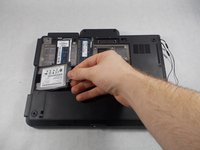
Pull out the hard drive and the small rubber sleigh that holds it.
-
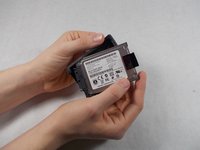
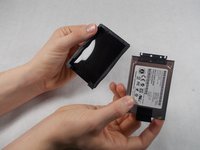
Pull the rubber sleigh off of the hard drive.
-


To reassemble your device, follow these instructions in reverse order.
Отменить: Я не выполнил это руководство.
6 человек успешно провели ремонт по этому руководству.

Команда

UMass Dartmouth, Team S8-G4, Valliere Spring 2018 Участник UMass Dartmouth, Team S8-G4, Valliere Spring 2018
UMASSD-VALLIERE-S18S8G4
3 членов
Автор 6 руководств
1 Комментарий к руководству
You can use any mSATA SSD as replacement by using the following caddy/adapter:
https://www.ebay.fr/itm/165266235415
jacques_06
