Перейти к основному содержанию

Honda 6500 Watt Generator EG6500CL AT Rotor Replacement

Выберете то, что вам нужно

  1. Honda 6500 Watt Generator EG6500CL AT Rotor Replacement, Honda 6500 Watt Generator EG6500CL AT Safety Precautions: шаг 1, изображение 1 из 2 Honda 6500 Watt Generator EG6500CL AT Rotor Replacement, Honda 6500 Watt Generator EG6500CL AT Safety Precautions: шаг 1, изображение 2 из 2
    • Before you work on the device, make sure to switch the engine off.

    • Switch the circuit breaker off.

  2. Honda 6500 Watt Generator EG6500CL AT Rotor Replacement, Disconnect the spark plug: шаг 2, изображение 1 из 2 Honda 6500 Watt Generator EG6500CL AT Rotor Replacement, Disconnect the spark plug: шаг 2, изображение 2 из 2
    • Grab the plastic housing at the end of the spark plug wire.

    • Pull firmly to disconnect the wire from the spark plug.

  3. Honda 6500 Watt Generator EG6500CL AT Rotor Replacement: шаг 3, изображение 1 из 2 Honda 6500 Watt Generator EG6500CL AT Rotor Replacement: шаг 3, изображение 2 из 2
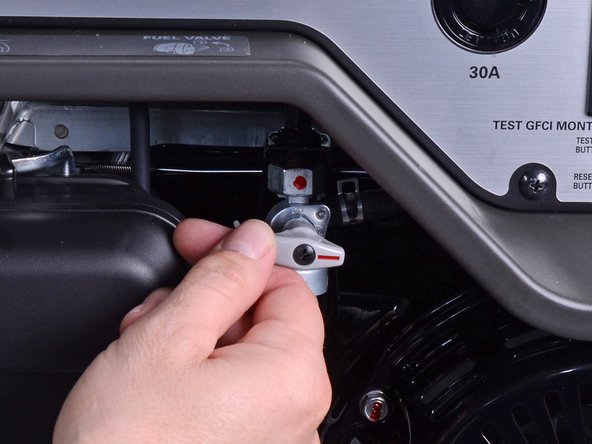
    • Twist the fuel valve clockwise into the cutoff position.

  4. Honda 6500 Watt Generator EG6500CL AT Rotor Replacement, Remove the generator cover: шаг 4, изображение 1 из 1
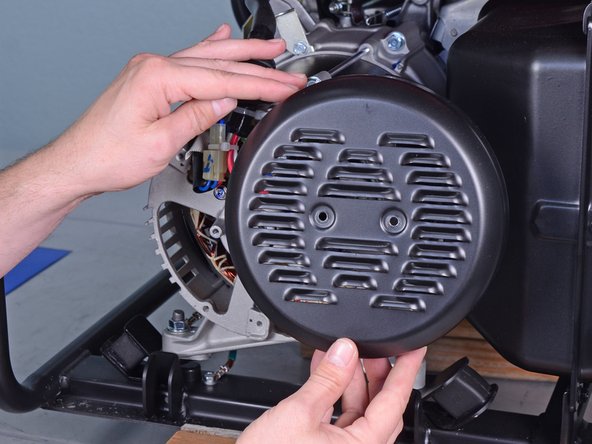
    • Use a Phillips screwdriver to remove the two screws securing the generator cover.

  5. Honda 6500 Watt Generator EG6500CL AT Rotor Replacement: шаг 5, изображение 1 из 2 Honda 6500 Watt Generator EG6500CL AT Rotor Replacement: шаг 5, изображение 2 из 2
    • Remove the generator cover.

  6. Honda 6500 Watt Generator EG6500CL AT Rotor Replacement, Remove the brush assembly: шаг 6, изображение 1 из 2 Honda 6500 Watt Generator EG6500CL AT Rotor Replacement, Remove the brush assembly: шаг 6, изображение 2 из 2
    • Squeeze and disconnect the stator connector from the wiring harness.

  7. Honda 6500 Watt Generator EG6500CL AT Rotor Replacement: шаг 7, изображение 1 из 2 Honda 6500 Watt Generator EG6500CL AT Rotor Replacement: шаг 7, изображение 2 из 2
    • Use a 10 mm socket to remove the bolt securing the brush assembly.

    • Pull the brush assembly out slightly from its recess.

  8. Honda 6500 Watt Generator EG6500CL AT Rotor Replacement: шаг 8, изображение 1 из 2 Honda 6500 Watt Generator EG6500CL AT Rotor Replacement: шаг 8, изображение 2 из 2
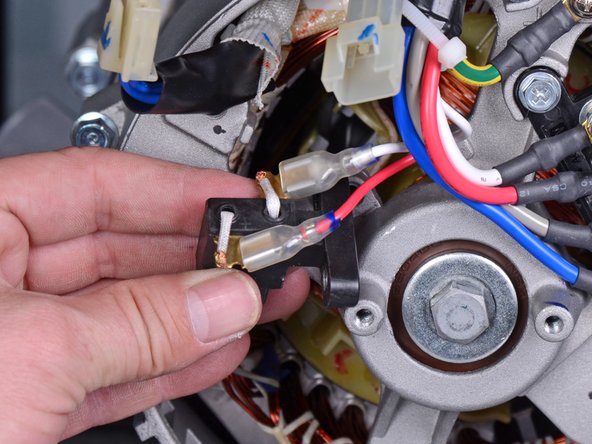
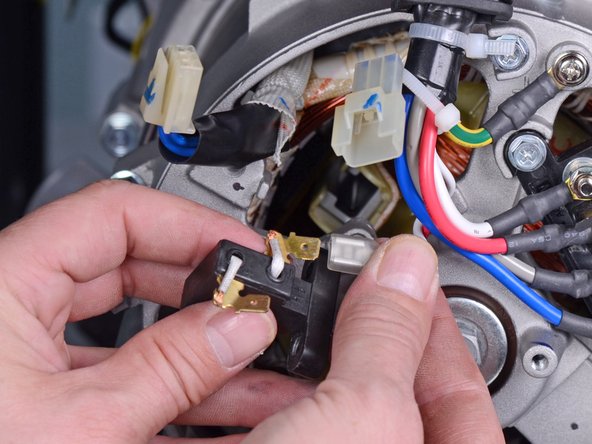
    • Disconnect the two spade connectors from the brush assembly.

  9. Honda 6500 Watt Generator EG6500CL AT Rotor Replacement: шаг 9, изображение 1 из 2 Honda 6500 Watt Generator EG6500CL AT Rotor Replacement: шаг 9, изображение 2 из 2
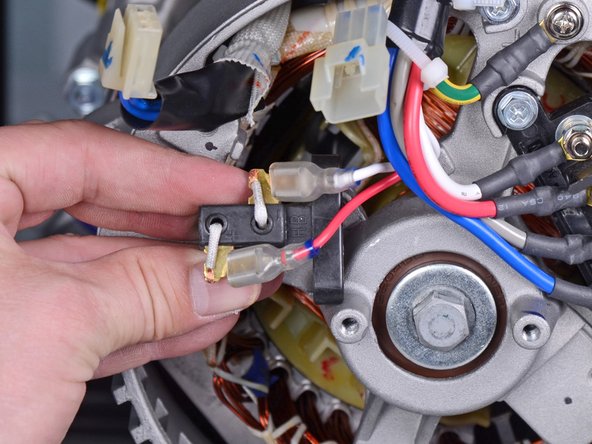
    • Remove the brush assembly.

    • During reassembly, use the second photo as reference for how to wire the brush assembly.

  10. Honda 6500 Watt Generator EG6500CL AT Rotor Replacement, Loosen the rear generator housing: шаг 10, изображение 1 из 1
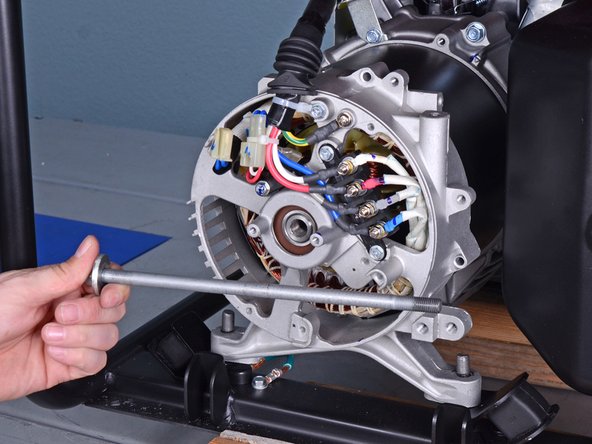
    • Use a 10 mm socket to remove the four long bolts securing the generator cover to the generator assembly.

    • During reassembly, tighten these bolts to 7 ft-lb (10 N-m).

  11. Honda 6500 Watt Generator EG6500CL AT Rotor Replacement: шаг 11, изображение 1 из 2 Honda 6500 Watt Generator EG6500CL AT Rotor Replacement: шаг 11, изображение 2 из 2
    • Use a 14 mm socket to remove the rotor bolt from the generator assembly.

    • This bolt may be difficult to loosen. If you have trouble removing the bolt, use an impact wrench or breaker bar.

    • During reassembly, tighten this bolt to 33 ft-lb (44 N-m).

  12. Honda 6500 Watt Generator EG6500CL AT Rotor Replacement: шаг 12, изображение 1 из 2 Honda 6500 Watt Generator EG6500CL AT Rotor Replacement: шаг 12, изображение 2 из 2
    • Remove the rotor bolt and washer.

  13. Honda 6500 Watt Generator EG6500CL AT Rotor Replacement: шаг 13, изображение 1 из 3 Honda 6500 Watt Generator EG6500CL AT Rotor Replacement: шаг 13, изображение 2 из 3 Honda 6500 Watt Generator EG6500CL AT Rotor Replacement: шаг 13, изображение 3 из 3
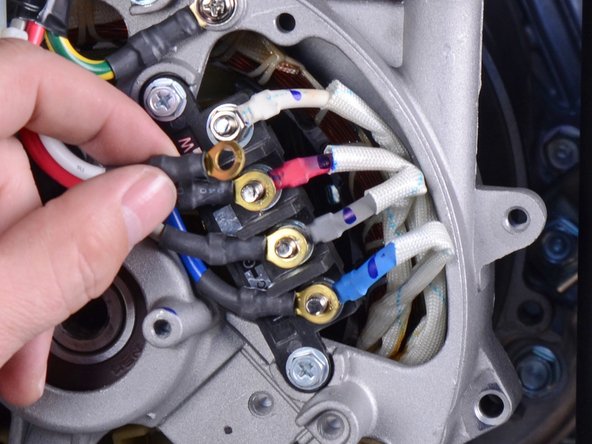
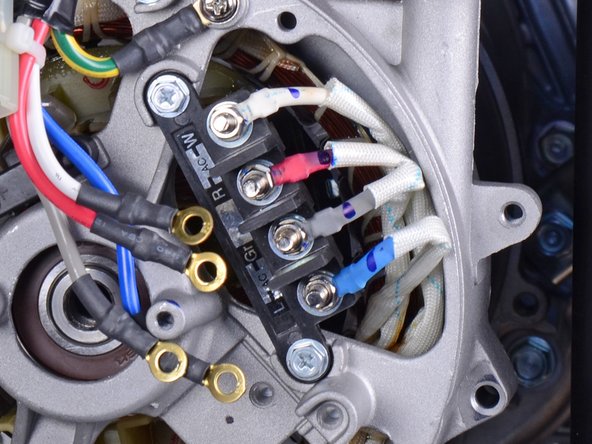
    • Use an 8 mm socket to remove the four nuts securing the wiring harness to the terminal.

    • Remove only the top nut from each terminal post.

    • Be careful not to lose the crush washers behind them.

    • Remove the wiring harness wires from the terminal.

  14. Honda 6500 Watt Generator EG6500CL AT Rotor Replacement, Reassembly tip: шаг 14, изображение 1 из 2 Honda 6500 Watt Generator EG6500CL AT Rotor Replacement, Reassembly tip: шаг 14, изображение 2 из 2
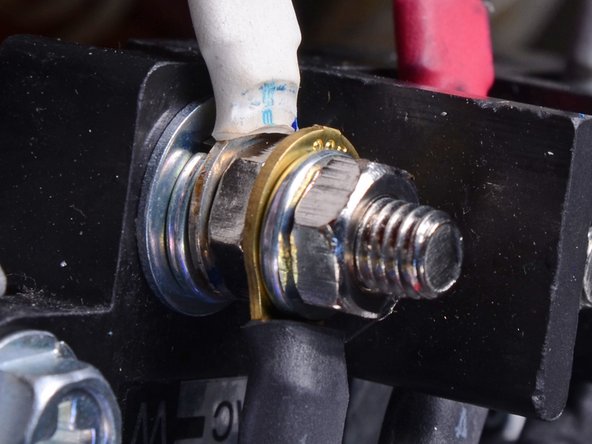
    • During reassembly, use these photos as a reference for how to re-stack the terminal posts. From the terminal base to tip:

    • Base washer

    • Crush washer

    • Stator wire connector

    • Nut

    • Wiring harness connector

    • Crush washer

    • Nut

  15. Honda 6500 Watt Generator EG6500CL AT Rotor Replacement: шаг 15, изображение 1 из 3 Honda 6500 Watt Generator EG6500CL AT Rotor Replacement: шаг 15, изображение 2 из 3 Honda 6500 Watt Generator EG6500CL AT Rotor Replacement: шаг 15, изображение 3 из 3
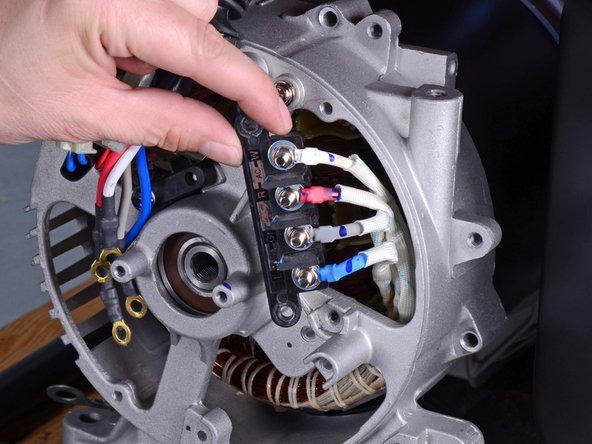
    • Use an 8 mm socket to remove the three bolts securing the wiring terminal and harness.

    • Remove the Phillips screw securing the harness ground.

    • Loosen the wiring terminal and harness from their resting positions.

  16. Honda 6500 Watt Generator EG6500CL AT Rotor Replacement: шаг 16, изображение 1 из 2 Honda 6500 Watt Generator EG6500CL AT Rotor Replacement: шаг 16, изображение 2 из 2
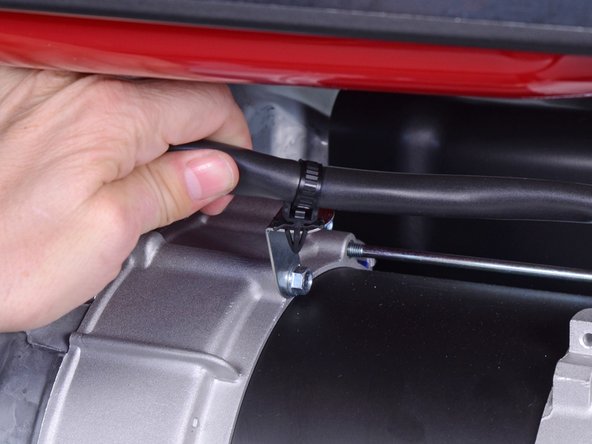
    • Use pliers to release the cable tie securing the wiring harness to the generator assembly.

  17. Honda 6500 Watt Generator EG6500CL AT Rotor Replacement, Loosen the mounting bolts: шаг 17, изображение 1 из 1
    • Carefully tilt the rear of the generator upwards to access the under-frame bolts.

    • Use a 12 mm socket to remove the two bolts underneath the frame, which secures the rear generator housing.

  18. Honda 6500 Watt Generator EG6500CL AT Rotor Replacement: шаг 18, изображение 1 из 3 Honda 6500 Watt Generator EG6500CL AT Rotor Replacement: шаг 18, изображение 2 из 3 Honda 6500 Watt Generator EG6500CL AT Rotor Replacement: шаг 18, изображение 3 из 3
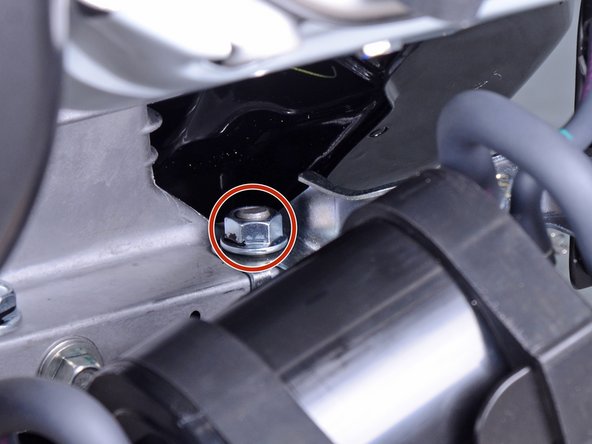
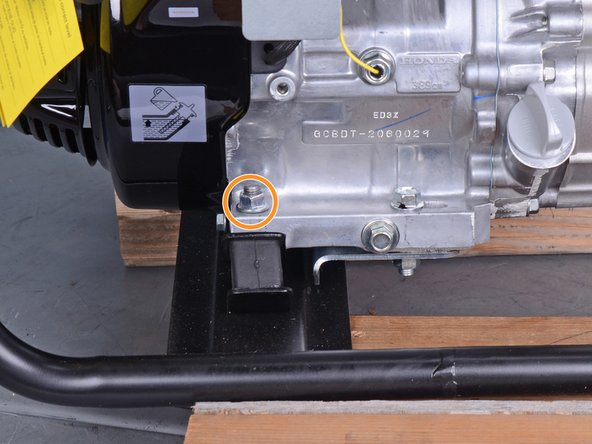
    • Removing these nuts give the generator assembly enough slack to remove the rear bushings.

    • Use a 14 mm socket to remove the mounting nut next to the emissions canister.

    • Use a 14 mm socket to remove the mounting nut near the oil filler hole.

  19. Honda 6500 Watt Generator EG6500CL AT Rotor Replacement: шаг 19, изображение 1 из 2 Honda 6500 Watt Generator EG6500CL AT Rotor Replacement: шаг 19, изображение 2 из 2
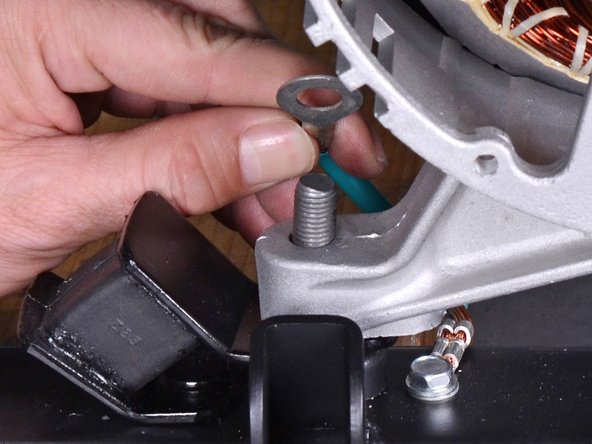
    • Use a 14 mm socket to remove the two nuts securing the rear housing to the bushings.

    • During reassembly, be sure to re-attach the ground terminal to the left bushing.

  20. Honda 6500 Watt Generator EG6500CL AT Rotor Replacement, Remove the rear bushings: шаг 20, изображение 1 из 3 Honda 6500 Watt Generator EG6500CL AT Rotor Replacement, Remove the rear bushings: шаг 20, изображение 2 из 3 Honda 6500 Watt Generator EG6500CL AT Rotor Replacement, Remove the rear bushings: шаг 20, изображение 3 из 3
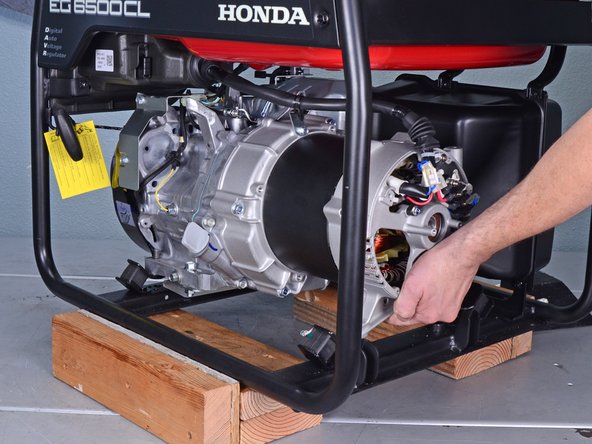
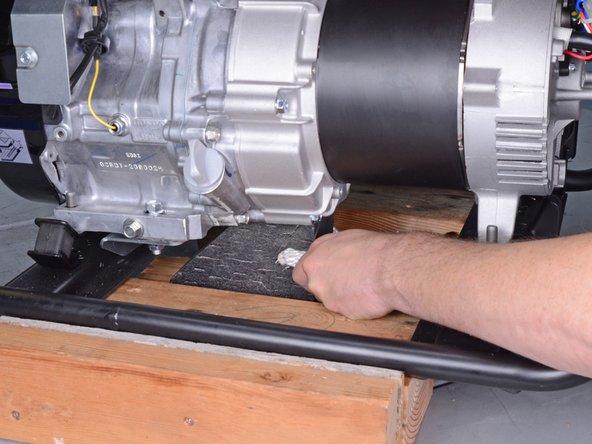
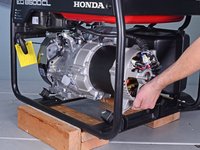
    • In these photos, the generator frame is propped on some blocks for ease of access. You do not need to do this for the procedure.

    • Tilt the generator assembly by lifting the rear housing slightly.

    • Place support blocks underneath the silver generator housing to support the generator assembly.

    • The generator weight should rest on the support blocks and no longer on the rear bushings.

    • Do not support the generator by the black stator cover.

  21. Honda 6500 Watt Generator EG6500CL AT Rotor Replacement: шаг 21, изображение 1 из 3 Honda 6500 Watt Generator EG6500CL AT Rotor Replacement: шаг 21, изображение 2 из 3 Honda 6500 Watt Generator EG6500CL AT Rotor Replacement: шаг 21, изображение 3 из 3
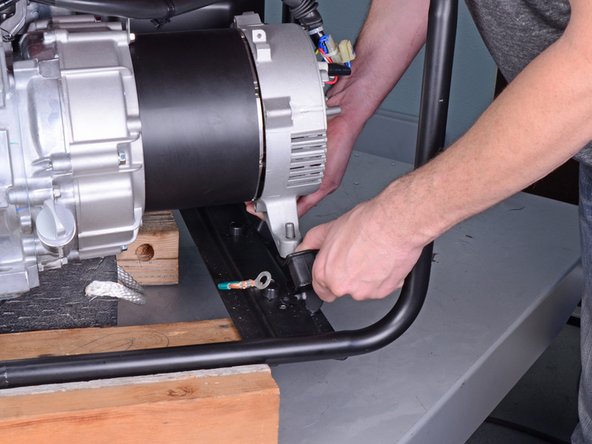
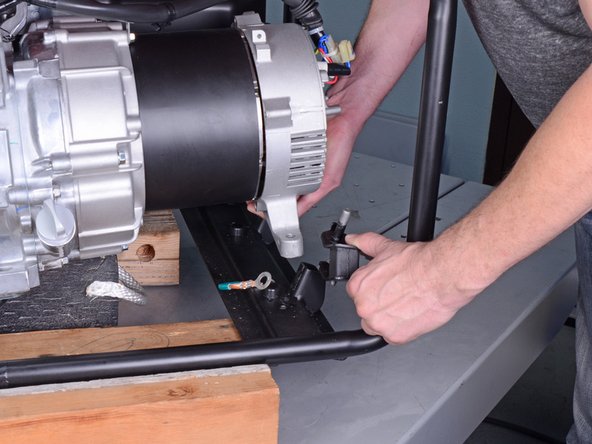
    • Lift the rear generator housing up as far as you can and maneuver the left bushing out of its socket.

    • Remove the left bushing.

  22. Honda 6500 Watt Generator EG6500CL AT Rotor Replacement: шаг 22, изображение 1 из 1
    • Repeat the previous step to remove the right bushing from its socket.

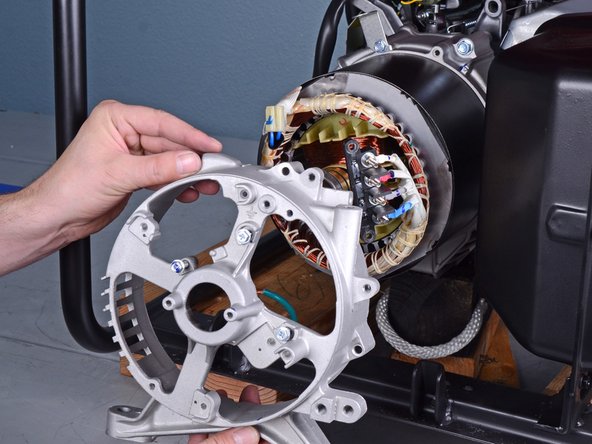
  23. Honda 6500 Watt Generator EG6500CL AT Rotor Replacement, Remove the rear generator housing: шаг 23, изображение 1 из 2 Honda 6500 Watt Generator EG6500CL AT Rotor Replacement, Remove the rear generator housing: шаг 23, изображение 2 из 2
    • Remove the rear generator housing from the generator assembly.

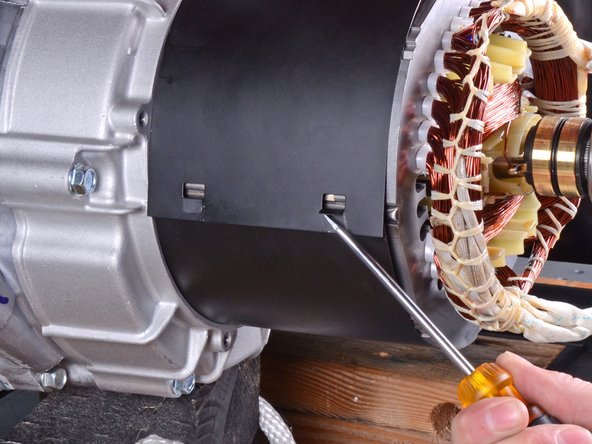
  24. Honda 6500 Watt Generator EG6500CL AT Rotor Replacement, Remove the stator cover: шаг 24, изображение 1 из 2 Honda 6500 Watt Generator EG6500CL AT Rotor Replacement, Remove the stator cover: шаг 24, изображение 2 из 2
    • Rotate the stator cover so that the seam is at an accessible angle.

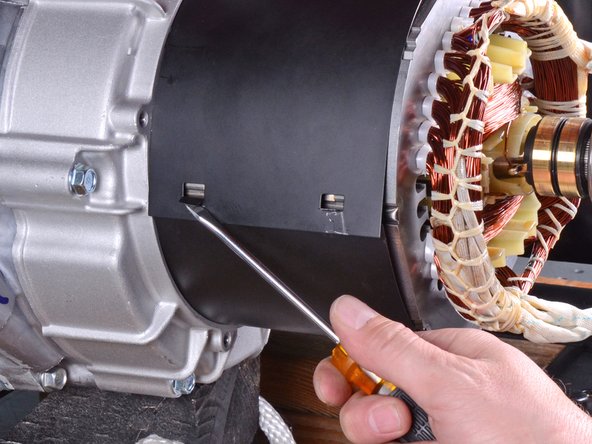
  25. Honda 6500 Watt Generator EG6500CL AT Rotor Replacement: шаг 25, изображение 1 из 3 Honda 6500 Watt Generator EG6500CL AT Rotor Replacement: шаг 25, изображение 2 из 3 Honda 6500 Watt Generator EG6500CL AT Rotor Replacement: шаг 25, изображение 3 из 3
    • Use a flathead screwdriver to pry up the tabs holding the stator cover together.

  26. Honda 6500 Watt Generator EG6500CL AT Rotor Replacement: шаг 26, изображение 1 из 1
    • Remove the stator cover.

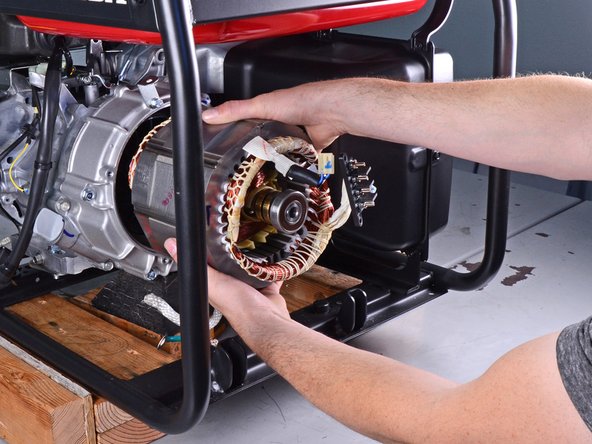
  27. Honda 6500 Watt Generator EG6500CL AT Rotor Replacement, Remove the stator: шаг 27, изображение 1 из 3 Honda 6500 Watt Generator EG6500CL AT Rotor Replacement, Remove the stator: шаг 27, изображение 2 из 3 Honda 6500 Watt Generator EG6500CL AT Rotor Replacement, Remove the stator: шаг 27, изображение 3 из 3
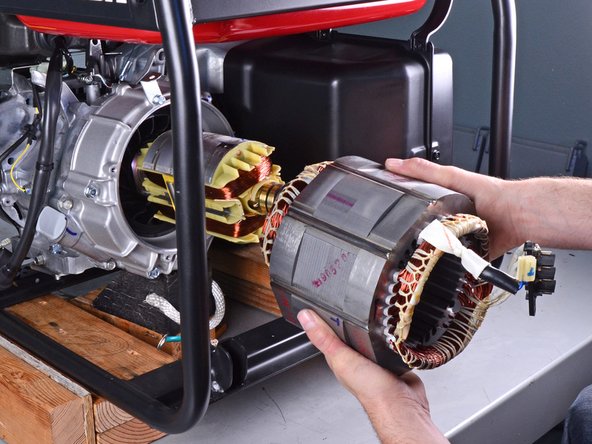
    • Remove the stator by pulling it straight out of the generator assembly.

  28. Honda 6500 Watt Generator EG6500CL AT Rotor Replacement, Reassembly tip: шаг 28, изображение 1 из 1
    • During reassembly, you don't need to install the stator in a precise rotational position. Just make sure the stator cables wires are in the top-left corner.

  29. Honda 6500 Watt Generator EG6500CL AT Rotor Replacement, Remove the recoil starter: шаг 29, изображение 1 из 1
    • Use a 10 mm socket to remove the three bolts securing the recoil starter.

  30. Honda 6500 Watt Generator EG6500CL AT Rotor Replacement: шаг 30, изображение 1 из 2 Honda 6500 Watt Generator EG6500CL AT Rotor Replacement: шаг 30, изображение 2 из 2
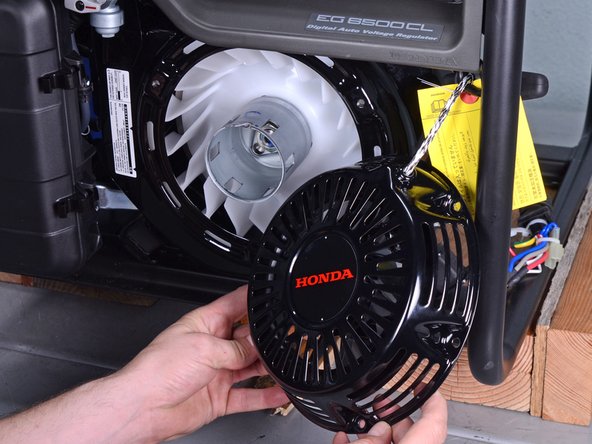
    • Remove the recoil starter.

  31. Honda 6500 Watt Generator EG6500CL AT Rotor Replacement, Brace the rotor: шаг 31, изображение 1 из 1
    • Place wooden blocks under the flat side of the rotor to prevent it from rotating.

  32. Honda 6500 Watt Generator EG6500CL AT Rotor Replacement: шаг 32, изображение 1 из 1
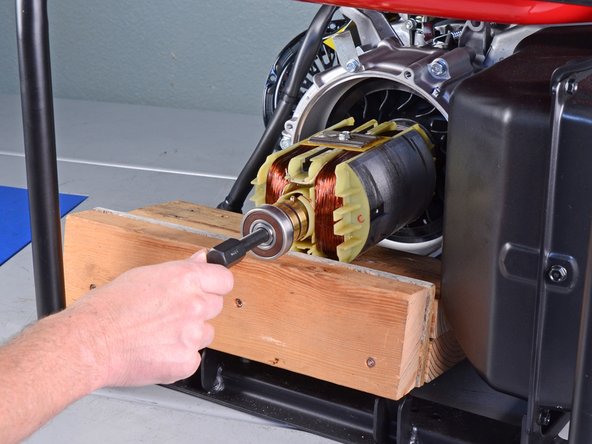
    • Insert a metal rod or a large screwdriver through the starter pulley to lock the rotor axle in place.

  33. Honda 6500 Watt Generator EG6500CL AT Rotor Replacement, Loosen the rotor: шаг 33, изображение 1 из 2 Honda 6500 Watt Generator EG6500CL AT Rotor Replacement, Loosen the rotor: шаг 33, изображение 2 из 2
    • Insert the rotor puller tool into the rotor axle.

    • Hand-tighten the puller tool onto the rotor threads.

  34. Honda 6500 Watt Generator EG6500CL AT Rotor Replacement: шаг 34, изображение 1 из 1
    • Use a 19 mm socket to tighten the puller tool until it breaks the rotor free from the generator assembly.

    • If you have trouble freeing the rotor, use a breaker bar to tighten the puller tool.

  35. Honda 6500 Watt Generator EG6500CL AT Rotor Replacement: шаг 35, изображение 1 из 2 Honda 6500 Watt Generator EG6500CL AT Rotor Replacement: шаг 35, изображение 2 из 2
    • Remove the rotor.

  36. Honda 6500 Watt Generator EG6500CL AT Rotor Replacement, Transfer the rotor fan: шаг 36, изображение 1 из 2 Honda 6500 Watt Generator EG6500CL AT Rotor Replacement, Transfer the rotor fan: шаг 36, изображение 2 из 2
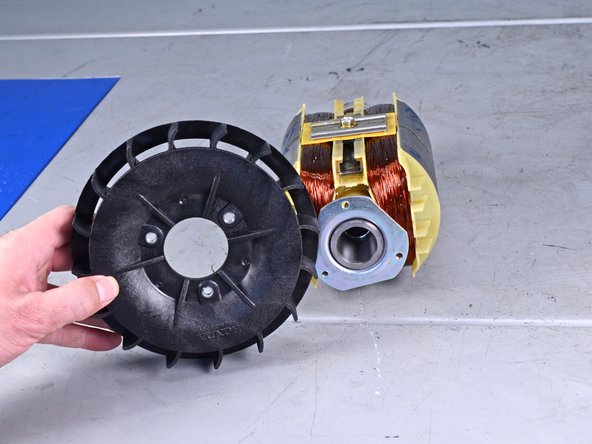
    • Use an 8 mm socket to remove the three bolts securing the rotor fan.

    • Transfer the fan to your replacement rotor.

  37. Honda 6500 Watt Generator EG6500CL AT Rotor Replacement, Align and re-attach the rotor: шаг 37, изображение 1 из 2 Honda 6500 Watt Generator EG6500CL AT Rotor Replacement, Align and re-attach the rotor: шаг 37, изображение 2 из 2
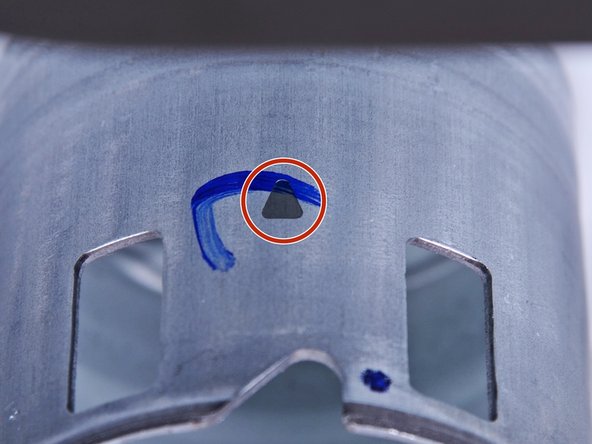
    • The next three steps show how to align and re-attach the rotor back onto the generator assembly.

    • Rotate the starter pulley until the top-dead-center marker is facing straight up.

    • The top-dead-center marker is a faint triangular indent on the starter pulley.

    • Once aligned, do not rotate the starter pulley or drive shaft until you've attached the rotor.

  38. Honda 6500 Watt Generator EG6500CL AT Rotor Replacement: шаг 38, изображение 1 из 2 Honda 6500 Watt Generator EG6500CL AT Rotor Replacement: шаг 38, изображение 2 из 2
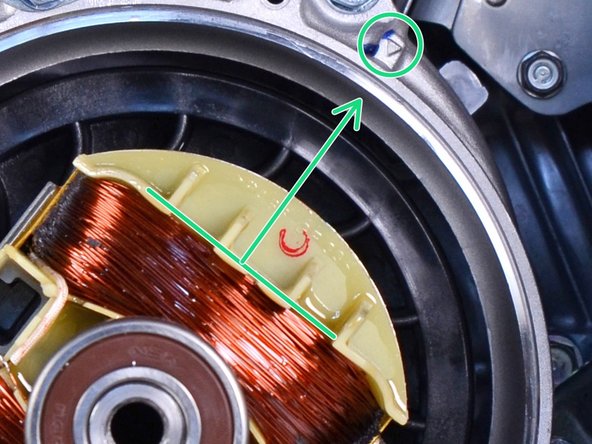
    • Align the rotor such that the flat side of a rotor coil sits perpendicular to the alignment arrow at the top-right edge of the generator case.

    • You don't have to align the rotor precisely—it just needs to be in the general direction as shown.

  39. Honda 6500 Watt Generator EG6500CL AT Rotor Replacement: шаг 39, изображение 1 из 1
    • Insert the rotor bolt and washer into the rotor axle.

    • Use a 14 mm socket and torque wrench to tighten the rotor bolt to 33 ft-lb (44 N-m).

    • Reassemble the rest of the generator by following the instructions in reverse.

Заключение

To reassemble your device, follow these instructions in reverse order.

Еще один человек закончил это руководство.

Arthur Shi

Участник с: 01/03/18

310 054 Репутация

Автор 701 руководств

Команда

iFixit Участник iFixit

Staff

123 членов

Автор 23 629 руководств

0 Комментарии к руководству

Добавить комментарий

Статистика просмотров:

За последние 24 часов: 4

За последние 7 дней: 7

За последние 30 дней: 33

За всё время: 2,302