Перейти к основному содержанию
Присоединяйся к сообществу ремонтников - Создай аккаунт

How to Install a 2.5" Hard Drive into an External Enclosure

Выберете то, что вам нужно

  1. How to Install a 2.5" Hard Drive into an External Enclosure, Install the drive into the enclosure: шаг 1, изображение 1 из 1
    • Before you begin, look at your hard drive's ports and make sure that it has the right connectors:

    • Narrow data port

    • Wide power port

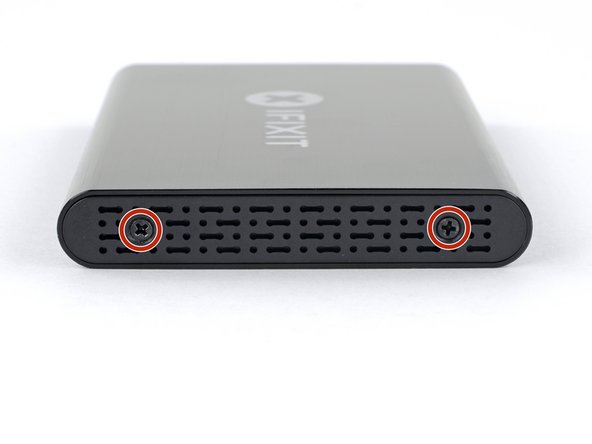
  2. How to Install a 2.5" Hard Drive into an External Enclosure, Open the enclosure: шаг 2, изображение 1 из 1
    • Use the included screwdriver to remove the two Phillips screws.

  3. How to Install a 2.5" Hard Drive into an External Enclosure: шаг 3, изображение 1 из 2 How to Install a 2.5" Hard Drive into an External Enclosure: шаг 3, изображение 2 из 2
    • Slide the plastic tray out of the aluminum housing.

  4. How to Install a 2.5" Hard Drive into an External Enclosure, Install the SSD: шаг 4, изображение 1 из 3 How to Install a 2.5" Hard Drive into an External Enclosure, Install the SSD: шаг 4, изображение 2 из 3 How to Install a 2.5" Hard Drive into an External Enclosure, Install the SSD: шаг 4, изображение 3 из 3
    • Set the drive in the plastic tray and align the drive ports with the tray socket.

    • To prevent strain on the enclosure socket, lay the drive as flat against the tray as possible.

    • Carefully push the drive into the tray socket to seat the ports.

    • Press the drive's raised edge down into the plastic tray.

    • If the drive edge catches on the foam block, the drive is not fully seated against the tray socket. Continue pressing the drive into the socket until it clears the foam block.

  5. How to Install a 2.5" Hard Drive into an External Enclosure: шаг 5, изображение 1 из 1
    • Flip the drive tray over.

    • Use the a Phillips screwdriver to install the four mounting screws (included in the kit) to secure the drive to the tray.

  6. How to Install a 2.5" Hard Drive into an External Enclosure: шаг 6, изображение 1 из 3 How to Install a 2.5" Hard Drive into an External Enclosure: шаг 6, изображение 2 из 3 How to Install a 2.5" Hard Drive into an External Enclosure: шаг 6, изображение 3 из 3
    • Slide the tray back into the aluminum housing.

    • Reinstall the two Phillips screws to secure the tray.

Заключение

Your drive is ready for use!

53 человек успешно провели ремонт по этому руководству.

Arthur Shi

Участник с: 01/03/18

322 865 Репутация

Автор 793 руководств

Команда

iFixit Участник iFixit

Staff

124 членов

Автор 24 162 руководств

12 Комментарии к руководству

Now what do I do?

Louise McCampbell - Ответить Поделиться

You will need to plug the enclosure into a computer to access it. From there, you can format the drive or retrieve data.

Arthur Shi - Поделиться

How do I plug the enclosure into a computer? Are there cables? Thank you.

Shannon Mikus - Ответить Поделиться

Very good explanation on "How to do it yourself"

Jawa Herath - Ответить Поделиться

Very good Instructions with clear explanations.

Jawa Herath - Ответить Поделиться

Добавить комментарий

Статистика просмотров:

За последние 24 часов: 17

За последние 7 дней: 96

За последние 30 дней: 397

За всё время: 40,922