Перейти к основному содержанию
Присоединяйся к сообществу ремонтников - Создай аккаунт

How to Use the Anti-Static Wrist Strap

Выберете то, что вам нужно

    1. How to Use the Anti-Static Wrist Strap, Remove any jewelry: шаг 1, изображение 1 из 2 How to Use the Anti-Static Wrist Strap, Remove any jewelry: шаг 1, изображение 2 из 2
      • Before you begin, remove any jewelry from your wrist and fingers.

      Спросите у FixBot

      Добавить комментарий

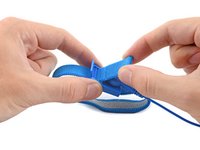
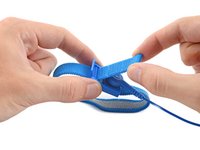
    2. How to Use the Anti-Static Wrist Strap, Adjust the strap: шаг 2, изображение 1 из 2 How to Use the Anti-Static Wrist Strap, Adjust the strap: шаг 2, изображение 2 из 2
      Инструмент, используемый на этом этапе:
      Anti-Static Wrist Strap
      $7.95
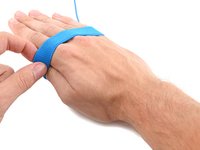
      • The anti-static strap should be adjusted to fit snugly on your wrist.

      • Pull up on the looped end of the strap to disengage the plastic lock.

      Спросите у FixBot

      Добавить комментарий

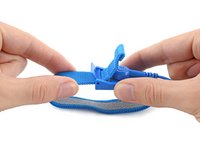
    3. How to Use the Anti-Static Wrist Strap: шаг 3, изображение 1 из 2 How to Use the Anti-Static Wrist Strap: шаг 3, изображение 2 из 2
      • To tighten the strap, pull the looped end away from the plastic slide.

      Спросите у FixBot

      Добавить комментарий

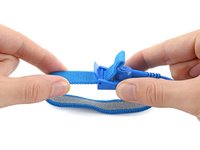
    4. How to Use the Anti-Static Wrist Strap: шаг 4, изображение 1 из 2 How to Use the Anti-Static Wrist Strap: шаг 4, изображение 2 из 2
      • To loosen the strap, pull the main part of the band away from the plastic slide.

      • Re-engage the plastic lock before continuing.

      Спросите у FixBot

      Добавить комментарий

    5. How to Use the Anti-Static Wrist Strap: шаг 5, изображение 1 из 2 How to Use the Anti-Static Wrist Strap: шаг 5, изображение 2 из 2
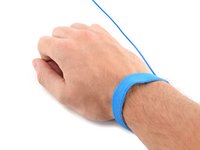
      • Slide the strap over your hand and secure it to your wrist.

      • If the strap is still too loose or tight, you can adjust it while it's on your wrist.

      Спросите у FixBot

      Добавить комментарий

    6. How to Use the Anti-Static Wrist Strap: шаг 6, изображение 1 из 2 How to Use the Anti-Static Wrist Strap: шаг 6, изображение 2 из 2
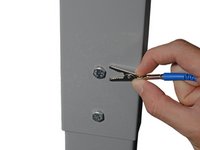
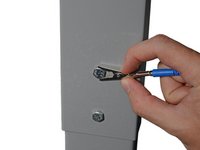
      • Attach the metal clip to one of the grounding nodes on an Anti-Static Mat or a grounded metal surface.

      Спросите у FixBot

      Добавить комментарий

    7. How to Use the Anti-Static Wrist Strap: шаг 7, изображение 1 из 1
      • You're now ready to repair.

      • During your repair, be mindful of the strap's cable, as stretching it too far can cause the clip to unsnap.

      Спросите у FixBot

      Добавить комментарий

Заключение

For other general electronics skills guides, click here.

Отменить: Я не выполнил это руководство.

57 человек успешно провели ремонт по этому руководству.

Alex Diaz-Kokaisl

Участник с: 01/16/22

247 275 Репутация

Автор 1 203 руководств

Команда

iFixit Участник iFixit

Staff

123 членов

Автор 69 849 руководств

8 Комментарии к руководству

J'ai un doute…
Retirer tout bijou/montre/whatever, mais uniquement sur la main où l'on met le bracelet (ce qui me paraît logique) ou bien des deux mains ?

Yacou - Ответить Поделиться

peut ton se connecter direct ex: sur une prise éléctrique avec l'embout terre de la prise

Lucka Lellig - Ответить Поделиться

Bonjour @luckalellig non, ceci est fortement déconseillé !! Le courant des prises électriques est trop fort et risquerait de vous électrocuter.

Claire Miesch - Ответить Поделиться

non la terre pas ce branche au pole positif et négatif

Lucka Lellig - Ответить Поделиться

Si vous êtes sûre que votre prise est réellement reliée à la terre (ce n'est souvent pas le cas dans les immeubles anciens, ils peuvent une prise de terre reliée à rien) oui la fiche terre (la fiche qui sort de la prise, surtout pas les trous qui sont la phase et le neutre et qui pourraient vous électrocuter - je précise car la réponse précédente semble confondre) sera parfaite.

Marcanpilami - Ответить Поделиться

Добавить комментарий

Статистика просмотров:

За последние 24 часов: 19

За последние 7 дней: 154

За последние 30 дней: 930

За всё время: 68,374