Перейти к основному содержанию
Присоединяйся к сообществу ремонтников - Создай аккаунт

Konica Minolta DiMAGE Z3 LCD Screen Replacement

Выберете то, что вам нужно

  1. Konica Minolta DiMAGE Z3 LCD Screen Replacement, Open the battery chamber: шаг 1, изображение 1 из 2 Konica Minolta DiMAGE Z3 LCD Screen Replacement, Open the battery chamber: шаг 1, изображение 2 из 2
    • Open the battery chamber door by sliding the door to the side of the camera to release the safety catch.

    • Lift the door up to open.

    Спросите у FixBot
  2. Konica Minolta DiMAGE Z3 LCD Screen Replacement, Insert the batteries: шаг 2, изображение 1 из 1
    • Insert the four batteries inside of the battery chamber door.

    • Make sure the positive and negative battery terminals are in the correct position.

    Спросите у FixBot
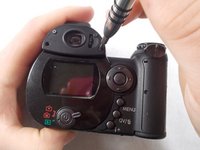
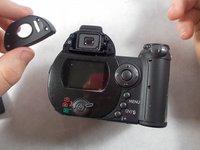
  3. Konica Minolta DiMAGE Z3 LCD Screen Replacement, Remove the viewfinder cover: шаг 3, изображение 1 из 2 Konica Minolta DiMAGE Z3 LCD Screen Replacement, Remove the viewfinder cover: шаг 3, изображение 2 из 2
    • Use a screwdriver to remove the four viewfinder cover screws.

    Спросите у FixBot
  4. Konica Minolta DiMAGE Z3 LCD Screen Replacement, Remove viewfinder screws: шаг 4, изображение 1 из 1
    • Remove the 2 small screws under the viewfinder.

    Спросите у FixBot
  5. Konica Minolta DiMAGE Z3 LCD Screen Replacement, Remove the screen cover: шаг 5, изображение 1 из 1
    • Remove the screen cover by applying slight pressure at the top, then pulling the screen protector away from the camera.

    • Do not apply pressure to the surface of the LCD screen or it may be permanently damaged. If fingerprints are on the LCD monitor, gently wipe with a soft, clean, dry cloth.

    Спросите у FixBot
  6. Konica Minolta DiMAGE Z3 LCD Screen Replacement, Remove screws from the bottom panel: шаг 6, изображение 1 из 1
    • Remove 6 screws on the bottom panel.

    Спросите у FixBot
  7. Konica Minolta DiMAGE Z3 LCD Screen Replacement, Remove screw from battery chamber: шаг 7, изображение 1 из 1
    • Remove 1 screw on the outer side of the battery chamber.

    • This will be under the rubber grip.

    Спросите у FixBot
  8. Konica Minolta DiMAGE Z3 LCD Screen Replacement: шаг 8, изображение 1 из 1
    • Remove 1 screw inside the battery chamber.

    Спросите у FixBot
  9. Konica Minolta DiMAGE Z3 LCD Screen Replacement: шаг 9, изображение 1 из 1
    • Pull the wrist strap away from the front of the camera to remove it.

    • Then carefully pull the back casing apart from the camera.

    Спросите у FixBot
  10. Konica Minolta DiMAGE Z3 LCD Screen Replacement: шаг 10, изображение 1 из 1
    • Remove the 3 screws that attach the LCD screen to the circuit board.

    Спросите у FixBot
  11. Konica Minolta DiMAGE Z3 LCD Screen Replacement: шаг 11, изображение 1 из 1
    • Gently remove the LCD screen from the circuit board.

    • There will be a ribbon cable and some wires attached to the LCD screen.

    Спросите у FixBot
  12. Konica Minolta DiMAGE Z3 LCD Screen Replacement: шаг 12, изображение 1 из 1
    Инструмент, используемый на этом этапе:
    Tweezers
    $4.99
    • Use tweezers to carefully pull the ribbon cable from the circuit board, not from the LCD screen.

    • Peel back tape on LCD screen to reveal where the wires are attached. Use tweezers to detach the wires from the LCD screen.

    Спросите у FixBot
Заключение

To reassemble your device, follow these instructions in reverse order.

Hieu Ngo

Участник с: 03/22/17

431 Репутация

Автор 4 руководств

Команда

UMass Dartmouth, Team S7-G4, Julie Spring 2017 Участник UMass Dartmouth, Team S7-G4, Julie Spring 2017

UMASSD-JULIE-S17S7G4

4 членов

Автор 8 руководств

0 Комментарии к руководству

Добавить комментарий

Статистика просмотров:

За последние 24 часов: 1

За последние 7 дней: 11

За последние 30 дней: 58

За всё время: 1,146