Перейти к основному содержанию
Присоединяйся к сообществу ремонтников - Создай аккаунт

Mac Mini Late 2014 Fan Replacement

Абсолютно необходимое руководство
Это руководство только для предварительной подготовки! Этот гайд является частью другой процедуры и не предназначен для самостоятельного использования.

Выберете то, что вам нужно

  1. Mac Mini Late 2014 Fan Replacement, Fan Assembly: шаг 1, изображение 1 из 1
    • Remove the two 12 mm T6 screws from the fan.

    • Loosen the 27 mm T6 captive screw–it will get removed with the fan assembly.

  2. Mac Mini Late 2014 Fan Replacement: шаг 2, изображение 1 из 3 Mac Mini Late 2014 Fan Replacement: шаг 2, изображение 2 из 3 Mac Mini Late 2014 Fan Replacement: шаг 2, изображение 3 из 3
    • The fan connector is trapped under the edge of the fan and cannot be disconnected until the fan is moved.

    • Do not attempt to remove the fan entirely.

    • Lift the fan straight up to free the captive screw from its hole in the logic board.

    • Pull the fan away from the SSD until you can easily access the fan connector.

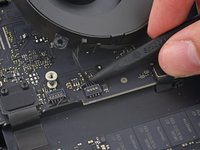
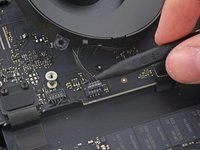
  3. Mac Mini Late 2014 Fan Replacement: шаг 3, изображение 1 из 2 Mac Mini Late 2014 Fan Replacement: шаг 3, изображение 2 из 2
    • Use the point of a spudger to lift the fan connector straight up out of its socket on the logic board.

  4. Mac Mini Late 2014 Fan Replacement: шаг 4, изображение 1 из 1
    • Remove the fan from the Mac mini.

Заключение

To reassemble your device, follow these instructions in reverse order.

Sam Goldheart

Участник с: 10/18/12

475 293 Репутация

Автор 538 руководств

Команда

iFixit Участник iFixit

Staff

123 членов

Автор 23 848 руководств

0 Комментарии к руководству

Добавить комментарий

Статистика просмотров:

За последние 24 часов: 0

За последние 7 дней: 2

За последние 30 дней: 6

За всё время: 336