Перейти к основному содержанию
Присоединяйся к сообществу ремонтников - Создай аккаунт

Nexus 5X Rear Panel Replacement

Выберете то, что вам нужно

    1. Nexus 5X Rear Panel Replacement, SIM Card Tray: шаг 1, изображение 1 из 3 Nexus 5X Rear Panel Replacement, SIM Card Tray: шаг 1, изображение 2 из 3 Nexus 5X Rear Panel Replacement, SIM Card Tray: шаг 1, изображение 3 из 3
      • Insert a SIM card ejection tool into the hole on the SIM card tray, located on the left edge of the phone.

      • Press in to eject the SIM card tray.

      • Remove the SIM card tray.

      Спросите у FixBot

      Добавить комментарий

    1. Nexus 5X Rear Panel Replacement, Rear Panel: шаг 2, изображение 1 из 3 Nexus 5X Rear Panel Replacement, Rear Panel: шаг 2, изображение 2 из 3 Nexus 5X Rear Panel Replacement, Rear Panel: шаг 2, изображение 3 из 3
      • Place an opening pick in the opening of the SIM card tray slot and twist it sideways to release the first plastic clip that holds the rear panel in its place.

      • Slide the opening pick around the top edge of the phone to release the plastic clips that secure the rear panel.

      Спросите у FixBot

      Добавить комментарий

    2. Nexus 5X Rear Panel Replacement: шаг 3, изображение 1 из 3 Nexus 5X Rear Panel Replacement: шаг 3, изображение 2 из 3 Nexus 5X Rear Panel Replacement: шаг 3, изображение 3 из 3
      • Continue to slide the opening pick around all sides of the phone to release all clips that secure the rear panel.

      Спросите у FixBot

      Добавить комментарий

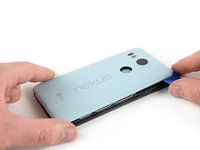
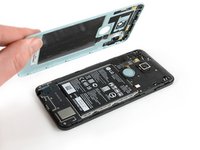
    3. Nexus 5X Rear Panel Replacement: шаг 4, изображение 1 из 2 Nexus 5X Rear Panel Replacement: шаг 4, изображение 2 из 2
      • Tilt the opening pick to lift the rear panel a little bit.

      • There are two more plastic clips next to the fingerprint sensor. Release them by gently pulling the rear panel.

      • Remove the rear panel.

      Спросите у FixBot

      Добавить комментарий

Заключение

To reassemble your device, follow these instructions in reverse order.

Repair didn’t go as planned? Check out our Nexus 5X Answers community for troubleshooting help.

Отменить: Я не выполнил это руководство.

26 человек успешно провели ремонт по этому руководству.

Dominik Schnabelrauch

Участник с: 11/23/16

264 621 Репутация

Автор 682 руководств

1 Комментарий к руководству

Bonjour,

Est-ce que vous arriveriez à m'indiquer l'espace disponible (en mm) entre le cache et la batterie svp?

Merci!

Lucas Marti - Ответить Поделиться

Добавить комментарий

Статистика просмотров:

За последние 24 часов: 2

За последние 7 дней: 35

За последние 30 дней: 65

За всё время: 9,361