Перейти к основному содержанию
Присоединяйся к сообществу ремонтников - Создай аккаунт

Nintendo DSi XL Touchscreen Replacement

Выберете то, что вам нужно

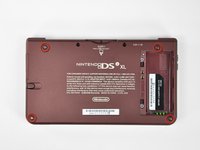
  1. Nintendo DSi XL Touchscreen Replacement, Battery: шаг 1, изображение 1 из 2 Nintendo DSi XL Touchscreen Replacement, Battery: шаг 1, изображение 2 из 2
    • Remove the two Phillips screws securing the battery cover to the back of the handheld console.

    • Lift the battery cover off the back of the DSi XL.

    Спросите у FixBot
  2. Nintendo DSi XL Touchscreen Replacement: шаг 2, изображение 1 из 1
    • Lift the battery from the DSi XL.

    Спросите у FixBot
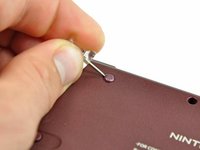
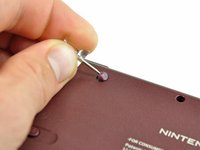
  3. Nintendo DSi XL Touchscreen Replacement, Lower Case: шаг 3, изображение 1 из 3 Nintendo DSi XL Touchscreen Replacement, Lower Case: шаг 3, изображение 2 из 3 Nintendo DSi XL Touchscreen Replacement, Lower Case: шаг 3, изображение 3 из 3
    • Remove the four rubber screw covers on the lower case by prying them up with a push pin.

    Спросите у FixBot
  4. Nintendo DSi XL Touchscreen Replacement: шаг 4, изображение 1 из 1
    • Remove the following seven Phillips screws that secure the lower case to the rest of the DSi XL:

    • Four silver 5.3 mm screws

    • Two black 5.3 mm screws

    • One black 2.5 mm screw

    Спросите у FixBot
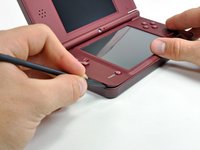
  5. Nintendo DSi XL Touchscreen Replacement: шаг 5, изображение 1 из 3 Nintendo DSi XL Touchscreen Replacement: шаг 5, изображение 2 из 3 Nintendo DSi XL Touchscreen Replacement: шаг 5, изображение 3 из 3
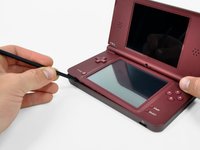
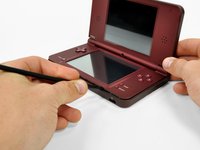
    • Turn the DSi XL over, and open the display.

    • Insert a spudger between the upper and lower case at the bottom left corner of the DSi.

    • Slide the spudger along the bottom edge of the upper case to release the latches securing the upper case to the lower case.

    Спросите у FixBot
  6. Nintendo DSi XL Touchscreen Replacement: шаг 6, изображение 1 из 2 Nintendo DSi XL Touchscreen Replacement: шаг 6, изображение 2 из 2
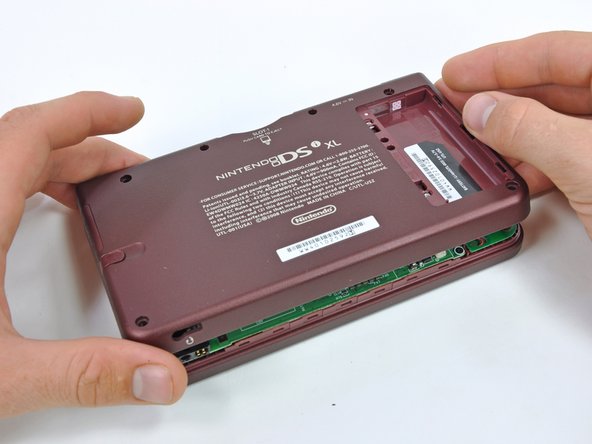
    • Close the display and turn the DSi XL over.

    • Lift the lower case from the front edge.

    • Rotate the lower case away from the DSi.

    • The lower case cannot be completely removed yet, since it is still connected to the motherboard.

    Спросите у FixBot
  7. Nintendo DSi XL Touchscreen Replacement: шаг 7, изображение 1 из 2 Nintendo DSi XL Touchscreen Replacement: шаг 7, изображение 2 из 2
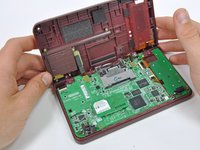
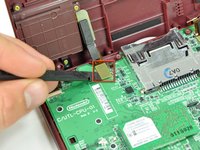
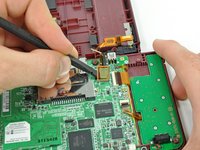
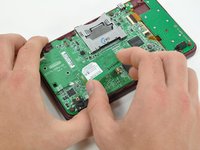
    • Using a spudger, pry the SD card/right shoulder button connector off its socket.

    • Pry the volume button/left shoulder button connector off its socket on the motherboard with a spudger.

    Спросите у FixBot
  8. Nintendo DSi XL Touchscreen Replacement, Wi-Fi Board: шаг 8, изображение 1 из 2 Nintendo DSi XL Touchscreen Replacement, Wi-Fi Board: шаг 8, изображение 2 из 2
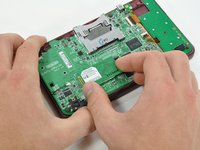
    • Lift the Wi-Fi board up off its socket on the motherboard.

    • Do not attempt to completely remove the Wi-Fi board yet. It is attached to the motherboard by an antenna cable.

    Спросите у FixBot
  9. Nintendo DSi XL Touchscreen Replacement: шаг 9, изображение 1 из 1
    • Use a spudger to pry the Wi-Fi cable off its socket on the underside of the Wi-Fi board.

    Спросите у FixBot
  10. Nintendo DSi XL Touchscreen Replacement, Motherboard: шаг 10, изображение 1 из 1
    • Use a spudger to pry the microphone cable off the motherboard.

    • Pry from underneath the cable.

    Спросите у FixBot
  11. Nintendo DSi XL Touchscreen Replacement: шаг 11, изображение 1 из 2 Nintendo DSi XL Touchscreen Replacement: шаг 11, изображение 2 из 2
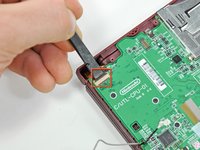
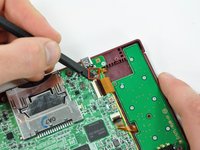
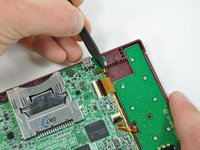
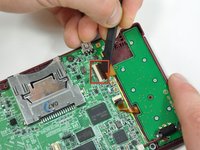
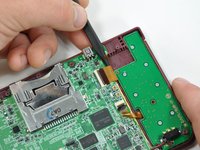
    • Using the flat end of a spudger, flip up the retaining flap on the camera ribbon ZIF connector.

    • Use the pointed end of a spudger to pull the camera ribbon from the ZIF connector.

    Спросите у FixBot
  12. Nintendo DSi XL Touchscreen Replacement: шаг 12, изображение 1 из 2 Nintendo DSi XL Touchscreen Replacement: шаг 12, изображение 2 из 2
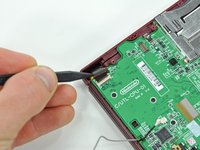
    • Using the flat end of a spudger, flip up the retaining flap on the touchscreen cable ZIF connector.

    • With the pointed end of the spudger, pull the touchscreen cable from its connector on the motherboard.

    Спросите у FixBot
  13. Nintendo DSi XL Touchscreen Replacement: шаг 13, изображение 1 из 2 Nintendo DSi XL Touchscreen Replacement: шаг 13, изображение 2 из 2
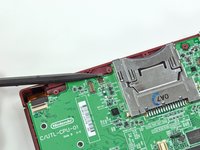
    • Using the flat end of a spudger, flip up the retaining flap on the backlight cable ZIF connector.

    • With the pointed end of the spudger, pull the backlight cable from its connector on the motherboard.

    Спросите у FixBot
  14. Nintendo DSi XL Touchscreen Replacement: шаг 14, изображение 1 из 2 Nintendo DSi XL Touchscreen Replacement: шаг 14, изображение 2 из 2
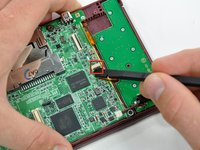
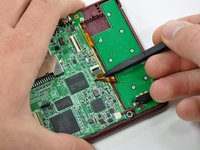
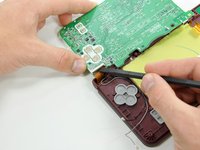
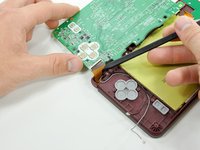
    • Using the flat end of a spudger, flip up the retaining flap on the lower display data cable ZIF connector.

    • With the pointed end of the spudger, pull the lower display data cable from its connector on the motherboard.

    Спросите у FixBot
  15. Nintendo DSi XL Touchscreen Replacement: шаг 15, изображение 1 из 2 Nintendo DSi XL Touchscreen Replacement: шаг 15, изображение 2 из 2
    • Using the flat end of a spudger, flip up the retaining flap on the ZIF connector for the D-Pad/power button cable.

    • With the pointed end of the spudger, pull the D-Pad/power button cable from its connector on the motherboard.

    Спросите у FixBot
  16. Nintendo DSi XL Touchscreen Replacement: шаг 16, изображение 1 из 1
    • Using the flat end of the spudger, pry the battery cable up off its socket on the motherboard.

    Спросите у FixBot
  17. Nintendo DSi XL Touchscreen Replacement: шаг 17, изображение 1 из 1
    • Remove the screws securing the motherboard to the upper case:

    • A single 2.5 mm silver Phillips screw

    • Four 3.7 mm black Phillips screws

    Спросите у FixBot
  18. Nintendo DSi XL Touchscreen Replacement: шаг 18, изображение 1 из 1
    • Deroute the microphone and antenna cables through the slot in the motherboard.

    Спросите у FixBot
  19. Nintendo DSi XL Touchscreen Replacement: шаг 19, изображение 1 из 2 Nintendo DSi XL Touchscreen Replacement: шаг 19, изображение 2 из 2
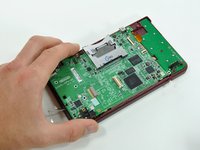
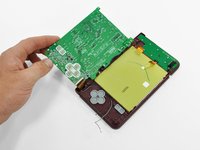
    • Rotate the motherboard off the lower case.

    • The motherboard cannot be completely removed yet. It is still attached by the upper LCD's display data ribbon cable.

    Спросите у FixBot
  20. Nintendo DSi XL Touchscreen Replacement: шаг 20, изображение 1 из 2 Nintendo DSi XL Touchscreen Replacement: шаг 20, изображение 2 из 2
    • Using the flat end of a spudger, flip up the retaining flap on the upper display data cable ZIF connector.

    • With the pointed end of the spudger, pull the upper display data cable from its connector on the underside of the motherboard.

    • The motherboard is now free from the upper case.

    Спросите у FixBot
  21. Nintendo DSi XL Touchscreen Replacement, Lower Display Assembly: шаг 21, изображение 1 из 2 Nintendo DSi XL Touchscreen Replacement, Lower Display Assembly: шаг 21, изображение 2 из 2
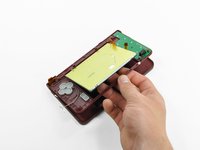
    • With the console still upside-down, open the DSi XL slightly.

    • Push the lower display away from the upper case.

    • Remove the lower display from the DSi XL.

    Спросите у FixBot
  22. Nintendo DSi XL Touchscreen Replacement, Lower LCD: шаг 22, изображение 1 из 2 Nintendo DSi XL Touchscreen Replacement, Lower LCD: шаг 22, изображение 2 из 2
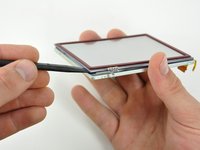
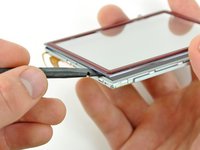
    • Insert a spudger between the touchscreen and top right corner of the display.

    • Slide the spudger down the right side of the display to free the edge of the touchscreen.

    Спросите у FixBot
  23. Nintendo DSi XL Touchscreen Replacement: шаг 23, изображение 1 из 2 Nintendo DSi XL Touchscreen Replacement: шаг 23, изображение 2 из 2
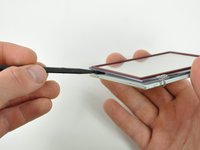
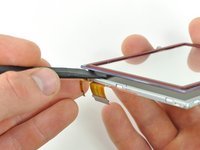
    • Continue around the bottom right corner of the display with the spudger.

    • Slide the spudger along the bottom edge of the touchscreen to separate it from the display.

    Спросите у FixBot
  24. Nintendo DSi XL Touchscreen Replacement: шаг 24, изображение 1 из 2 Nintendo DSi XL Touchscreen Replacement: шаг 24, изображение 2 из 2
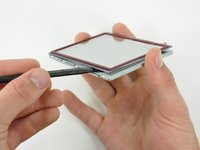
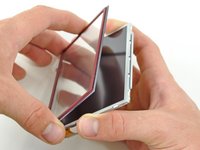
    • Continue around the bottom left corner of the display with a spudger.

    • Slide the spudger along the left edge of the touchscreen to remove it from the display.

    Спросите у FixBot
  25. Nintendo DSi XL Touchscreen Replacement: шаг 25, изображение 1 из 2 Nintendo DSi XL Touchscreen Replacement: шаг 25, изображение 2 из 2
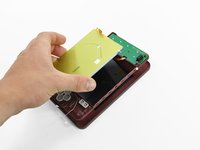
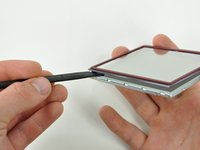
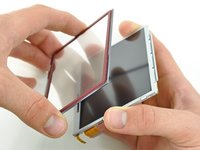
    • With three sides freed, remove the touchscreen from the lower display.

    Спросите у FixBot
Заключение

To reassemble your device, follow these instructions in reverse order.

20 человек успешно провели ремонт по этому руководству.

David Hodson

Участник с: 04/13/10

156 208 Репутация

Автор 127 руководств

4 Комментарии к руководству

Great tutorial, I completely missed the fact that the lower screen is TWO screens: the touchscreen and the proper screen. Nailed it!!

luissebastianangeles - Ответить Поделиться

thankyou! <3

Zenn22 - Ответить Поделиться
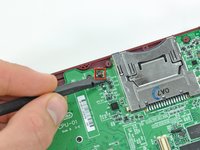
Step 16 = whole socket came off the motherboard with the least amount of effort. Tried soldering new contacts but too fine. Device now only good for parts.

Reese Banister - Ответить Поделиться

Be super careful with p10 and p18 retention clips. If these come out, you are up the creek without a paddle.

Aaron Newman - Ответить Поделиться

Добавить комментарий

Статистика просмотров:

За последние 24 часов: 13

За последние 7 дней: 92

За последние 30 дней: 496

За всё время: 55,949