Введение
If your OnePlus 6 is having hardware malfunctions or if your in need for a new battery, use this guide to gain access into the core of the phone. This guide serves as the backbone to fixing any issues that may arise inside of the phone.
The back panel of the OnePlus 6 unlocks worlds of opportunity for reparability and is the casing for all the parts inside of the phone. Before taking the back panel off, make sure to take a look at the OnePlus 6 Troubleshooting page to see if there is a simple fix to any problem you may be having before taking the next step to replace anything.
Even though taking a dive into the repair world is fascinating, be careful while following this guide because the back of the OnePlus 6 is generally made out of glass, so be careful not to shatter it.
Before performing this guide and any procedures to follow, make sure that the phone is powered off and that there are no outside power sources plugged in.
Выберете то, что вам нужно
-
-
Turn on the heat gun to a low heat and and gently heat the curved edges on the back of the phone.
-
Wedge the opening picks between the front and back panel and slide them around the perimeter to break the adhesive securing the back cover.
-
Repeat until the back panel is fully released.
-
-
-
-
Gently lift up the back panel, with care not to damage the fingerprint sensor ribbon cable.
-
-
Инструмент, используемый на этом этапе:Tweezers$4.99
-
Use a pair of tweezers to gently pull up on the red tab and disconnect the cable from the device.
-
Completely remove the back panel from the device.
-


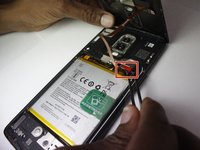
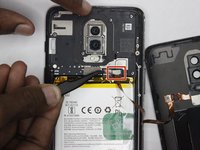
To reassemble your device, follow these instructions in reverse order.
Отменить: Я не выполнил это руководство.
Еще один человек закончил это руководство.



Команда

Clemson, Team 4-3, Hunter Fall 2021 Участник Clemson, Team 4-3, Hunter Fall 2021
CLEM-HUNTER-F21S4G3
5 членов
Автор 14 руководств
