Введение
If your Subaru key fob model 14AHK (printed on the back of the fob) is not unlocking, locking, or starting the car, it may need a new battery. Your vehicle may also display a low key fob battery warning message.
The Subaru smart key fob model 14AHK is compatible with many modern Subaru vehicles equipped with push-to-start ignition systems. Some Subaru models from 2014–2018 use a similar-looking key fob (FCC ID: HYQ14AHC), but it operates on a different frequency. Be sure to confirm your key fob model before purchasing a replacement battery.
This guide explains how to replace the battery yourself. You will need a CR2032 battery and a plastic pry tool to complete the replacement.
Dispose of the old battery properly at a battery recycling center or an approved battery drop-off location.
Выберете то, что вам нужно
-
-
Press the silver button on the back of the key fob.
-
While pressing the silver key, pull out the physical key.
 Спросите у FixBot
-
-
-
-
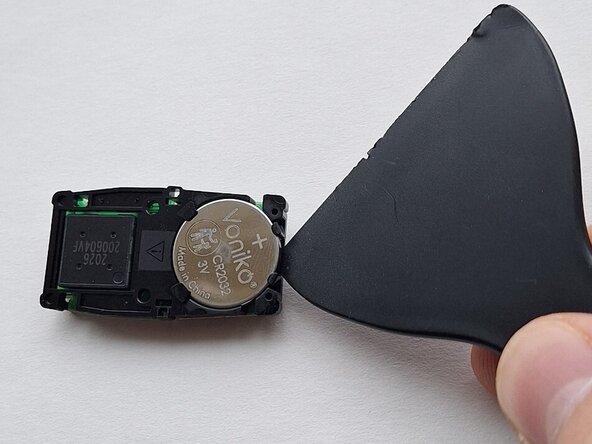
Use a plastic pry tool to lift the battery out of place.
-
Remove the old battery.
-
-
-
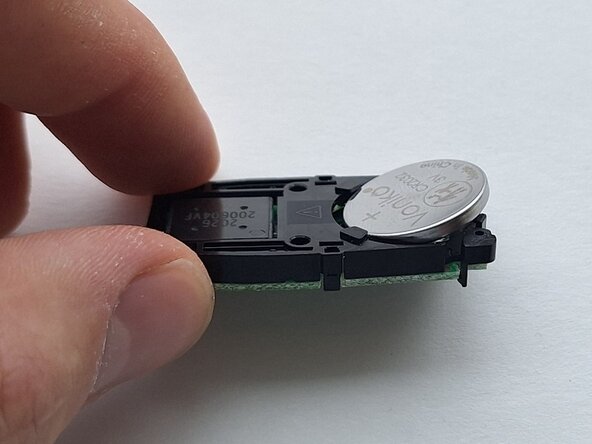
Insert the new battery at an angle.
-
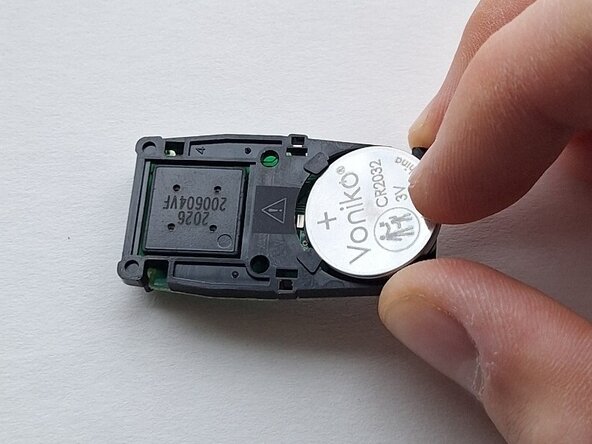
Press down on the raised side of the battery until it snaps into place.
-
-
-
Reinstall the control board into the key fob with the same orientation as before.
-
-
-
Align the back cover and press firmly around the edges to secure it in place.
-
-
-
Test the key fob by pressing a button and looking for a red light to light up in the top left corner.
-




Отменить: Я не выполнил это руководство.
Еще один человек закончил это руководство.

Команда

Central Washington University, Team 1-5, Pengilly Winter 2026 Участник Central Washington University, Team 1-5, Pengilly Winter 2026
CWU-PENGILLY-W26S1G5
1 член
Автор 1 руководств
