Перейти к основному содержанию
Присоединяйся к сообществу ремонтников - Создай аккаунт

Vtech Kidibeats Drum Set Volume Switch Replacement

Выберете то, что вам нужно

  1. Vtech Kidibeats Drum Set Volume Switch Replacement, Back Panel: шаг 1, изображение 1 из 1
    • Locate the battery panel that is centered between the three leg supports at the bottom of the drum set.

    Спросите у FixBot

    Добавить комментарий

  2. Vtech Kidibeats Drum Set Volume Switch Replacement: шаг 2, изображение 1 из 1
    • To remove the battery panel, loosen the 10 mm panel screw using a flathead 4.0 screwdriver.

    • You can also use a small coin to loosen the screw.

    Спросите у FixBot

    Добавить комментарий

  3. Vtech Kidibeats Drum Set Volume Switch Replacement: шаг 3, изображение 1 из 1
    • Using your fingers, pry open and remove the back battery panel.

    Спросите у FixBot

    Добавить комментарий

  4. Vtech Kidibeats Drum Set Volume Switch Replacement: шаг 4, изображение 1 из 1
    • Use your fingers to remove each battery from its housing.

    Спросите у FixBot

    Добавить комментарий

  5. Vtech Kidibeats Drum Set Volume Switch Replacement: шаг 5, изображение 1 из 1
    • Using a Phillips #2 screwdriver, loosen and remove the six 14 mm screws.

    Спросите у FixBot

    Добавить комментарий

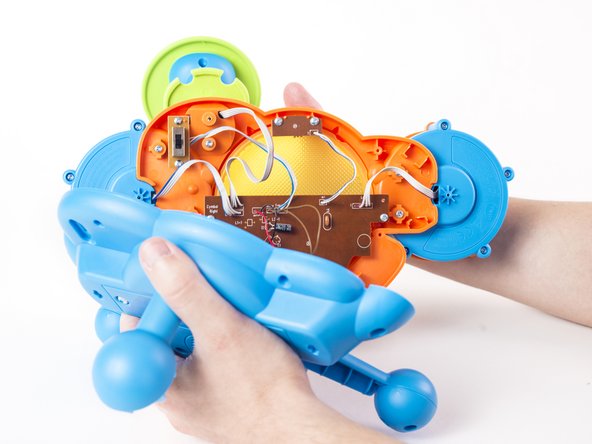
  6. Vtech Kidibeats Drum Set Volume Switch Replacement: шаг 6, изображение 1 из 2 Vtech Kidibeats Drum Set Volume Switch Replacement: шаг 6, изображение 2 из 2
    • With your hands, separate the bottom panel from the drum set.

    • When removing the bottom panel, be careful not to pull too hard in order to prevent damaging the connections from the motherboard to the speaker and power source.

    Спросите у FixBot

    Добавить комментарий

  7. Vtech Kidibeats Drum Set Volume Switch Replacement, Volume Switch: шаг 7, изображение 1 из 1
    • Loosen and remove the two 8 mm screws using a Phillips #00 screwdriver.

    Спросите у FixBot

    Добавить комментарий

  8. Vtech Kidibeats Drum Set Volume Switch Replacement: шаг 8, изображение 1 из 1
    • Use your fingers to gently remove the volume switch from its setting.

    Спросите у FixBot

    Добавить комментарий

  9. Vtech Kidibeats Drum Set Volume Switch Replacement: шаг 9, изображение 1 из 1
    Спросите у FixBot

    Добавить комментарий

Заключение

To reassemble your device, follow these instructions in reverse order.

Отменить: Я не выполнил это руководство.

Еще один человек закончил это руководство.

Aaron Klementowski

Участник с: 02/09/16

847 Репутация

Автор 6 руководств

Команда

USF Tampa, Team 2-8, Cagle Spring 2016 Участник USF Tampa, Team 2-8, Cagle Spring 2016

USFT-CAGLE-S16S2G8

2 членов

Автор 12 руководств

0 Комментарии к руководству

Добавить комментарий

Статистика просмотров:

За последние 24 часов: 1

За последние 7 дней: 3

За последние 30 дней: 25

За всё время: 1,134