Перейти к основному содержанию
Присоединяйся к сообществу ремонтников - Создай аккаунт

Xbox 360 Faceplate Replacement

Абсолютно необходимое руководство
Это руководство только для предварительной подготовки! Этот гайд является частью другой процедуры и не предназначен для самостоятельного использования.

Выберете то, что вам нужно

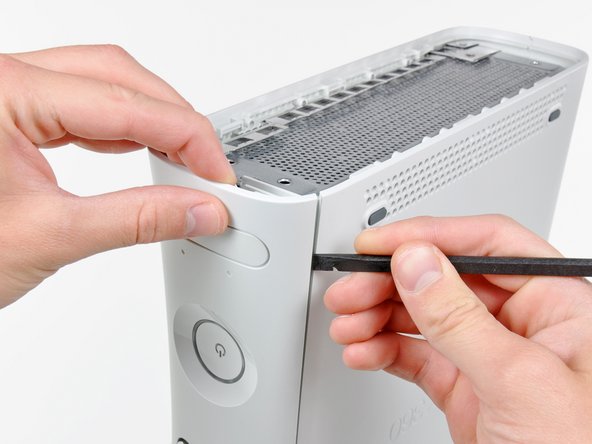
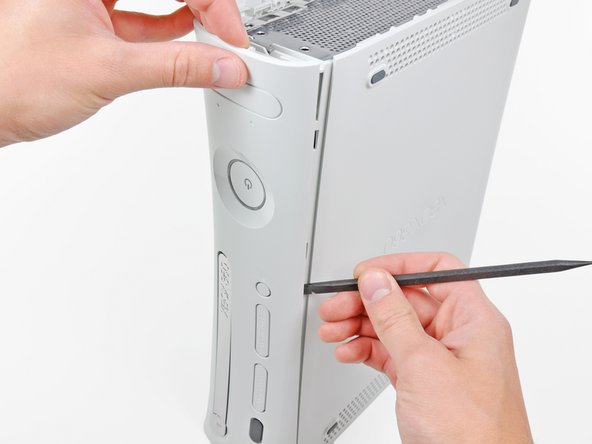
  1. Xbox 360 Faceplate Replacement, Faceplate: шаг 1, изображение 1 из 2 Xbox 360 Faceplate Replacement, Faceplate: шаг 1, изображение 2 из 2
    • Insert the flat edge of a spudger between the faceplate and the outer casing near the power button.

    • Run your spudger along the edge of the faceplate to release the clips securing it to the front of the console.

    • You may also accomplish this task by using the edge of the Xbox 360 opening tool, but it may scratch the plastic case.

    • Alternatively, you can use your hands to carefully pull the faceplate away from the Xbox.

  2. Xbox 360 Faceplate Replacement: шаг 2, изображение 1 из 1
    • Repeat the same motions as previously mentioned to release the left side of the faceplate.

  3. Xbox 360 Faceplate Replacement: шаг 3, изображение 1 из 1
    • Remove the faceplate from the front face of the console.

Заключение

To reassemble your device, follow these instructions in reverse order.

Еще один человек закончил это руководство.

0 Комментарии к руководству

Добавить комментарий

Статистика просмотров:

За последние 24 часов: 0

За последние 7 дней: 3

За последние 30 дней: 4

За всё время: 995