Перейти к основному содержанию
Присоединяйся к сообществу ремонтников - Создай аккаунт

Yujin Robot iCLEBO Arte Battery Replacement Guide

Выберете то, что вам нужно

  1. Yujin Robot iCLEBO Arte Battery Replacement Guide, Battery: шаг 1, изображение 1 из 3 Yujin Robot iCLEBO Arte Battery Replacement Guide, Battery: шаг 1, изображение 2 из 3 Yujin Robot iCLEBO Arte Battery Replacement Guide, Battery: шаг 1, изображение 3 из 3
    • Locate and unscrew the two 15mm screws with a Phillips #2 screwdriver.

  2. Yujin Robot iCLEBO Arte Battery Replacement Guide: шаг 2, изображение 1 из 3 Yujin Robot iCLEBO Arte Battery Replacement Guide: шаг 2, изображение 2 из 3 Yujin Robot iCLEBO Arte Battery Replacement Guide: шаг 2, изображение 3 из 3
    • Remove both screws shown by rotating them counter-clockwise.

  3. Yujin Robot iCLEBO Arte Battery Replacement Guide: шаг 3, изображение 1 из 1
    • Remove the battery compartment's lid.

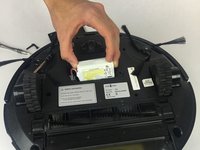
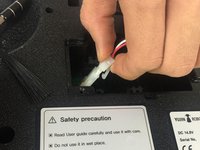
  4. Yujin Robot iCLEBO Arte Battery Replacement Guide: шаг 4, изображение 1 из 2 Yujin Robot iCLEBO Arte Battery Replacement Guide: шаг 4, изображение 2 из 2
    • Slide the battery out, and disconnect it from the robot by squeezing the tab on the power cable.

    • If you pull too hard on the connector without properly squeezing the tab, something will break.

Заключение

To reassemble your device, follow these instructions in reverse order.

Еще один человек закончил это руководство.

Trent Bingel

Участник с: 02/28/17

437 Репутация

Автор 4 руководств

Команда

USF Tampa, Team S2-G3, Nance Spring 2017 Участник USF Tampa, Team S2-G3, Nance Spring 2017

USFT-NANCE-S17S2G3

4 членов

Автор 14 руководств

1 Комментарий к руководству

Tried 2 different new batteries and still won’t charge

desrn55 - Ответить Поделиться

Добавить комментарий

Статистика просмотров:

За последние 24 часов: 0

За последние 7 дней: 5

За последние 30 дней: 12

За всё время: 3,040