Перейти к основному содержанию
Присоединяйся к сообществу ремонтников - Создай аккаунт
iPhone 15 Pro Max Screen Opening

Абсолютно необходимое руководство
Это руководство только для предварительной подготовки! Этот гайд является частью другой процедуры и не предназначен для самостоятельного использования.
  1. iPhone 15 Pro Max Screen Opening, Heat the bottom edge: шаг 1, изображение 1 из 1
    • Use a hair dryer or heat gun to heat the bottom edge of the screen until it's hot to the touch.

    • Be careful not to heat the phone hotter than this—the battery is susceptible to heat damage.

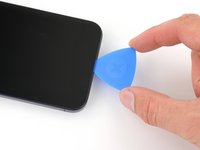
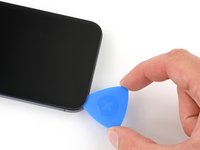
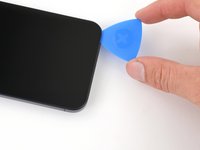
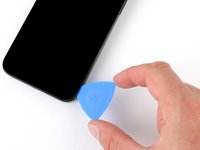
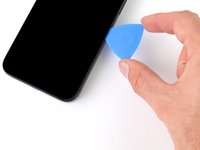
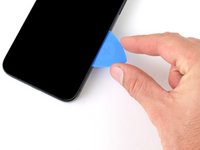
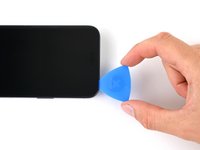
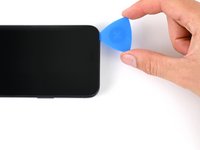
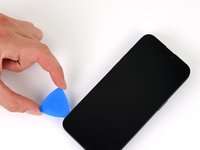
  2. iPhone 15 Pro Max Screen Opening, Insert an opening pick: шаг 2, изображение 1 из 3 iPhone 15 Pro Max Screen Opening, Insert an opening pick: шаг 2, изображение 2 из 3 iPhone 15 Pro Max Screen Opening, Insert an opening pick: шаг 2, изображение 3 из 3
    • Apply a suction handle to the bottom edge of the screen.

    • Pull up on the handle with a strong, steady force to create a gap between the screen and the frame.

    • Insert the tip of an opening pick into the gap.

  3. iPhone 15 Pro Max Screen Opening, Screen information: шаг 3, изображение 1 из 1
    • As you slice the adhesive securing the screen in the next steps, be careful of the following areas:

    • There are two delicate cables connecting the screen to the phone: one just above the action button, and the other near the middle of the left edge.

    • There are multiple spring contacts around the perimeter of the phone. Be extra careful not to insert your pick deeper than suggested in these locations to avoid bending the contacts.

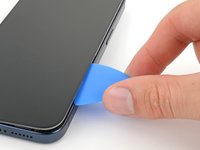
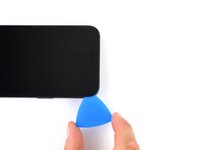
  4. iPhone 15 Pro Max Screen Opening, Separate the bottom edge adhesive: шаг 4, изображение 1 из 3 iPhone 15 Pro Max Screen Opening, Separate the bottom edge adhesive: шаг 4, изображение 2 из 3 iPhone 15 Pro Max Screen Opening, Separate the bottom edge adhesive: шаг 4, изображение 3 из 3
    • Don't insert your opening pick deeper than 3 mm along the bottom edge.

    • Slide your pick back and forth along the bottom edge to separate the adhesive.

    • Leave your pick inserted in the bottom right corner to prevent the adhesive from re-sealing.

  5. iPhone 15 Pro Max Screen Opening, Heat the right edge: шаг 5, изображение 1 из 1
    • Heat the right edge of the screen until it's hot to the touch.

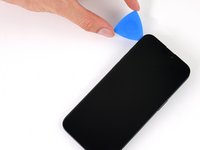
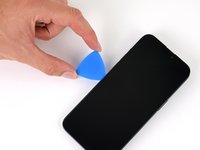
  6. iPhone 15 Pro Max Screen Opening, Position the opening pick: шаг 6, изображение 1 из 3 iPhone 15 Pro Max Screen Opening, Position the opening pick: шаг 6, изображение 2 из 3 iPhone 15 Pro Max Screen Opening, Position the opening pick: шаг 6, изображение 3 из 3
    • Don't insert your pick deeper than 5 mm along the right edge.

    • Slide your pick around the bottom right corner of the screen and toward the power button until you feel a hard stop at a clip securing the screen.

    • Rotate your pick so the flat edge is under the screen.

  7. iPhone 15 Pro Max Screen Opening, Release the right clip: шаг 7, изображение 1 из 3 iPhone 15 Pro Max Screen Opening, Release the right clip: шаг 7, изображение 2 из 3 iPhone 15 Pro Max Screen Opening, Release the right clip: шаг 7, изображение 3 из 3
    • Twist the pick to increase the gap between the screen and the frame until the right clip releases.

    • Insert a second opening pick to the right of the first pick.

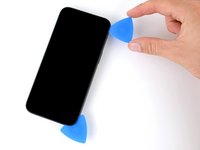
  8. iPhone 15 Pro Max Screen Opening, Separate the right edge adhesive: шаг 8, изображение 1 из 3 iPhone 15 Pro Max Screen Opening, Separate the right edge adhesive: шаг 8, изображение 2 из 3 iPhone 15 Pro Max Screen Opening, Separate the right edge adhesive: шаг 8, изображение 3 из 3
    • Slide the first pick back to the bottom right corner of the screen.

    • Slide the second pick to the top right corner of the screen to separate the adhesive.

    • Leave these picks inserted to prevent the adhesive from resealing.

  9. iPhone 15 Pro Max Screen Opening, Heat the top edge: шаг 9, изображение 1 из 1
    • Heat the top edge of the screen until it's hot to the touch.

  10. iPhone 15 Pro Max Screen Opening, Separate the top edge adhesive: шаг 10, изображение 1 из 3 iPhone 15 Pro Max Screen Opening, Separate the top edge adhesive: шаг 10, изображение 2 из 3 iPhone 15 Pro Max Screen Opening, Separate the top edge adhesive: шаг 10, изображение 3 из 3
    • Don't insert your pick deeper than 3 mm along the top edge.

    • Slide your pick around the top right corner and along the top edge to release the two clips and adhesive securing it.

  11. iPhone 15 Pro Max Screen Opening, Heat the left edge: шаг 11, изображение 1 из 1
    • Heat the left edge of the screen until it's hot to the touch.

  12. iPhone 15 Pro Max Screen Opening, Separate the left edge adhesive: шаг 12, изображение 1 из 3 iPhone 15 Pro Max Screen Opening, Separate the left edge adhesive: шаг 12, изображение 2 из 3 iPhone 15 Pro Max Screen Opening, Separate the left edge adhesive: шаг 12, изображение 3 из 3
    • Don't insert your pick deeper than 2 mm along the left edge to avoid the two cables connecting the screen to the phone.

    • Rotate your pick around the top left corner of the screen.

    • Slide your pick to the bottom left corner of the screen to separate the adhesive.

Заключение

To reassemble your device, follow these instructions in reverse order.

Clay Eickemeyer

Участник с: 09/19/22

97 044 Репутация

Автор 470 руководств

Команда

Guide Team Участник Guide Team

Staff

10 членов

Автор 16 028 руководств

0 Комментарии к руководству

Добавить комментарий

Статистика просмотров:

За последние 24 часов: 0

За последние 7 дней: 2

За последние 30 дней: 6

За всё время: 160