
Перейти к основному содержанию

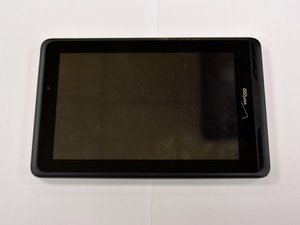
Distributed by Verizon, the Ellipsis 7 is an Android 4.4 KitKat tablet that features a 7" display and a quad-core 1.2 GHz processor. Can also be identified with the model number QMV78.

battery charging and lasting

i have a Verizon Ellipsis 7 for a few years and the battery has suddenly start to do worse and worse I plug it in then 13 hours after it gets to 100% and i go start going though my instagram feed and 5 minutes later the battery is on like 39% and i wonder if I reset it ill fix it or what if anyone has a suggestion on how to fix it please let me know

Ответ на этот вопрос У меня та же проблема

Это хороший вопрос?

Счет 2
Добавить комментарий

3 Ответов

Наиболее полезный ответ

A few things to try:

1.) Let the battery completely drain and recharge to 100%. By completely drain, I mean let it run until it shuts itself off. Then wait 15 minutes, turn it back on, and let it run until it shuts itself off again. This will ensure the battery is discharged. Then charge it to 100%. Hopefully, this will recalibrate the battery and let any "smart charging" software figure out the 0% and 100% levels of the battery. https://www.androidpit.com/how-to-calibr...

2.) If the above doesn't work, you can reset the software. https://www.verizonwireless.com/support/...

3.) Replace the battery. Verizon Ellipsis 7 Battery Replacement

Был ли этот ответ полезен?

Счет 1

2 Комментариев:

Wait, that guide does not show how to replace the battery, only the charging port.

Even if replacing the battery after removing the back cover is a no-brainer: just disconnect it from the motherboard.

из

It does appear that the guide is mislabeled as a battery replacement. However, it is still useful... Look at the last step. You can clearly see the connector for the battery, where the black-film of the battery has the "+" and "-" on it.

из

Добавить комментарий

nice like it thanks you

if you are a developer android buy installs for your app to promote your app in the ratings and analyze the market

Был ли этот ответ полезен?

Счет 0

1 Комментарий:

I couldn’t figure out how to take off the back panel.

из

Добавить комментарий

1. Turn it off

2. take the back off the tablet

3. unhook the battery and let it sit for about a min.

4. re-hook the battery

5. Turn on and see if that fixed it

Был ли этот ответ полезен?

Счет 0
Добавить комментарий

Добавьте свой ответ

SQUEAKER_GAMER буду вечно благодарен.
Статистика просмотров:

За последние 24 часов: 2

За последние 7 дней: 4

За последние 30 дней: 16

За всё время: 2,817

