Перейти к основному содержанию
Присоединяйся к сообществу ремонтников - Создай аккаунт

Fitbit Blaze Vibration Motor Replacement

Выберете то, что вам нужно

  1. Fitbit Blaze  Vibration Motor Replacement, Wristband: шаг 1, изображение 1 из 2 Fitbit Blaze  Vibration Motor Replacement, Wristband: шаг 1, изображение 2 из 2
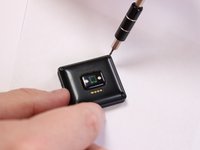
    • Locate the front LCD screen on your device.

    • Fitbit logo should appear in the bottom center of the screen.

    Спросите у FixBot

    Добавить комментарий

  2. Fitbit Blaze  Vibration Motor Replacement: шаг 2, изображение 1 из 1
    • Push the screen out through the back of the metal ring enclosure.

    • Use a small amount of force on screen to prevent damage. Use other hand to catch screen.

    Спросите у FixBot
    Добавить комментарий

  3. Fitbit Blaze  Vibration Motor Replacement: шаг 3, изображение 1 из 3 Fitbit Blaze  Vibration Motor Replacement: шаг 3, изображение 2 из 3 Fitbit Blaze  Vibration Motor Replacement: шаг 3, изображение 3 из 3
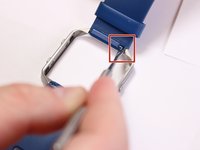
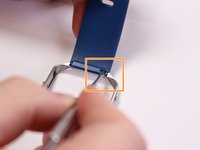
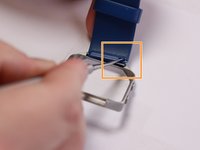
    • Locate the metal pin behind the wristband located on the edge of metal ring.

    • Insert the pointed end of the metal spudger into the pin hold and push it into the blue rectangle enclosure.

    • Use a small amount of force to avoid damaging the pins.

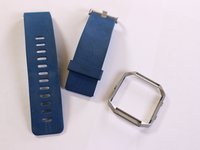
    • Remove wristband.

    Спросите у FixBot
    Добавить комментарий

  4. Fitbit Blaze  Vibration Motor Replacement, Display Frame: шаг 4, изображение 1 из 3 Fitbit Blaze  Vibration Motor Replacement, Display Frame: шаг 4, изображение 2 из 3 Fitbit Blaze  Vibration Motor Replacement, Display Frame: шаг 4, изображение 3 из 3
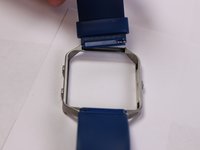
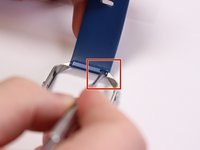
    • Locate the pin behind the second wristband located on the edge of metal ring.

    • Insert the pointed end of the metal spudger into the pin hold and push it into opposite direction.

    • Use a small amount of force to avoid damaging the pins.

    • Remove wristband.

    Спросите у FixBot
    Добавить комментарий

  5. Fitbit Blaze  Vibration Motor Replacement, Vibration Motor: шаг 5, изображение 1 из 3 Fitbit Blaze  Vibration Motor Replacement, Vibration Motor: шаг 5, изображение 2 из 3 Fitbit Blaze  Vibration Motor Replacement, Vibration Motor: шаг 5, изображение 3 из 3
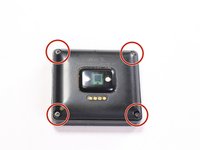
    • Place device screen face down and locate the four screws attaching the back cover.

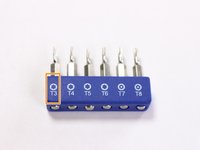
    • Use a T3 torx head or T3 torx screwdriver to remove the four screws.

    Спросите у FixBot

    Добавить комментарий

  6. Fitbit Blaze  Vibration Motor Replacement: шаг 6, изображение 1 из 3 Fitbit Blaze  Vibration Motor Replacement: шаг 6, изображение 2 из 3 Fitbit Blaze  Vibration Motor Replacement: шаг 6, изображение 3 из 3
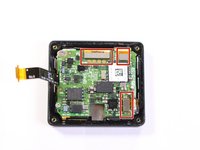
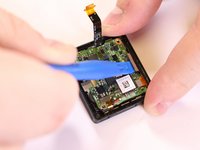
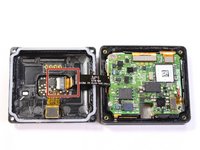
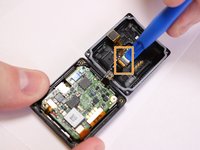
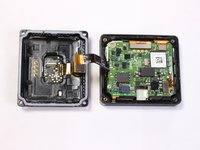
    • Grab the back, lift and open like a book to expose the motherboard. Locate the ribbon connector on the left.

    • Use a plastic spudger tool on the ribbon connected from the heart rate monitor to the motherboard.

    • Insert and lift the plastic opening tool to release the ribbon.

    • Only a small force when lifting the plastic connector is needed to avoid damage.

    Спросите у FixBot

    Добавить комментарий

  7. Fitbit Blaze  Vibration Motor Replacement: шаг 7, изображение 1 из 3 Fitbit Blaze  Vibration Motor Replacement: шаг 7, изображение 2 из 3 Fitbit Blaze  Vibration Motor Replacement: шаг 7, изображение 3 из 3
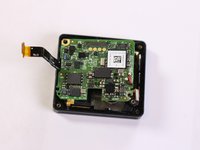
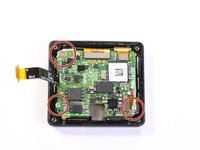
    • Separate the back and set aside, locate the three screws attaching the motherboard.

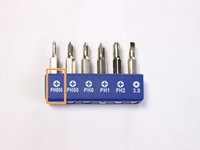
    • Use a PH000 head or a PH000 screwdriver to remove the three screws.

    Спросите у FixBot

    Добавить комментарий

  8. Fitbit Blaze  Vibration Motor Replacement: шаг 8, изображение 1 из 3 Fitbit Blaze  Vibration Motor Replacement: шаг 8, изображение 2 из 3 Fitbit Blaze  Vibration Motor Replacement: шаг 8, изображение 3 из 3
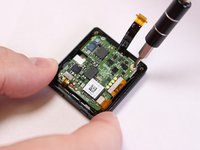
    • Use a plastic spudger tool on the ribbons connected to the motherboard.

    • Insert the tool under the ribbon and lift to release the connection.

    • Only a small force when lifting the plastic connector is needed to avoid damage.

    Спросите у FixBot
    Добавить комментарий

  9. Fitbit Blaze  Vibration Motor Replacement: шаг 9, изображение 1 из 3 Fitbit Blaze  Vibration Motor Replacement: шаг 9, изображение 2 из 3 Fitbit Blaze  Vibration Motor Replacement: шаг 9, изображение 3 из 3
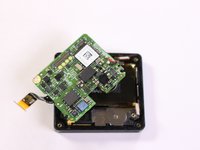
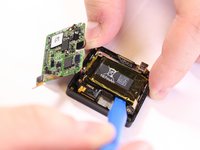
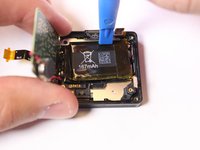
    • Lift and push the motherboard to the side to uncover the 167mAh battery.

    • Use a plastic spudger tool to pry out the battery from its adhesive plastic underneath.

    • Lift up and pull downward to remove battery. Switch to the top portion of the battery and push downward to pry out battery.

    Спросите у FixBot
    Добавить комментарий

  10. Fitbit Blaze  Vibration Motor Replacement: шаг 10, изображение 1 из 2 Fitbit Blaze  Vibration Motor Replacement: шаг 10, изображение 2 из 2
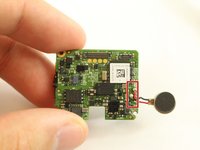
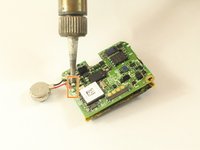
    • Flip the motherboard back to the front to locate the metal pins from the vibration motor soldered to the board.

    • Desolder the connection to remove the motor component.

    • Follow this guide on how to solder and desolder connectors Soldering Guide

    • Excessive heat will damage the components, so do not apply the soldering iron to the component for long amounts of time.

    Спросите у FixBot
    Добавить комментарий

Заключение

To reassemble your device, follow these instructions in reverse order.

Отменить: Я не выполнил это руководство.

Adrian Borrego

Участник с: 02/20/17

2 242 Репутация

Автор 5 руководств

Команда

USF Tampa, Team S3-G3, Sullivan Spring 2017 Участник USF Tampa, Team S3-G3, Sullivan Spring 2017

USFT-SULLIVAN-S17S3G3

4 членов

Автор 15 руководств

4 Комментарии к руководству

anyone got a part number or a description of the motor that gets replaced. looking to do this and fix. thanks

Ben - Ответить Поделиться

And how many destroyed “FitBit Blaze” are we going to see now?

tjhbob - Ответить Поделиться

what kind of motor can you replace this with?

dbick - Ответить Поделиться

Any idea what is the value of the C3 capacitor?

P J - Ответить Поделиться

Добавить комментарий

Статистика просмотров:

За последние 24 часов: 0

За последние 7 дней: 6

За последние 30 дней: 43

За всё время: 3,589