
Перейти к основному содержанию
Присоединяйся к сообществу ремонтников - Создай аккаунт

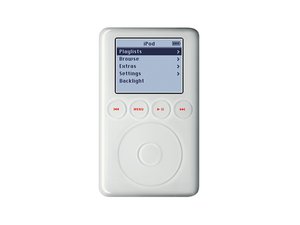
Model A1040 / 10, 15, 20, 30, or 40 GB hard drive / four touch-sensitive LED backlit buttons above touch wheel

Why won't the iPod turn on?

Hello All Hopeful Helpers,

My 3rd gen. iPod 10 GB with the 4 buttons above with touch wheel won't start up at all. I've tried to hit the play button then the center wheel button alternately but it just won't turn on. (The Hold switch is not on.)

Can anyone help? I miss my music!

Ответ на этот вопрос У меня та же проблема

Это хороший вопрос?

Счет 3
Добавить комментарий

6 Ответов

Наиболее полезный ответ

have you tried resetting the iPod? see: http://support.apple.com/kb/HT1320

What happens when you plug it into the dock connector? does it charge or power on? anything?

does your iPod still have the original battery? if so maybe the battery is dead - the battery on my old 20G 3rd gen iPod died and had to be replaced long long ago.

Был ли этот ответ полезен?

Счет 2
Добавить комментарий

Are you trying to charge it via USB? You need to use a 30-pin to firewire cable and charger, or an iPod dock. The 3rd gen iPod can’t charge with a USB cable like the other iPods can.

Был ли этот ответ полезен?

Счет 1
Добавить комментарий

That looks OLD

I bet the battery has had it - what if you have it on iTunes - any luck?

could be the HD as well - those things don't last forever

Был ли этот ответ полезен?

Счет 0

2 Комментариев:

Thanks for your replies. I have tried to use with the power cord and when hooked up via computer...still nothing. I reckon the battery is dead. Does this mean I've lost my music and other data on it?

I have not tried resetting it and will check that out. Does that mean I will lose all of my music and other data?

I'm already 'used to' the idea that I've lost it all, but it would be a nice 'present' if I were able to recover this stuff.

Again, thank you.

из

Changing the battery is generally safe for the data. If just the battery is dead, the iPod should boot up again once the new battery is in place and charged. You may need to plug it into a wall charger for a while to get the battery out of "storage mode" (sometimes lithium batteries ship partly charged, but switched off).

Resetting the ipod (as in turning off and on) is safe for the data. Restoring it in iTunes will delete the data.

If the hard drive is dying, you MIGHT be able to get some of the data back with a disk cloning tool or data recovery program (such as the "dd" command in Linux, use with caution).

из

Добавить комментарий

The people at the apple store told me it's usually the motherboard when it won't do anything at all under any circumstances.

If it is the mobo that means you music could still be intact on your hd, you would need a donor ipod, or 1.8in drive adapter to get it though.

Был ли этот ответ полезен?

Счет 0
Добавить комментарий

REPLACE THE Battery find it on ebay

mikey88772

Был ли этот ответ полезен?

Счет 0
Добавить комментарий

Does this mean I have to buy another battery ? Or can I do something else

Был ли этот ответ полезен?

Счет 0

1 Комментарий:

Have you tried plugging it into your computer? if so and no response, then yes you will likely have to change the battery

из

Добавить комментарий

Добавьте свой ответ

gbird буду вечно благодарен.
Статистика просмотров:

За последние 24 часов: 1

За последние 7 дней: 11

За последние 30 дней: 38

За всё время: 15,586