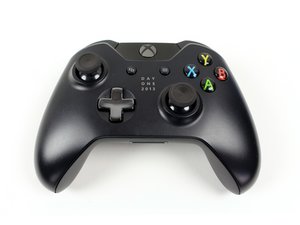
Беспроводной контроллер Xbox 7MN-0001 от корпорации Microsoft — это самый популярный контроллер для игровой консоли Xbox, который также можно использовать с ПК.
Just recently my xbox one controller won't detect my xbox one official headset. I tried using other alternative like plugging the xbox one official headset adapter but the controller still can't detect the headset. The light on the mute button won't light up when I pressed it
Прокрутите эту тему, чтобы найти подходящее место для этого комментария. Затем нажмите "Прикрепить комментарий к этому сообщению", чтобы переместить его.
19 Комментариев
I have the same problem... my headset use to work now it won’t even detect any headset.
Hi I’m having the same problem. My turtle beach headset used to work perfectly in my new controller but not it dosent even read that I have a headset in? When I make a party it says “cannot recoignize Mic for this person, I’ve updated my controller & that still didn’t help. I’ve even tried a different controller & it still won’t work... & the headset works perfectly in other controllers, someone please help!!!
I’m having this problem also, headset did the same thing on my back up controller for about 5 seconds then detected. Only thing I can think is the port must be loose in some way.
I was just playing and using the headset perfectly fine then it randomly comes up with that message and the mute light won't go off and it didn't work when I tried a different controller. I haven't had Xbox live in a long time and finally got it today and told a friend I'd talk and play and unless I can fix this I can't.
I had the same issue, I updated the firmware on the controller and then restart everything, this fixed the problem. The problem seems to be known to Microsoft as it's on the front page of their controller support area: https://support.xbox.com/en-GB/xbox-one/...
Instructions from site:
1 Sign in to Xbox Live on your Xbox One console and install the latest system update if prompted to do so.
2 If you have a stereo headset adapter, plug it into the bottom of your controller so it can also get updates.
3 If you're using a stereo headset adapter, plug in a headset (a headset must be plugged in so the adapter will turn on).
4 Press the Xbox button to open the guide.
5 Select System > Kinect & devices > Devices & accessories, and then select the controller you want to update.
6 Select Device info, select the Firmware version box, and then select Continue.
7 When the update is complete, you can update additional controllers.
They provide instructions on how to update via USB and PC if this doesn't work.
Прокрутите эту тему, чтобы найти подходящее место для этого комментария. Затем нажмите "Прикрепить комментарий к этому сообщению", чтобы переместить его.
14 Комментариев:
Great advice! you just saved my son from having a meltdown, fixed his audio problem, thought I was going to have to buy another controller! Many thanks!
It's not the firmware or software, its the controller. I did all of this and it still won't read my new turtle beach headset. It's the little metal square inside that came loose. Now I have to buy my 27th controller. Can't Microsoft ever make something that actually works. I dropped this one once, and now it won't read the headset.
i have a brand new controller straight out of the box….tried the update nothing….tried re-syncing nothing…..tried blowing it out nothing……. nothing sounds loose and the headset works perfectly fine with my worn out controller
Прокрутите эту тему, чтобы найти подходящее место для этого комментария. Затем нажмите "Прикрепить комментарий к этому сообщению", чтобы переместить его.
2 Комментариев:
Same issue since last night. Same controller and headset work on other 2 consoles in house. Has to be something with Xbox
Having same problem the controller is only 5 days old head phones worked fine then switched on and wouldn’t work Microsoft blamed headset brought another one and it didn’t now they blaming controller and want me to send it back with a 28 day turn around
Прокрутите эту тему, чтобы найти подходящее место для этого комментария. Затем нажмите "Прикрепить комментарий к этому сообщению", чтобы переместить его.
Прокрутите эту тему, чтобы найти подходящее место для этого комментария. Затем нажмите "Прикрепить комментарий к этому сообщению", чтобы переместить его.
Easy way is to replace headset jack in controller. I did it yesterday took 10 mins. Look on YouTube.. you can get a replacement jack looking on google.
Прокрутите эту тему, чтобы найти подходящее место для этого комментария. Затем нажмите "Прикрепить комментарий к этому сообщению", чтобы переместить его.
I had the same problem... It has something to do with the multi-use port being broken... Has it always been that way or did it just start doing it? If it has always done that you have a faulty controller and if it's new you should be able to get a replacement from Xbox support.
Прокрутите эту тему, чтобы найти подходящее место для этого комментария. Затем нажмите "Прикрепить комментарий к этому сообщению", чтобы переместить его.
9 Комментариев:
Is this also true for the 3.5mm port. My sons just stopped detecting the mic
We have the Xbox One, and my son just recently started using the headset..he would get the cannot detect mic message on and off, and now it just says every time he tries to use a headset. We have tried going through the settings, tried multiple headsets, etc. I bought this bundle in either June/July, and it came with 2 controllers. Both controllers have this issue, so I am curious to know whether this is a common issue for this console. Very frustrating!!
Im getting this alot too, ive heard its something to do with a little metal sqaure thingy in the port, it comes loose and stops the mics from being detected. Dont bother getting new mics over and over again, thats what i did, just get a new controller :)
Прокрутите эту тему, чтобы найти подходящее место для этого комментария. Затем нажмите "Прикрепить комментарий к этому сообщению", чтобы переместить его.
With all of us having this issue I am questioning why there isn’t a recall as the manufacturer clearly created a product that isn’t functioning properly.
We had this same issue!! Yes, the controllers are faulty. when I rang Xbox support to ask why the headset wasn't working, I was told that yes the controllers are faulty. So I don't know why Microsoft haven't recalled them (They are probably hoping that everyone goes lout and spends money on buying new controllers and headsets to fix the problem!!!!) We had to send ours back to microsoft and we are now awaiting our replacement. (Its been over a month now though... Grrrrr!!)
Holly cow I have about 8 controller since I have 3 Xbox ones and one of those is the X and other is the S and since the X just came out I couldn’t even make the headset to work coming out of the box .. so it ain’t the controller it has to be a software issue .... now just today 2-6-2018 I plugged in the headset again to one of the controllers that it was working and guess what it didn’t work .... 2-8 controllers can only make the headset work the rest are done but I said let me update this controllers for the 100th time with the headset plugged in just one more time.....and guess what “......it updated and now I have 4-8 controllers that can use the headset... now I haven’t updated the rest because I want to play NBA 2K but I will update on the other controllers if I ever find this thread again in my lifetime
Прокрутите эту тему, чтобы найти подходящее место для этого комментария. Затем нажмите "Прикрепить комментарий к этому сообщению", чтобы переместить его.
1 Комментарий:
You must make sure that the headset is plugged into the controller BEFORE you turn the Xbox console on with the controller.
I found it was the port where the headset goes where my son kept plugging the headset in and pulling it out. We had the same issue on 2 controller one was only 2 weeks old . I now make him leave the headset plugged in .
I recently read that the jack port only rests on the motherboard so it's loosing connection .
Прокрутите эту тему, чтобы найти подходящее место для этого комментария. Затем нажмите "Прикрепить комментарий к этому сообщению", чтобы переместить его.
Ive made my son keep the head phones plugged in at all times. We don't use the rechargeable battery pack just normal batteries then there's no need to keep taking the jack in and out and so far we haven't had a problem . Julie bucknell
Прокрутите эту тему, чтобы найти подходящее место для этого комментария. Затем нажмите "Прикрепить комментарий к этому сообщению", чтобы переместить его.
1 Комментарий:
Yes because;
You must make sure that the headset is plugged into the controller BEFORE you turn the Xbox console on with the controller.
I was having the same issue. I solved by re syncing my controller to the xbox. I thought something goofy was happening when my xbox wouldn't turn on half the time by turning on the controller. Hope this
Прокрутите эту тему, чтобы найти подходящее место для этого комментария. Затем нажмите "Прикрепить комментарий к этому сообщению", чтобы переместить его.
Прокрутите эту тему, чтобы найти подходящее место для этого комментария. Затем нажмите "Прикрепить комментарий к этому сообщению", чтобы переместить его.
Прокрутите эту тему, чтобы найти подходящее место для этого комментария. Затем нажмите "Прикрепить комментарий к этому сообщению", чтобы переместить его.
I found that this happens only when using the controller that came with the Xbox. I would recommend getting a new controller and if it still doesn’t work get a new mic. This happened to me and two of my friends.
Прокрутите эту тему, чтобы найти подходящее место для этого комментария. Затем нажмите "Прикрепить комментарий к этому сообщению", чтобы переместить его.
1 Комментарий:
Nooooo!! don't go and buy a new controller at your own expense!!!! The wireless controllers that come with the Xbox one s are faulty. we had the same problem and when I contacted Xbox they told me that alot of the controllers are faulty and don't work properly. We had to send ours back to Xbox and are awaiting our replacement.
Прокрутите эту тему, чтобы найти подходящее место для этого комментария. Затем нажмите "Прикрепить комментарий к этому сообщению", чтобы переместить его.
2 Комментариев:
That’s not correct. It’s the controller man. I’ve tried everything.
We had this exact same issue. When I contacted Xbox support, they told me that many of the Xbox One wireless controllers are infact faulty. We have had to send ours back to Microsoft and WE ARE STILL WAITING for our replacement to be sent, this has been over a month now that we have been waiting!! very frustrating!!
Прокрутите эту тему, чтобы найти подходящее место для этого комментария. Затем нажмите "Прикрепить комментарий к этому сообщению", чтобы переместить его.
None of these solutions work at all. We need one legit answer. Someone has got to be smart enough to figure this out, there our millions of us gamers suffering so please, as a fellow gamer, help up……….
Прокрутите эту тему, чтобы найти подходящее место для этого комментария. Затем нажмите "Прикрепить комментарий к этому сообщению", чтобы переместить его.
1 Комментарий:
How many of you play while the controller is plugged in cause fresh batteries seem to do the trick
Прокрутите эту тему, чтобы найти подходящее место для этого комментария. Затем нажмите "Прикрепить комментарий к этому сообщению", чтобы переместить его.
Because Xbox 1x is an expensive piece of sh… I spent 2 hours trying to get the phone computer to give me a live person and hear that it is a very common problem with the controller. The solution they gave me….Was to buy a new controller. Seriously pathetic Microsoft!
Прокрутите эту тему, чтобы найти подходящее место для этого комментария. Затем нажмите "Прикрепить комментарий к этому сообщению", чтобы переместить его.
2 Комментариев:
After trying everything and reading everything I have concluded it is the controller mic input that is faulty on standard issue x 1 s controllers. I pushed down on it and ducked taped it, working now.
Hello all!! I was recently having this issue, then I started doing simple things like checking my controller status…and low and behold my controller had a firmware update. Updated the firmware amd problem solved!!
Прокрутите эту тему, чтобы найти подходящее место для этого комментария. Затем нажмите "Прикрепить комментарий к этому сообщению", чтобы переместить его.
1 Комментарий:
Glad that worked for you, but not me and apparently many more people. Apple sort of admits that. It is a problem with all controllers and their only recommendation was to swap it out at game stop (for more money of course). They had no valid fix for the problem, just tough luck.
I would guess it was something intentional by Microsoft. Around the same time this trend hit, they stopped selling adapters, trying to get you to buy the wireless headsets. I got an adapter and it has worked fine. The only answer i have for this retarded-ass “marketing strategy”
Прокрутите эту тему, чтобы найти подходящее место для этого комментария. Затем нажмите "Прикрепить комментарий к этому сообщению", чтобы переместить его.
Прокрутите эту тему, чтобы найти подходящее место для этого комментария. Затем нажмите "Прикрепить комментарий к этому сообщению", чтобы переместить его.
I'm not sure if this will work for everyone. But, I went to Xbox home>multiplayer>start a party. Once that’s active, start your game and switch to party chat on the game if applicable. That's what worked for me!
Прокрутите эту тему, чтобы найти подходящее место для этого комментария. Затем нажмите "Прикрепить комментарий к этому сообщению", чтобы переместить его.
Прокрутите эту тему, чтобы найти подходящее место для этого комментария. Затем нажмите "Прикрепить комментарий к этому сообщению", чтобы переместить его.
Same problem, headset works sometimes other times it doesn't. The problem seems to be with Microsoft's software and how it detects the headset when plugged in.
Update (07/24/2020)
You must make sure that the headset is plugged into the controller before you turn the Xbox One console on with the controller.
Прокрутите эту тему, чтобы найти подходящее место для этого комментария. Затем нажмите "Прикрепить комментарий к этому сообщению", чтобы переместить его.
Have you tried performing a firmware update on the controller I have the same issue did that and it resolved my issue pretty quick all you got to do is go to settings,device streaming,accessories and go to the three dots and if an update is available hit update.
Прокрутите эту тему, чтобы найти подходящее место для этого комментария. Затем нажмите "Прикрепить комментарий к этому сообщению", чтобы переместить его.
Прокрутите эту тему, чтобы найти подходящее место для этого комментария. Затем нажмите "Прикрепить комментарий к этому сообщению", чтобы переместить его.

 2
2  2
2  1
1 



















19 Комментариев
I have the same problem... my headset use to work now it won’t even detect any headset.
из Randeep Virdi
This has just started happening to our console aswell only had it since Christmas!! Can't solve this problem , does anyone no how to ?
из Jill
Hi I’m having the same problem. My turtle beach headset used to work perfectly in my new controller but not it dosent even read that I have a headset in? When I make a party it says “cannot recoignize Mic for this person, I’ve updated my controller & that still didn’t help. I’ve even tried a different controller & it still won’t work... & the headset works perfectly in other controllers, someone please help!!!
из Tayla
I’m having this problem also, headset did the same thing on my back up controller for about 5 seconds then detected. Only thing I can think is the port must be loose in some way.
из Lisa Delvalle
I was just playing and using the headset perfectly fine then it randomly comes up with that message and the mute light won't go off and it didn't work when I tried a different controller. I haven't had Xbox live in a long time and finally got it today and told a friend I'd talk and play and unless I can fix this I can't.
из Whitney page
Показать ещё 14 комментариев