Msi pro b760m-a wifi ddr4 how to replace CMOS battery

I want to replace battery and wnat to buy which one battery
Это хороший вопрос?
Счет
0

I want to replace battery and wnat to buy which one battery
Это хороший вопрос?

Репутация: 520,8к
 11
11
 398
398
 1,5к
1,5к
Был ли этот ответ полезен?
But there is an iron plate stuck
Post an image of the motherboard showing where the cmos battery is and the plate.
Here's how to do this in ifixit Adding images to an existing question
Ok i upload the image tq
That is a heatsink over the IO (Input/Output) IC chip
It's either held on by clips (I can't see any in the image) or it is screwed onto the motherboard
If the motherboard is still in the case you may have to remove it from the case and then unscrew the heatsink from the underside of the board.
Usually the cmos battery model or part number is on the battery itself.
use that information to find suppliers

Репутация: 13
1
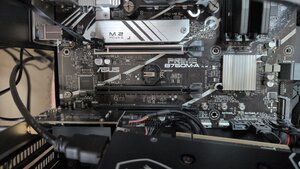
For those finding the CMOS battery on b760m-a, it is right under your display card not inside the heatsink! I cut my finger when trying to reach under the heatsink!!
Был ли этот ответ полезен?
За последние 24 часов: 19
За последние 7 дней: 56
За последние 30 дней: 215
За всё время: 1,776
