
Аккумулятор
Этот перевод был сделан машиной и пока не проверен человеком. Говоришь на этом языке? Проверить перевод.
|
3 Ответов 1 Оценка |
My tablet is showing => FASTBOOT MODE on the screen what should I do? |
|
2 Ответов 1 Оценка |
Why is my acer tablet not turning on |
|
1 ответ 0 Оценка |
Why is my screen touch malfunctioning? |
|
2 Ответов 1 Оценка |
My tablet touch screen is cracked what should I do? |
Вот некоторые основные инструменты, используемые для работы на данном устройстве. Вам, возможно, не понадобиться каждый инструмент для каждой процедуры.
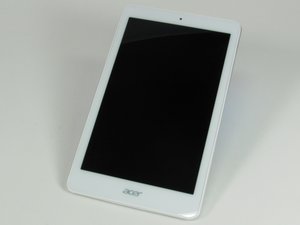
Планшет Acer Iconia Tab 8 A1-860 оснащен 8-дюймовым дисплеем с белой рамкой вокруг экрана и серебристо-серой задней панелью. Он весит 360 г и имеет размеры 216 на 130 мм. На задней панели находится небольшая квадратная наклейка «Intel Inside». Надпись «Acer» расположена на лицевой стороне внизу и на задней панели. На задней стороне в верхнем левом углу находится слот для карты micro SD. На верхнем торце устройства расположены порт micro USB и разъем для наушников.
Планшет Acer Iconia Tab 8 A1-860 можно идентифицировать по номеру модели и серийному номеру на белой этикетке, расположенной на нижней части устройства. Дополнительную помощь по идентификации вашего планшета можно найти на странице поддержки Acer.
FIX-SUOVANEN-S16S1G1
3 членов
Автор 12 руководств
За последние 24 часов: 1
За последние 7 дней: 14
За последние 30 дней: 45
За все время: 5,023


