Популярные вопросы форума
СпроситьВопросов нет. Будьте первым, кто задаст вопрос!
Общие сведения
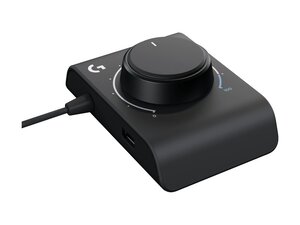
Адаптер для гоночных контроллеров (Racing Adapter) — это компактный адаптер (ключ), предназначенный для подключения периферийных игровых устройств Logitech к совместимым платформам. Он выполнен в прочном корпусе из АБС-пластика с усиленным металлом разъемом, рассчитанным на многократное подключение и извлечение. Ключевые особенности включают подключение «plug-and-play» и простой форм-фактор для легкой интеграции с гоночными рулями или игровыми консолями. На странице поддержки Logitech указано, что для этого продукта не предусмотрены загружаемое ПО, запчасти или видеоинструкции.
Идентификация
Адаптер для гоночных контроллеров Logitech можно идентифицировать по номеру модели (M/N WU0012). Этикетка с моделью находится на корпусе устройства. На этой этикетке указаны номер модели (M/N), артикул (P/N) и серийный номер (S/N).
Технические характеристики
- Производитель: Logitech
- Название продукта: Адаптер для гоночных контроллеров (Racing Adapter)
- Номер модели / артикул: Не указаны на странице поддержки Logitech
- Компоненты: Единый адаптер/ключ (отдельный приемник отсутствует); запчасти не предусмотрены
- Подключение / интерфейс: Не указаны на странице поддержки Logitech (интерфейс типа адаптера; имеется штекерный разъем)
- Материалы: Прочный корпус из АБС-пластика с усиленным металлом разъемом (материалы производителя прямо не указаны на странице поддержки)
- Микропрограмма / ПО: Загрузки и обновления микропрограммы недоступны (на странице поддержки Logitech указано, что для этого продукта нет загружаемого контента)
- Доступность запчастей: Нет — на странице поддержки Logitech запчасти для этого продукта не указаны
- Сертификаты: Не указаны на странице поддержки Logitech
- Клавиши / кнопки: Не применимо — устройство является адаптером-ключом и не содержит пользовательских кнопок; производитель не указывал модели внутренних переключателей
Устранение неисправностей
Распространенные неисправности включают потерю соединения или периодическое отсутствие обнаружения устройства, что может быть вызвано повреждением кабеля/разъема или поломкой внутренних паяных соединений. Выполните диагностику, проверив другие порты USB/кабели, а также осмотрев разъем на предмет коррозии или погнутых контактов. Если адаптер работает нестабильно, вскройте корпус, чтобы проверить, не отсоединились ли паяные соединения, и, при наличии соответствующих навыков, выполните их перепайку с помощью паяльного оборудования. Logitech не предоставляет запчасти или файлы для скачивания для этого продукта, поэтому, если внутренний ремонт невозможен, зачастую требуется замена устройства.
Для получения дополнительной помощи по устранению неполадок посетите сайт https://support.logi.com. На странице поддержки продукта указано, что для него нет доступных загружаемых файлов, запасных частей или документации.
Дополнительная информация
Информация о гарантии
Проверьте страницу информации о гарантии Logitech для получения сведений о гарантии в вашем регионе; на странице поддержки Logitech упоминаются гарантийные ресурсы, но не перечислены условия гарантии конкретно для этого продукта.

