Перейти к основному содержанию

(New) iPhone 15 Screen Installation

Абсолютно необходимое руководство
Это руководство только для предварительной подготовки! Этот гайд является частью другой процедуры и не предназначен для самостоятельного использования.
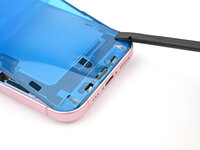
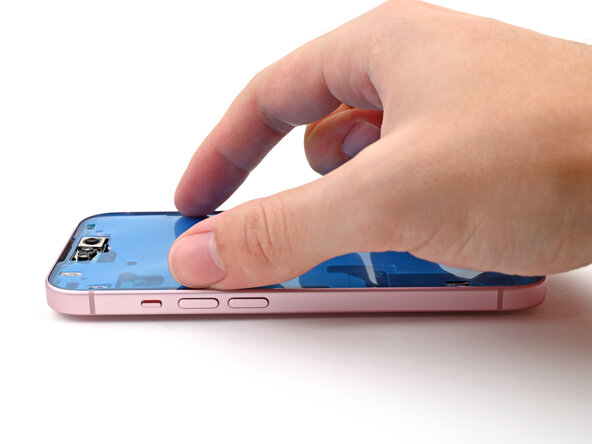
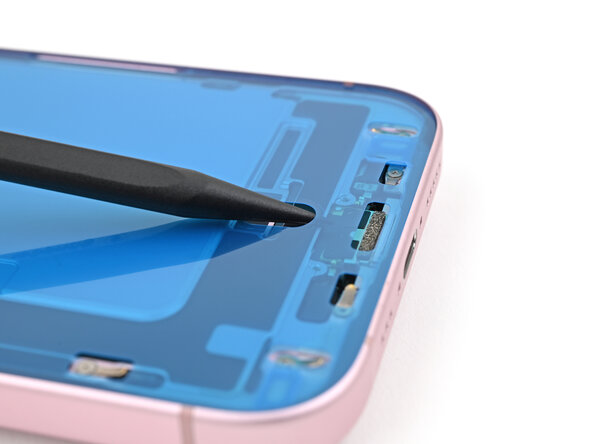
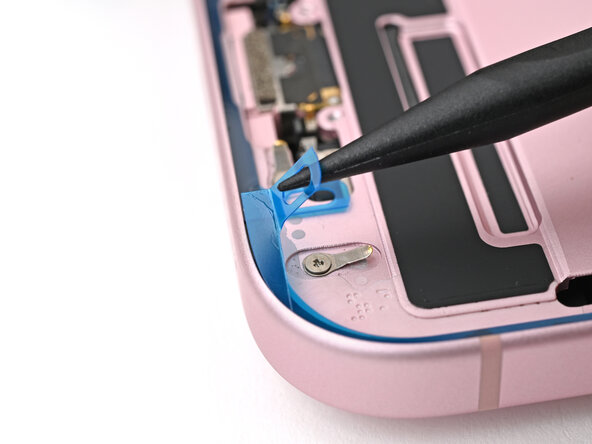
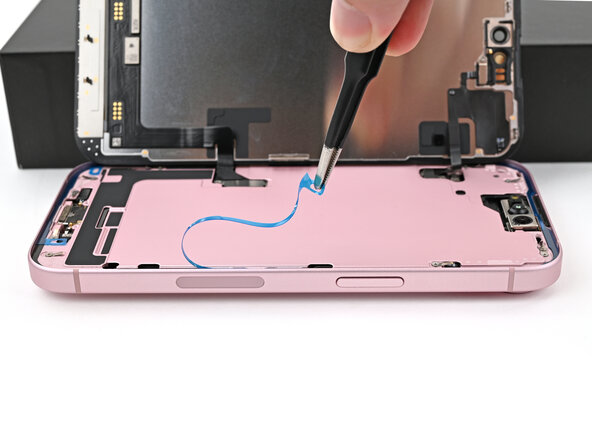
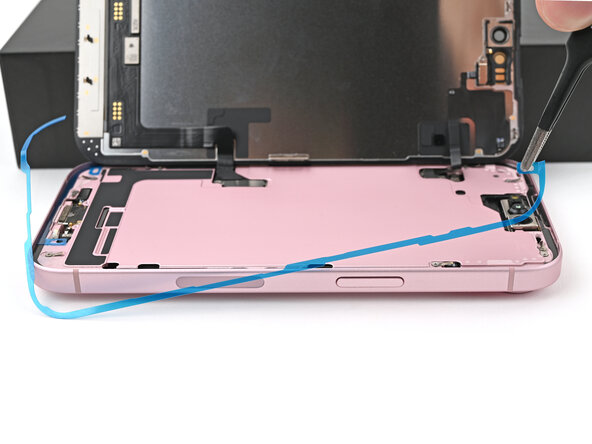
  1. (New) iPhone 15 Screen Installation, Remove the screen adhesive: шаг 1, изображение 1 из 3 (New) iPhone 15 Screen Installation, Remove the screen adhesive: шаг 1, изображение 2 из 3 (New) iPhone 15 Screen Installation, Remove the screen adhesive: шаг 1, изображение 3 из 3
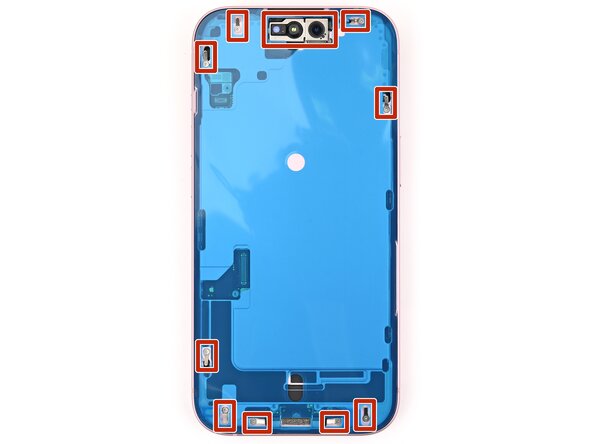
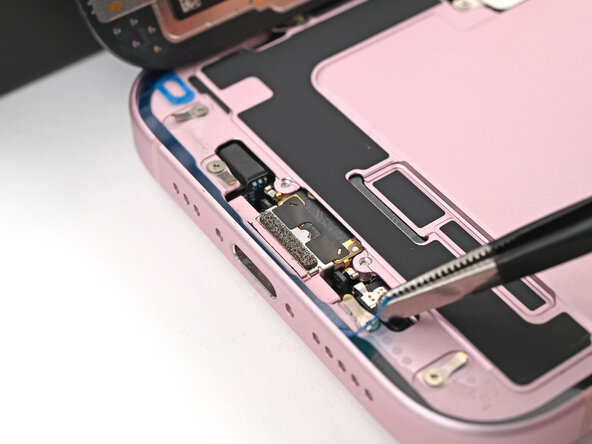
    • Be careful not to damage any of the spring contacts as you clean the frame.

    • This is a good point to test your repair before sealing up your phone. Connect the screen, power on your phone, and make sure it works as expected. Power it back down and continue reassembly.

    • The adhesive remaining on your phone is difficult to remove and leaves residue. If you have trouble removing the adhesive, apply some heat using a hair dryer or heat gun.

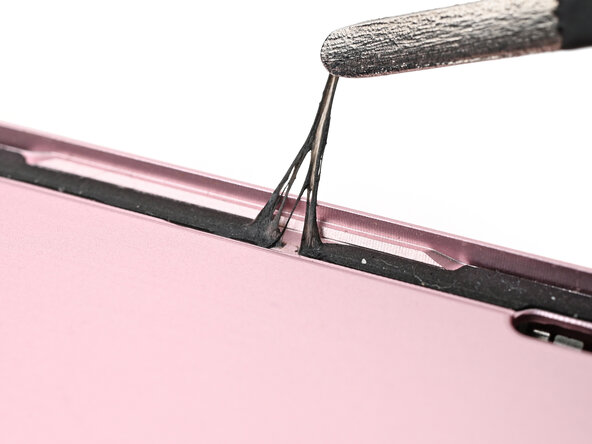
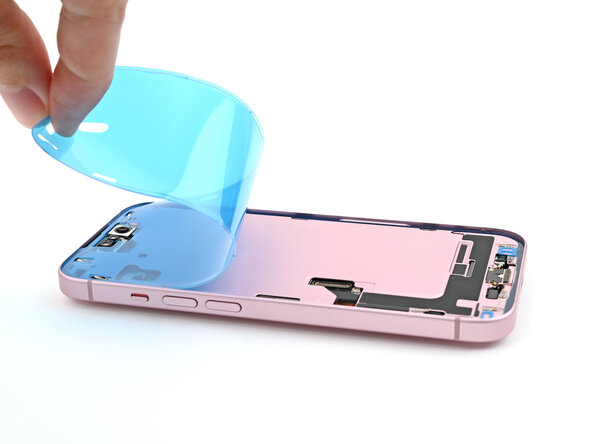
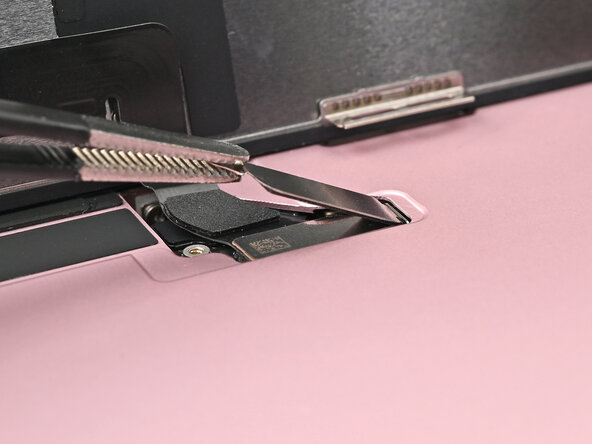
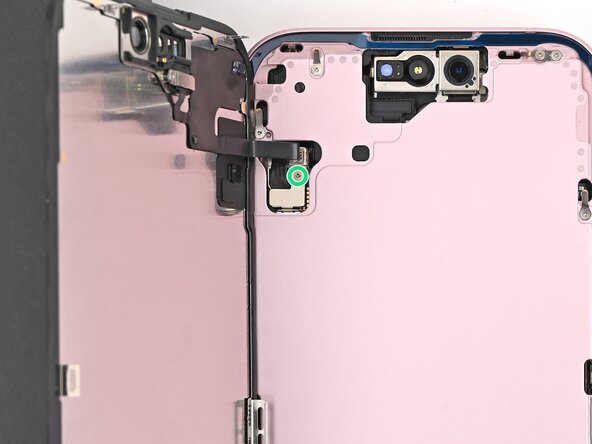
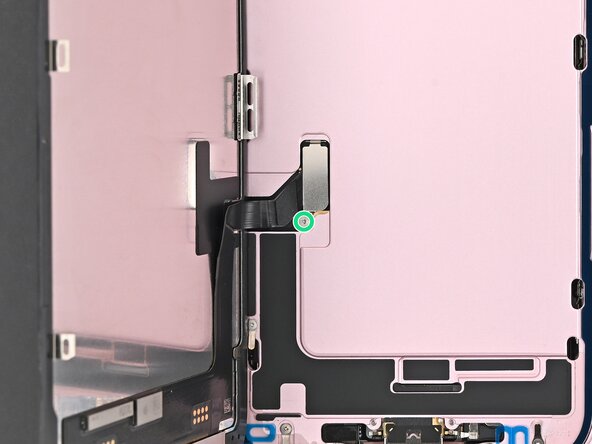
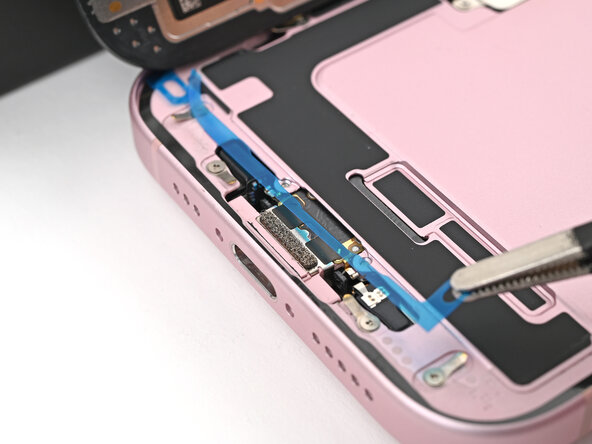
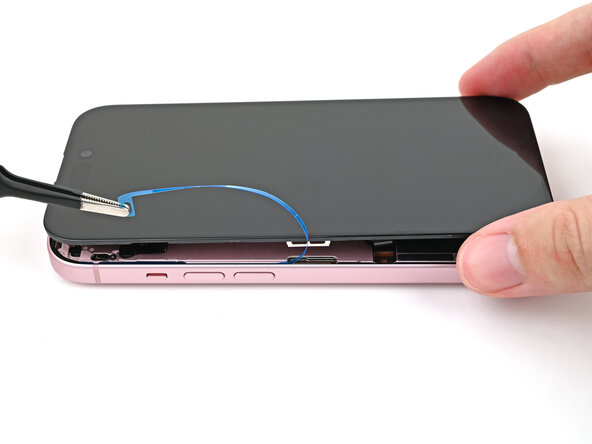
    • Use a spudger to push the screen adhesive up until you can grab it with a pair of tweezers.

    • Use a pair of tweezers, or your fingers, to remove the adhesive around the entire perimeter of the iPhone.

  2. (New) iPhone 15 Screen Installation: шаг 2, изображение 1 из 3 (New) iPhone 15 Screen Installation: шаг 2, изображение 2 из 3 (New) iPhone 15 Screen Installation: шаг 2, изображение 3 из 3
    • Any leftover residue will compromise your iPhone's seal. Be sure to clean the frame thoroughly.

    • Wrap a microfiber or lint-free cloth around the pointed end of a spudger and apply a few drops of high-concentration (greater than 90%) isopropyl alcohol to the cloth.

    • Wipe in one direction along the perimeter of the frame to clean the adhesive residue.

    • Wait a few minutes before proceeding to make sure any excess alcohol has evaporated.

  3. (New) iPhone 15 Screen Installation, Ambient light sensor information: шаг 3, изображение 1 из 1
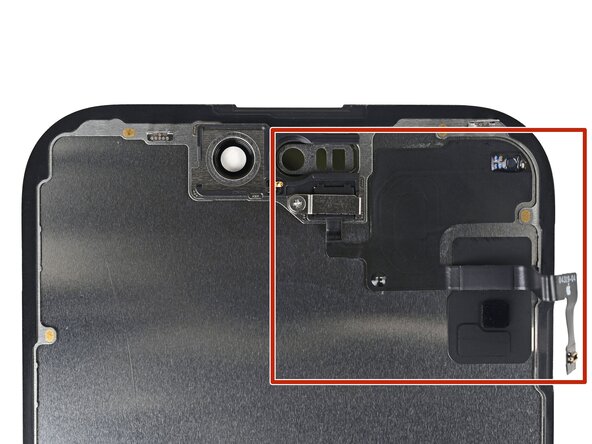
    • The ambient light sensor is located behind the screen, directly beneath the cut‑out for the Face ID sensors.

    • Check if the replacement screen comes with one installed. If it does, skip to this step.

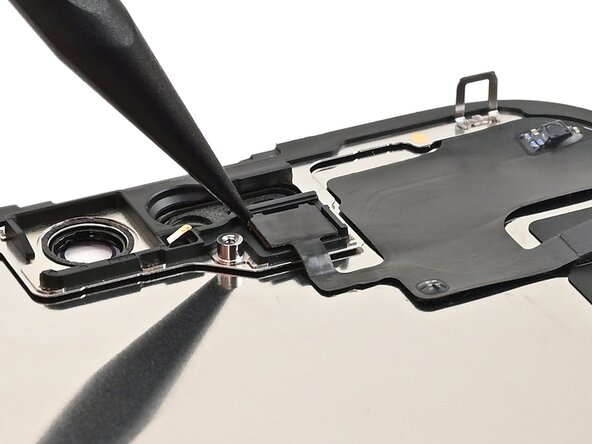
  4. (New) iPhone 15 Screen Installation, Remove the ambient light sensor bracket: шаг 4, изображение 1 из 2 (New) iPhone 15 Screen Installation, Remove the ambient light sensor bracket: шаг 4, изображение 2 из 2
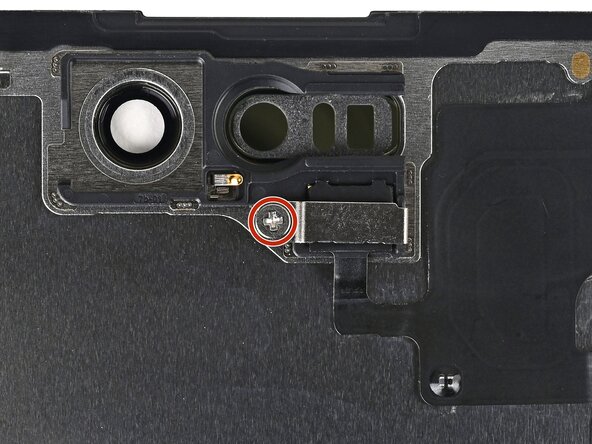
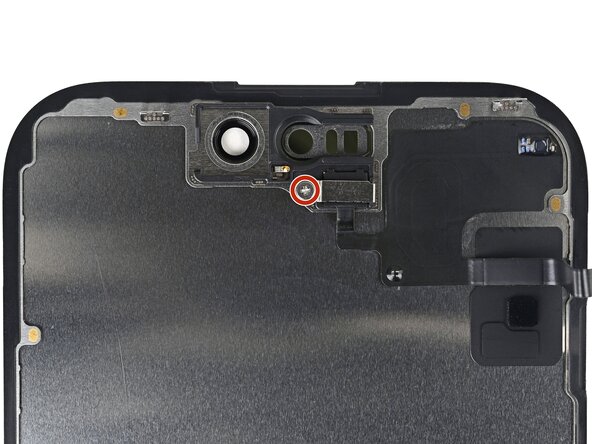
    • Use a Phillips screwdriver to remove the 1.3 mm‑long screw securing the ambient light sensor bracket.

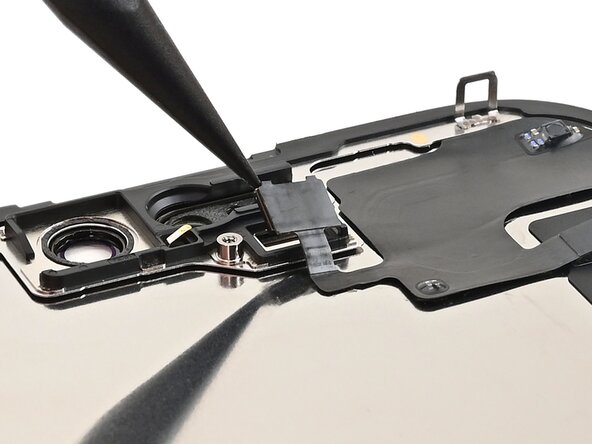
  5. (New) iPhone 15 Screen Installation: шаг 5, изображение 1 из 2 (New) iPhone 15 Screen Installation: шаг 5, изображение 2 из 2
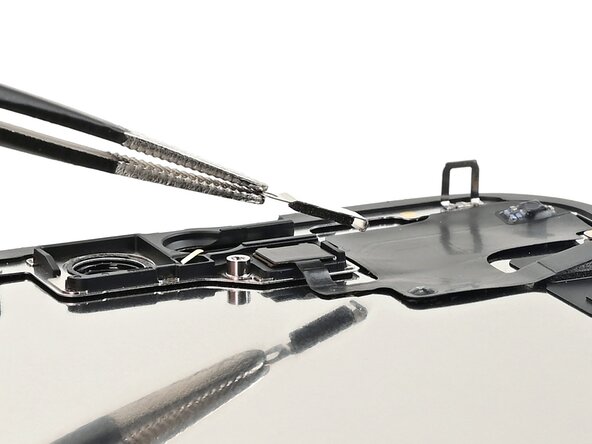
    • Use a pair of tweezers or your fingers to lift and remove the ambient light sensor bracket.

  6. (New) iPhone 15 Screen Installation, Heat the ambient light sensor: шаг 6, изображение 1 из 1
  7. (New) iPhone 15 Screen Installation, Pry up the ambient light sensor: шаг 7, изображение 1 из 2 (New) iPhone 15 Screen Installation, Pry up the ambient light sensor: шаг 7, изображение 2 из 2
    • Use a spudger to pry up the ambient light sensor.

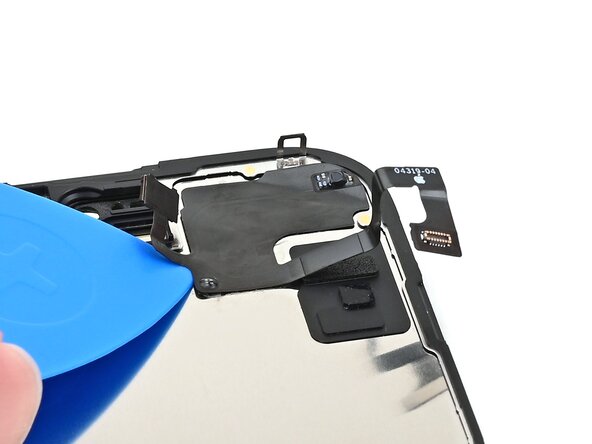
  8. (New) iPhone 15 Screen Installation, Peel up the ambient light sensor cable: шаг 8, изображение 1 из 2 (New) iPhone 15 Screen Installation, Peel up the ambient light sensor cable: шаг 8, изображение 2 из 2
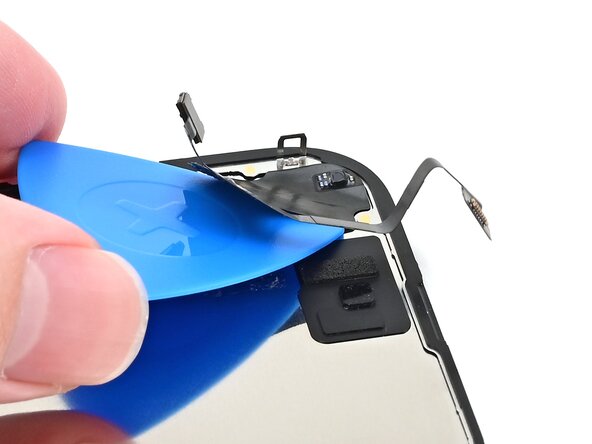
    • Gently slide an opening pick under the ambient light sensor cable, starting near the sensor and moving towards to the opposite corner until it's free from the screen.

    • If the adhesive doesn't peel up easily, apply more heat.

  9. (New) iPhone 15 Screen Installation, Remove the ambient light sensor: шаг 9, изображение 1 из 1
    • Use a pair of tweezers to lift the ambient light sensor off of the screen.

  10. (New) iPhone 15 Screen Installation, Prepare the ambient light sensor: шаг 10, изображение 1 из 2 (New) iPhone 15 Screen Installation, Prepare the ambient light sensor: шаг 10, изображение 2 из 2
    Инструмент, используемый на этом этапе:
    Tesa 61395 Tape
    $2.99
    • Use tweezers to reposition any adhesive that may have covered the ambient light sensor during removal. The adhesive should form a border around the raised white rectangle.

    • If the adhesive was damaged or stayed with the old screen, replace it with a 1 mm wide strip of thin, double-sided tape along its bottom border.

  11. (New) iPhone 15 Screen Installation, Place the ambient light sensor: шаг 11, изображение 1 из 2 (New) iPhone 15 Screen Installation, Place the ambient light sensor: шаг 11, изображение 2 из 2
    • Align the ambient light sensor with its recess in the back of the screen.

    • Use a spudger or your finger to press the ambient light sensor into its recess.

  12. (New) iPhone 15 Screen Installation, Warm the ambient light sensor: шаг 12, изображение 1 из 1
    • Use a hair dryer, heat gun, or heated iOpener to soften the adhesive under the ambient light sensor and ambient light sensor cable. It only needs to be warm—not hot.

  13. (New) iPhone 15 Screen Installation, Press the ambient light sensor: шаг 13, изображение 1 из 3 (New) iPhone 15 Screen Installation, Press the ambient light sensor: шаг 13, изображение 2 из 3 (New) iPhone 15 Screen Installation, Press the ambient light sensor: шаг 13, изображение 3 из 3
    Инструмент, используемый на этом этапе:
    Tesa 61395 Tape
    $2.99
    • Use your finger to press down the ambient light sensor cable.

    • If the ambient light sensor cable isn't sticking, apply a few small pieces of double‑sided tape, like Tesa tape, to the back of the sensor cable.

  14. (New) iPhone 15 Screen Installation, Install the ambient light sensor bracket: шаг 14, изображение 1 из 3 (New) iPhone 15 Screen Installation, Install the ambient light sensor bracket: шаг 14, изображение 2 из 3 (New) iPhone 15 Screen Installation, Install the ambient light sensor bracket: шаг 14, изображение 3 из 3
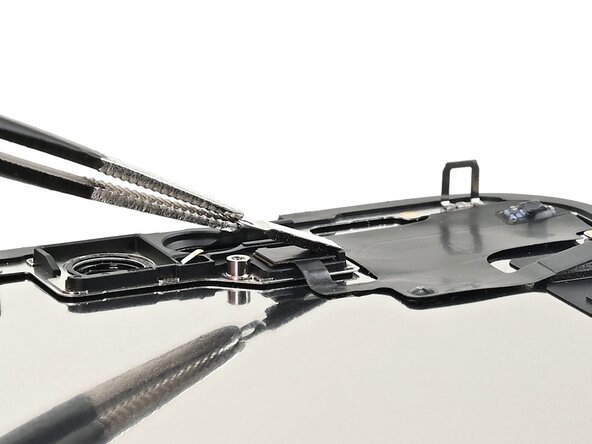
    • Use tweezers or your fingers to hook the ambient light sensor bracket over the back of the sensor and set it into place.

  15. (New) iPhone 15 Screen Installation: шаг 15, изображение 1 из 2 (New) iPhone 15 Screen Installation: шаг 15, изображение 2 из 2
    • Use a Phillips screwdriver to install the 1.3 mm‑long screw securing the ambient light sensor bracket.

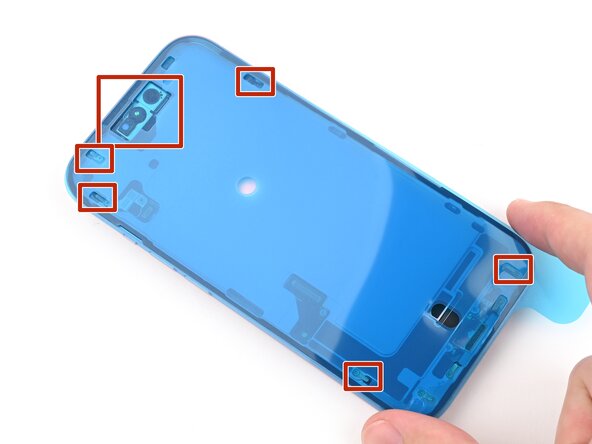
  16. (New) iPhone 15 Screen Installation, Orient the adhesive: шаг 16, изображение 1 из 3 (New) iPhone 15 Screen Installation, Orient the adhesive: шаг 16, изображение 2 из 3 (New) iPhone 15 Screen Installation, Orient the adhesive: шаг 16, изображение 3 из 3
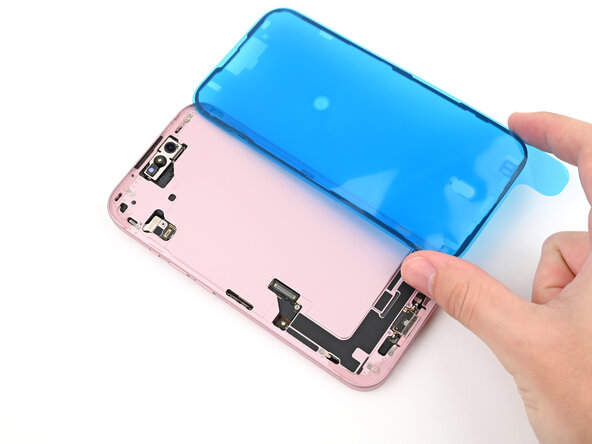
    • Lay the adhesive next to the phone and use features like cutouts for spring contacts and the front‑facing camera to make sure the adhesive is oriented correctly.

    • Your adhesive may look slightly different.

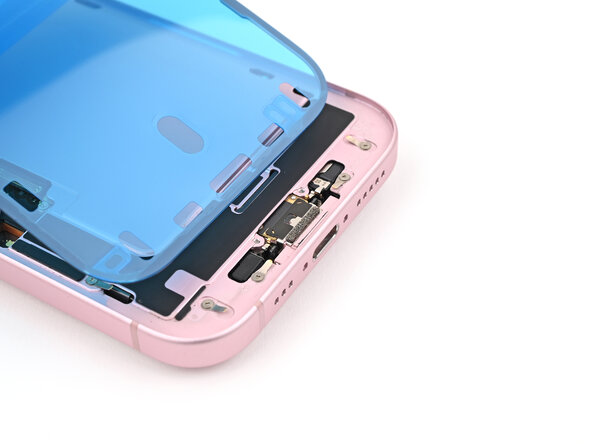
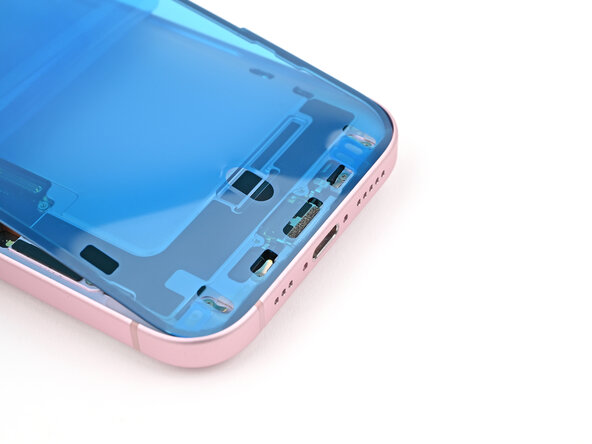
  17. (New) iPhone 15 Screen Installation, Apply the adhesive: шаг 17, изображение 1 из 3 (New) iPhone 15 Screen Installation, Apply the adhesive: шаг 17, изображение 2 из 3 (New) iPhone 15 Screen Installation, Apply the adhesive: шаг 17, изображение 3 из 3
    • Once the adhesive is pressed into place, you can't reposition it—you'll have to remove it and start over with new adhesive.

    • Use the pull tab to begin peeling the back liner off of the adhesive starting from the bottom, but do not remove the liner all the way.

    • While holding the back liner out of the way, carefully align the exposed edge of the adhesive to the bottom edge of the iPhone's frame.

  18. (New) iPhone 15 Screen Installation: шаг 18, изображение 1 из 3 (New) iPhone 15 Screen Installation: шаг 18, изображение 2 из 3 (New) iPhone 15 Screen Installation: шаг 18, изображение 3 из 3
    • When the adhesive is aligned, use the flat end of a spudger, or your finger, to press it down firmly along the bottom edge.

  19. (New) iPhone 15 Screen Installation: шаг 19, изображение 1 из 3 (New) iPhone 15 Screen Installation: шаг 19, изображение 2 из 3 (New) iPhone 15 Screen Installation: шаг 19, изображение 3 из 3
    • Continue peeling the back liner off of the adhesive while pressing the adhesive into place along the edges of the iPhone's frame.

    • If you correctly aligned the lower edge of the adhesive, the side and top edges will fall perfectly into place. If the adhesive is misaligned, remove it and start over with new adhesive.

    • If your adhesive is misaligned and you don't have another set handy, it's okay to temporarily put your iPhone back together and use it normally without any adhesive, but keep in mind that your iPhone's water resistance will be compromised until you install new adhesive.

  20. (New) iPhone 15 Screen Installation, Press the adhesive into place: шаг 20, изображение 1 из 3 (New) iPhone 15 Screen Installation, Press the adhesive into place: шаг 20, изображение 2 из 3 (New) iPhone 15 Screen Installation, Press the adhesive into place: шаг 20, изображение 3 из 3
    • Make sure the liner is aligned properly by checking that all spring contacts and the front-facing camera are in their cutouts. If they aren't, remove the adhesive and start over with a new sheet.

    • Use the flat end of a spudger to press the adhesive firmly into place all around the iPhone.

    • Be careful not to press on the camera, spring contacts, or other internal components.

  21. (New) iPhone 15 Screen Installation, Remove the top liner: шаг 21, изображение 1 из 2 (New) iPhone 15 Screen Installation, Remove the top liner: шаг 21, изображение 2 из 2
    • Insert the point of a spudger under the top liner's hole at the bottom of the frame.

    • Pry up to separate the liner from the frame—enough to grip it with your fingers.

    • Your pull tab may be in a different location. Make sure you're pulling the full-size top liner, not the thin liners under it.

  22. (New) iPhone 15 Screen Installation: шаг 22, изображение 1 из 3 (New) iPhone 15 Screen Installation: шаг 22, изображение 2 из 3 (New) iPhone 15 Screen Installation: шаг 22, изображение 3 из 3
    • Peel back the top liner and remove it.

  23. (New) iPhone 15 Screen Installation, Prop up the screen: шаг 23, изображение 1 из 1
    • Prop the screen up along the left edge of the iPhone frame, using a box or similar sturdy object to support the screen.

  24. (New) iPhone 15 Screen Installation, Connect the screen: шаг 24, изображение 1 из 2 (New) iPhone 15 Screen Installation, Connect the screen: шаг 24, изображение 2 из 2
    • Use the flat end of a spudger or your finger to connect the screen and front sensor press connectors.

  25. (New) iPhone 15 Screen Installation: шаг 25, изображение 1 из 3 (New) iPhone 15 Screen Installation: шаг 25, изображение 2 из 3 (New) iPhone 15 Screen Installation: шаг 25, изображение 3 из 3
    • Insert the top of the screen connector cover into its slot in the frame and lay it over the press connector.

  26. (New) iPhone 15 Screen Installation: шаг 26, изображение 1 из 3 (New) iPhone 15 Screen Installation: шаг 26, изображение 2 из 3 (New) iPhone 15 Screen Installation: шаг 26, изображение 3 из 3
    • Insert the front sensor connector cover into its slot in the frame at a 90‑degree angle vertically.

    • Lay the cover over the press connector.

  27. (New) iPhone 15 Screen Installation, Install the cover screws: шаг 27, изображение 1 из 2 (New) iPhone 15 Screen Installation, Install the cover screws: шаг 27, изображение 2 из 2
    • Use a tri-point Y000 driver to install the two 0.9 mm‑long screws securing the front sensor connector and screen connector covers.

  28. (New) iPhone 15 Screen Installation, Remove the final adhesive liners: шаг 28, изображение 1 из 2 (New) iPhone 15 Screen Installation, Remove the final adhesive liners: шаг 28, изображение 2 из 2
    • As you remove the liners in this step, the adhesive will be fully exposed. Make sure nothing touches the exposed adhesive.

    • Use a spudger, or your fingers, to separate the pull tabs at the bottom right corner of the frame.

  29. (New) iPhone 15 Screen Installation: шаг 29, изображение 1 из 3 (New) iPhone 15 Screen Installation: шаг 29, изображение 2 из 3 (New) iPhone 15 Screen Installation: шаг 29, изображение 3 из 3
    • Remove the narrow liner covering the adhesive along the right and top edges of the frame.

  30. (New) iPhone 15 Screen Installation: шаг 30, изображение 1 из 3 (New) iPhone 15 Screen Installation: шаг 30, изображение 2 из 3 (New) iPhone 15 Screen Installation: шаг 30, изображение 3 из 3
    • Remove the liner along the bottom edge of the frame.

  31. (New) iPhone 15 Screen Installation: шаг 31, изображение 1 из 3 (New) iPhone 15 Screen Installation: шаг 31, изображение 2 из 3 (New) iPhone 15 Screen Installation: шаг 31, изображение 3 из 3
    • Without letting the screen touch the adhesive, hold the screen over the phone so you can access the final liner along the left edge of the phone.

    • Use a pair of tweezers or your fingers to remove the final liner along the left edge of the phone.

  32. (New) iPhone 15 Screen Installation, Place the screen: шаг 32, изображение 1 из 3 (New) iPhone 15 Screen Installation, Place the screen: шаг 32, изображение 2 из 3 (New) iPhone 15 Screen Installation, Place the screen: шаг 32, изображение 3 из 3
    • Lay the screen straight down onto the frame and press until the clips engage.

    • Press around the perimeter of the screen to engage all clips.

  33. (New) iPhone 15 Screen Installation, Heat the screen: шаг 33, изображение 1 из 2 (New) iPhone 15 Screen Installation, Heat the screen: шаг 33, изображение 2 из 2
    • To help the adhesive bond, apply heat to the edges of the screen using an iOpener, hair dryer, or heat gun until it's hot to the touch.

    • If you have screen vise clamps, use them to strengthen the bond of your new adhesive. If not, keep reading for more ways to secure the screen.

  34. (New) iPhone 15 Screen Installation, Press the screen: шаг 34, изображение 1 из 3 (New) iPhone 15 Screen Installation, Press the screen: шаг 34, изображение 2 из 3 (New) iPhone 15 Screen Installation, Press the screen: шаг 34, изображение 3 из 3
    • To evenly compress your iPhone and strengthen the bond of the screen to the frame, you need to account for the camera bump.

    • If you have the box your iPhone came in, take the lid and place it on a flat surface.

    • If you don't have your original box, skip this step for an alternate method.

    • Place your iPhone screen-side-up in the lid of your box with the camera bump in its recess.

    • Find something close to the size of your iPhone, but taller than the sides of the box. Stack it on top of the iPhone, followed by a few heavy objects.

    • Leave the objects in place for at least thirty minutes. The lighter the objects, the longer they should be left. Ideally, leave them stacked overnight.

  35. (New) iPhone 15 Screen Installation: шаг 35, изображение 1 из 2 (New) iPhone 15 Screen Installation: шаг 35, изображение 2 из 2
    • If you don't have the original box for your iPhone, follow the next three steps for another method to evenly compress the screen.

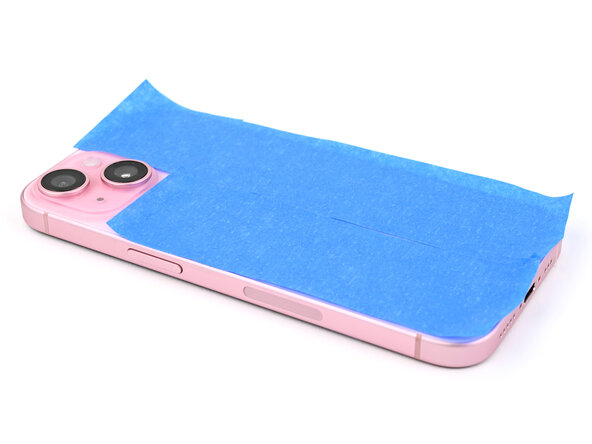
    • Place the iPhone screen-side-down on a soft, flat surface.

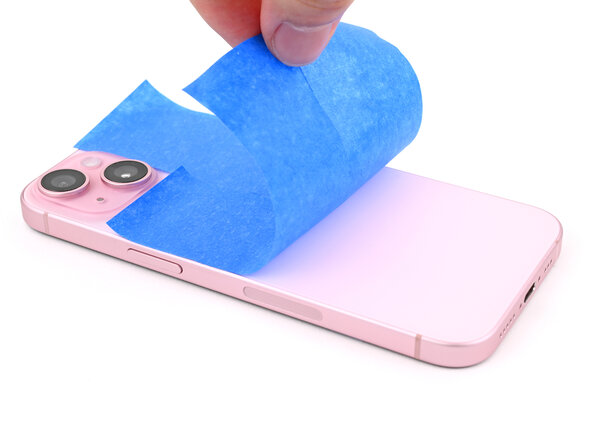
    • Apply tape to the back glass to protect its finish.

  36. (New) iPhone 15 Screen Installation: шаг 36, изображение 1 из 3 (New) iPhone 15 Screen Installation: шаг 36, изображение 2 из 3 (New) iPhone 15 Screen Installation: шаг 36, изображение 3 из 3
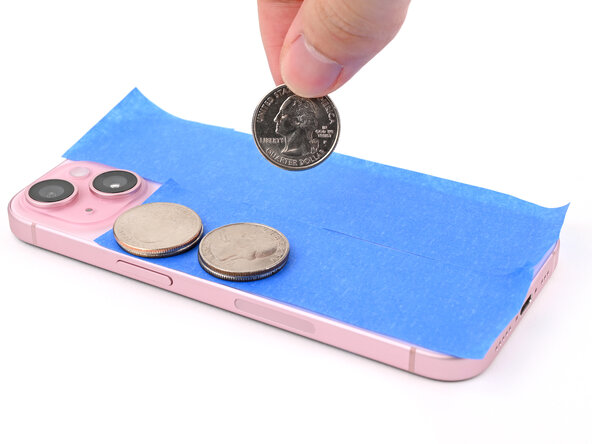
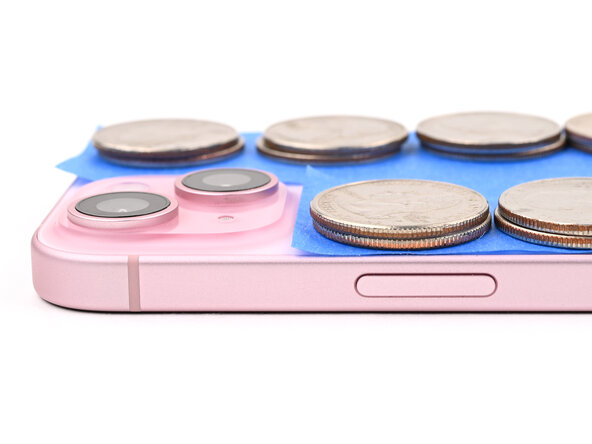
    • Place evenly spaced layers of coins or similarly thick objects on the tape along the edges of the back glass.

    • Stack them to a consistent height taller than the camera bump.

  37. (New) iPhone 15 Screen Installation: шаг 37, изображение 1 из 1
    • Stack multiple books or other heavy objects on your iPhone.

    • The coins may leave an impression on the bottom object, so don't use anything valuable.

    • Leave the objects in place for at least thirty minutes. The lighter the objects, the longer they should be left. Ideally, leave them stacked overnight.

Заключение

To reassemble your device, follow these instructions in reverse order.

Alex Diaz-Kokaisl

Участник с: 01/16/22

212 716 Репутация

Автор 1 039 руководств

0 Комментарии к руководству

Добавить комментарий

Статистика просмотров:

За последние 24 часов: 1

За последние 7 дней: 11

За последние 30 дней: 39

За всё время: 70