Перейти к основному содержанию
Присоединяйся к сообществу ремонтников - Создай аккаунт

ASUS VG248 Disassembly

Выберете то, что вам нужно

    1. ASUS VG248 Disassembly, ASUS VG248 Disassembly: шаг 1, изображение 1 из 2 ASUS VG248 Disassembly, ASUS VG248 Disassembly: шаг 1, изображение 2 из 2
      • Before you begin, lay the monitor face down on a smooth, clean surface.

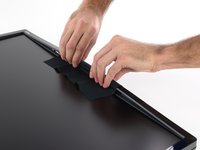
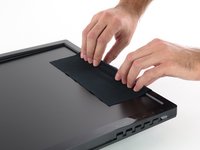
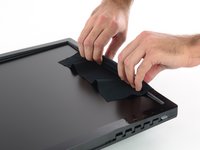
      • Four rubbery covers hide four screws in the rear of the monitor.

      • Pry out the plastic covers with a stiff pointed tool, like a metal spudger.

      Спросите у FixBot

      Добавить комментарий

    2. ASUS VG248 Disassembly: шаг 2, изображение 1 из 1
      • Remove the four 13.4 mm Philips #1 screws securing the monitor stand.

      Спросите у FixBot

      Добавить комментарий

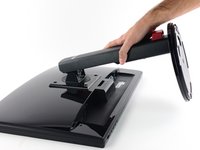
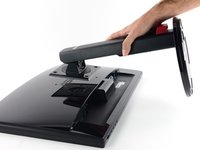
    3. ASUS VG248 Disassembly: шаг 3, изображение 1 из 2 ASUS VG248 Disassembly: шаг 3, изображение 2 из 2
      • Remove the stand from the display.

      Спросите у FixBot

      Добавить комментарий

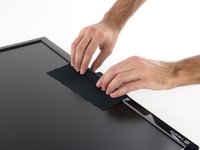
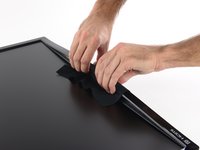
    4. ASUS VG248 Disassembly: шаг 4, изображение 1 из 2 ASUS VG248 Disassembly: шаг 4, изображение 2 из 2
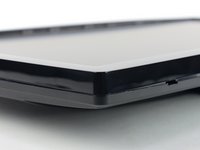
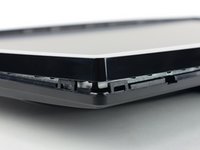
      • The display bezel is held to the rear case by plastic clips that can be released by pulling straight up on the bezel.

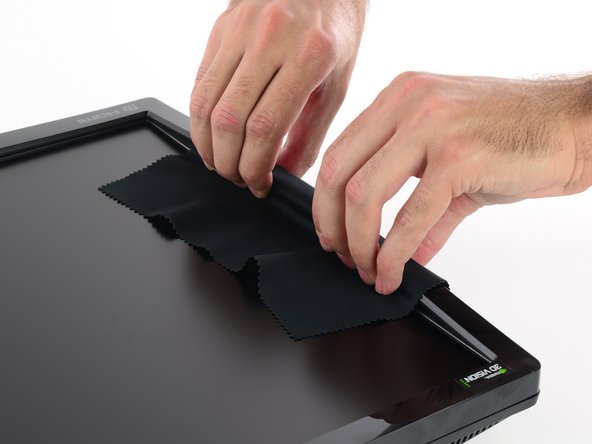
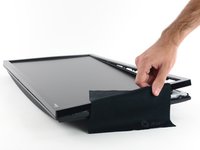
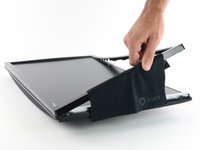
      • Rather than use any prying tools that could damage the LCD, it's best to just pull with your fingers. A thin cloth will both protect your fingertips and prevent you from smudging the LCD.

      • Lay the cloth over one of the long edges of the display.

      • Grip the side of the bezel through the cloth and lift straight up. A few clips in the center will pop free.

      • Be careful to pull straight up, and not pry against the display. Pushing down on the display could damage it.

      Спросите у FixBot

      Добавить комментарий

    5. ASUS VG248 Disassembly: шаг 5, изображение 1 из 2 ASUS VG248 Disassembly: шаг 5, изображение 2 из 2
      • Repeat the procedure around the display, lifting up the center of the next side.

      Спросите у FixBot

      Добавить комментарий

    6. ASUS VG248 Disassembly: шаг 6, изображение 1 из 2 ASUS VG248 Disassembly: шаг 6, изображение 2 из 2
      • Move around to the other long side and lift up on the center of the bezel.

      Спросите у FixBot

      Добавить комментарий

    7. ASUS VG248 Disassembly: шаг 7, изображение 1 из 2 ASUS VG248 Disassembly: шаг 7, изображение 2 из 2
      • Grip the center of the final side and lift the bezel away from the rear case.

      Спросите у FixBot

      Добавить комментарий

    8. ASUS VG248 Disassembly: шаг 8, изображение 1 из 2 ASUS VG248 Disassembly: шаг 8, изображение 2 из 2
      • Now that you've freed the centers of the four sides, it's time to move on to the corners.

      • Each corner is secured by two large clips that can't be freed by just pulling straight up like you did with the sides.

      • In the next step, you'll be pushing in on the corner clip on the left of the bottom edge of the bezel.

      Спросите у FixBot

      Добавить комментарий

    9. ASUS VG248 Disassembly: шаг 9, изображение 1 из 2 ASUS VG248 Disassembly: шаг 9, изображение 2 из 2
      Инструмент, используемый на этом этапе:
      Jimmy
      $7.95
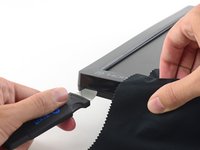
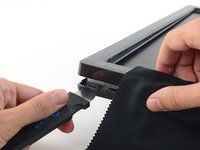
      • Using a thin stiff prying device, like a Jimmy, press in against the bottom clip in the lower left corner (beneath the HDMI logo).

      • While pressing the clip in, pull up on the lower edge of the bezel. The entire corner should pop free.

      Спросите у FixBot

      Добавить комментарий

    10. ASUS VG248 Disassembly: шаг 10, изображение 1 из 3 ASUS VG248 Disassembly: шаг 10, изображение 2 из 3 ASUS VG248 Disassembly: шаг 10, изображение 3 из 3
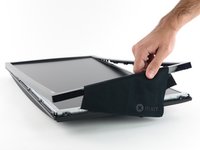
      • Once you've freed one corner, you should be able to gently twist the bezel off, freeing all of the remaining corners.

      • If any corners are particularly stubborn, repeat the previous step on the difficult corner.

      Спросите у FixBot

      Добавить комментарий

    11. ASUS VG248 Disassembly: шаг 11, изображение 1 из 1
      • Remove the bezel.

      Спросите у FixBot

      Добавить комментарий

    12. ASUS VG248 Disassembly: шаг 12, изображение 1 из 2 ASUS VG248 Disassembly: шаг 12, изображение 2 из 2
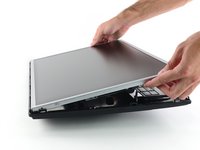
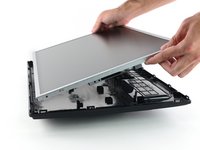
      • Lift the LCD out of the rear case.

      • The row of adjustment buttons will come out of the case with the display, attached by a thin ribbon cable. Take care not to damage the cable.

      Спросите у FixBot

      Добавить комментарий

    13. ASUS VG248 Disassembly: шаг 13, изображение 1 из 1
      • With the casing removed, you now have access to the button board, cables, and the housing over the motherboard components.

      Спросите у FixBot

      Добавить комментарий

Заключение

To reassemble your device, follow these instructions in reverse order.

Отменить: Я не выполнил это руководство.

23 человек успешно провели ремонт по этому руководству.

Sam Goldheart

Участник с: 10/18/12

477 791 Репутация

Автор 538 руководств

Команда

iFixit Участник iFixit

Staff

123 членов

Автор 42 765 руководств

11 Комментарии к руководству

Do you know of any place that sell the replacement lcd screen?

treymcbrd - Ответить Поделиться
Hi there, I have a little thunderbug trapped in the LCD is it possible to take the metal casing at the front of to reomve said bug? Thanks

TJ Grainger - Ответить Поделиться
You could yes, but be very careful NOT to introduce dust into the panel!

Bertus van den Dikkenberg - Ответить Поделиться

Hi. A really small bug got stuck within my screen and I accidentally squished it so now it’s dead in there and I want to clean it. How would I remove the top layer of the screen? Because from what I can see it seems like it got squished between the glass and the actual LCD screen itself.

Carl Viernes - Ответить Поделиться

Me too, same issue, a very small bug I thaught was outside, acutally was inside and I squeezed it. It's very small but the dot is disturbing.
Is it possibile to take a part the layers of the LCD screen?
I have an ASUS PA248

Thank you

Piero - Ответить Поделиться

Добавить комментарий

Статистика просмотров:

За последние 24 часов: 16

За последние 7 дней: 132

За последние 30 дней: 708

За всё время: 137,651