Перейти к основному содержанию
Присоединяйся к сообществу ремонтников - Создай аккаунт

Acer Aspire 5253 RAM Replacement

Выберете то, что вам нужно

  1. Acer Aspire 5253 RAM Replacement, Battery: шаг 1, изображение 1 из 1
    • Turn the laptop over.

    Спросите у FixBot

    Добавить комментарий

  2. Acer Aspire 5253 RAM Replacement: шаг 2, изображение 1 из 1
    • "Unlock" your battery by moving the switch as shown so that an unlocked lock on a red background is shown.

    Спросите у FixBot

    Добавить комментарий

  3. Acer Aspire 5253 RAM Replacement: шаг 3, изображение 1 из 1
    • Next move the other switch, while the unlocked symbol is still showing. The battery should pop up, and no longer be flush with the bottom of the laptop.

    Спросите у FixBot

    Добавить комментарий

  4. Acer Aspire 5253 RAM Replacement: шаг 4, изображение 1 из 1
    • Now remove the battery by lifting it out of the laptop by the side closest to the switches.

    Спросите у FixBot

    Добавить комментарий

  5. Acer Aspire 5253 RAM Replacement: шаг 5, изображение 1 из 1
    • You have successfully removed the battery. Congratulations!

    Спросите у FixBot

    Добавить комментарий

  6. Acer Aspire 5253 RAM Replacement, Back Cover Panel: шаг 6, изображение 1 из 1
    • Now, locate the two screws that hold the back cover panel onto the laptop.

    Спросите у FixBot

    Добавить комментарий

  7. Acer Aspire 5253 RAM Replacement: шаг 7, изображение 1 из 1
    • Unscrew both of the screws that are holding the back panel in place with the Philips #00 head.

    • The screws are 3/8" in length and have a 1/4" head.

    Спросите у FixBot

    Добавить комментарий

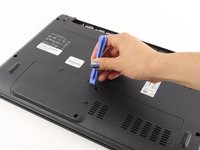
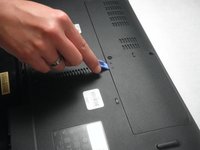
  8. Acer Aspire 5253 RAM Replacement: шаг 8, изображение 1 из 2 Acer Aspire 5253 RAM Replacement: шаг 8, изображение 2 из 2
    • Once both screws have been removed use a plastic opening tool to lift the panel up. Starting with the indented notch , and moving left and right from there.

    Спросите у FixBot

    Добавить комментарий

  9. Acer Aspire 5253 RAM Replacement: шаг 9, изображение 1 из 1
    • After the panel has been loosened by the plastic opening tool, take your finger, place it in the gap, and remove the panel from the laptop.

    Спросите у FixBot

    Добавить комментарий

  10. Acer Aspire 5253 RAM Replacement, RAM: шаг 10, изображение 1 из 1
    • Now, locate the RAM.

    Спросите у FixBot

    Добавить комментарий

  11. Acer Aspire 5253 RAM Replacement: шаг 11, изображение 1 из 1
    • Locate the two metal pieces on both sides of the RAM that are holding it in place.

    Спросите у FixBot

    Добавить комментарий

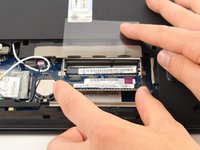
  12. Acer Aspire 5253 RAM Replacement: шаг 12, изображение 1 из 1
    • Pull the tabs apart to remove the RAM.

    • The RAM will pop up once they are pried open.

    Спросите у FixBot

    Добавить комментарий

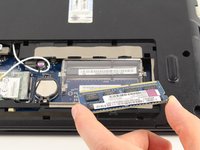
  13. Acer Aspire 5253 RAM Replacement: шаг 13, изображение 1 из 2 Acer Aspire 5253 RAM Replacement: шаг 13, изображение 2 из 2
    • Carefully slide the RAM out of the compartment.

    Спросите у FixBot

    Добавить комментарий

Заключение

To reassemble your device, follow these instructions in reverse order.

Отменить: Я не выполнил это руководство.

6 человек успешно провели ремонт по этому руководству.

Cynthia Barajas

Участник с: 04/08/14

2 258 Репутация

Автор 5 руководств

Команда

Cal Poly, Team 8-11, Regan Spring 2014 Участник Cal Poly, Team 8-11, Regan Spring 2014

CPSU-REGAN-S14S8G11

4 членов

Автор 15 руководств

1 Комментарий к руководству

which bus-ram acer 5253 can use? i know it use bus 1066 but i don't know with bus 1666 how is machine active?

nhanblack1996 - Ответить Поделиться

Добавить комментарий

Статистика просмотров:

За последние 24 часов: 0

За последние 7 дней: 13

За последние 30 дней: 50

За всё время: 4,524