Введение
The Acer Aspire 5741-5698 is an aging laptop that struggles to compete with newer standards. For that reason, replacing the factory RAM chip with something with a bit more power is a good course of action.
Выберете то, что вам нужно
-
-
-
Flip the laptop over so the bottom side is facing up.
-
Remove the two Phillips screws that secure the bottom flap
 Спросите у FixBot
-
-
-
-
Depress the two prongs holding the chip in and remove the chip.
-
Slide in a new chip, seating it so that it clicks and locks into position.
-
-


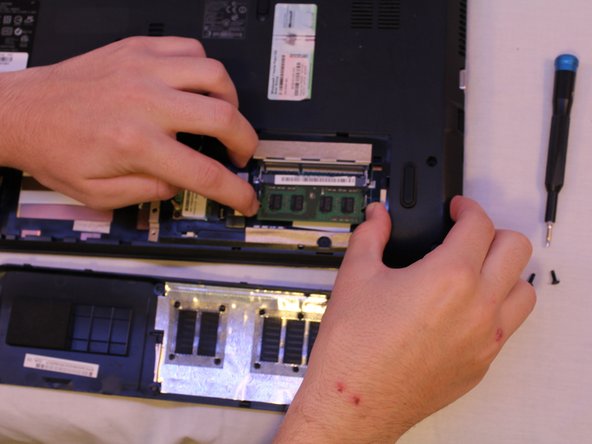

To reassemble your device, follow these instructions in reverse order.
Отменить: Я не выполнил это руководство.
2 человек успешно провели ремонт по этому руководству.

Команда

Cal Poly, Team S18-G6, White Winter 2019 Участник Cal Poly, Team S18-G6, White Winter 2019
CPSU-WHITE-W19S18G6
4 членов
Автор 44 руководств
1 Комментарий к руководству
No meu caso e ICER aspire 5741 que está com a tela preta e já fiz todos esses procedimentos que vcs mostram, mas não resolveu. Ele liga, pedi a senha, manda aguardar, mas fica com a tela preta. Não aparece nada na tela
