Введение
In the age of evolving cell phone technology, the cameras each has is a huge factor point when buying the phone. These cameras are becoming so advanced, they are replacing the need for handheld digital cameras. Because of this, owners rely greatly on a functioning camera in their phones. This guide will provide users with information needed access and replace the camera in an Alcatel OneTouch Evolve in the case of a malfunctioning, damaged or dirty camera.
Выберете то, что вам нужно
-
-
-
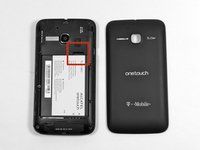
This will be an opening with enough space to insert the flat head of the plastic opening tool.
-
It will be located on the bottom right of the phone
 Спросите у FixBot
-
-
-
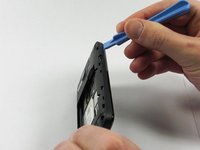
Rotate the pry tool 90 degrees until the panel lifts up.
-
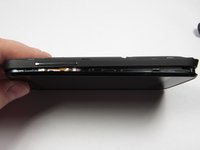
With your thumb nail, lift the rest of the panel up around the perimeter of the phone.
-
-
-
-
-
This is the battery for the Alcatel One Touch Evolve. Look for this component when the back panel has been removed.
-
-
-
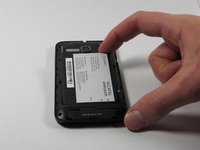
Place finger in the tab on the top right corner of the battery indicated by a black arrow. With slight pressure, push battery down and out of the slot until the battery is removed
-
-
-
-
-
-
There will be eight 4.5mm screws that fit your Phillips head PH00 screwdriver notated by the red circles in the image.
-
-
Инструмент, используемый на этом этапе:Tweezers$4.99
-
Unscrew each screw, counter-clockwise (left), until each one has been removed.
-
If necessary, use tweezers to fully remove the screws from the device.
-
-
-
Access the small pry tool in the tool kit
-
Place flat head in the crease between the phone and panel where the matte finish meets the shiny finish of the front of the phone.
-
Rotate the pry tool 90 degrees until part of the panel lifts up
-
All areas need to be fully risen off before the panel can be removed.
-
-
-
-
-
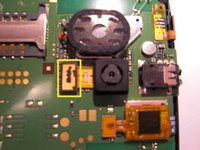
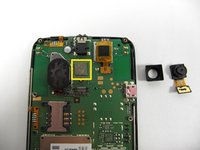
See yellow square for the location of the camera on the mother board.
-
-
-
By gently lifting the bottom rectangular piece of the camera component upwards and away from the device, the connection will come free.
-
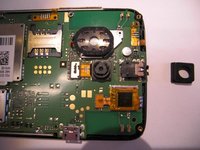
Remove the rubber casing from the camera, this piece is simply resting over the camera and can easily be removed.
-
-
-
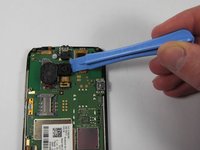
Place your plastic opening tool underneath the bottom of the camera and rotate the tool to lift the camera. This will take a slight amount of force.
-
You will start to see the silver sticky patch between the camera and the mother board - leave this on the mother board.
-
Keep separating the camera from the sticky patch until completely removed.
-
To replace camera, use the yellow lines on the motherboard as your guide.
-
-




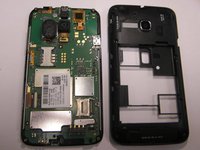




To reassemble your device, follow these instructions in reverse order.
Отменить: Я не выполнил это руководство.
6 человек успешно провели ремонт по этому руководству.

Команда

UMass Dartmouth, Team 4-5, Miles Fall 2014 Участник UMass Dartmouth, Team 4-5, Miles Fall 2014
UMASSD-MILES-F14S4G5
3 членов
Автор 42 руководств
1 Комментарий к руководству
Thank you kindly for your time to write the tutorial.
