Перейти к основному содержанию
Присоединяйся к сообществу ремонтников - Создай аккаунт

Amazon Kindle DX LCD Replacement

Выберете то, что вам нужно

  1. Amazon Kindle DX LCD Replacement, Liquid Crystal Display (LCD): шаг 1, изображение 1 из 1
    • Take your Kindle and place it screen side down in order to open it from the back. Use the opening tool from the ifixit tool kit and insert it between the metal casing and plastic top piece.

    Спросите у FixBot

    Добавить комментарий

  2. Amazon Kindle DX LCD Replacement: шаг 2, изображение 1 из 1
    • Once enough pressure is applied the small piece will pop open.

    Спросите у FixBot

    Добавить комментарий

  3. Amazon Kindle DX LCD Replacement: шаг 3, изображение 1 из 1
    • Remove the plastic piece.

    Спросите у FixBot

    Добавить комментарий

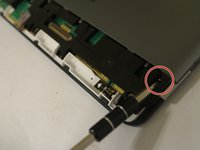
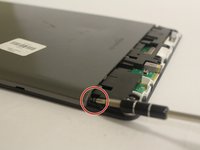
  4. Amazon Kindle DX LCD Replacement: шаг 4, изображение 1 из 2 Amazon Kindle DX LCD Replacement: шаг 4, изображение 2 из 2
    • Once the small plastic piece is removed you will need to locate two 40mm screws on both corners of the remaining casing. Use the PH000 Philips Head Screwdriver from the tool kit to remove both screws.

    Спросите у FixBot

    Добавить комментарий

  5. Amazon Kindle DX LCD Replacement: шаг 5, изображение 1 из 1
    • Use the opening tool again to take the off the bigger metal piece.

    Спросите у FixBot

    Добавить комментарий

  6. Amazon Kindle DX LCD Replacement: шаг 6, изображение 1 из 1
    • Once the piece removed, locate the battery.

    Спросите у FixBot

    Добавить комментарий

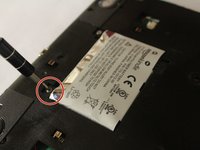
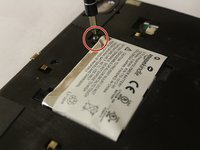
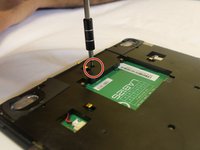
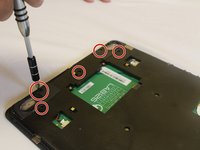
  7. Amazon Kindle DX LCD Replacement: шаг 7, изображение 1 из 2 Amazon Kindle DX LCD Replacement: шаг 7, изображение 2 из 2
    • Locate the two 30mm screws securing the battery on the bottom of the Kindle DX. Use the PH00 Philips head screw driver from the tool kit to remove both screws.

    Спросите у FixBot

    Добавить комментарий

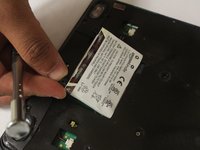
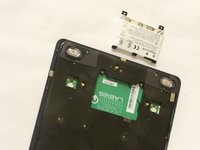
  8. Amazon Kindle DX LCD Replacement: шаг 8, изображение 1 из 2 Amazon Kindle DX LCD Replacement: шаг 8, изображение 2 из 2
    • Take the battery off once the screws have been removed.

    Спросите у FixBot

    Добавить комментарий

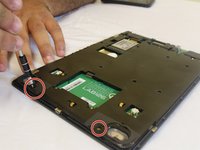
  9. Amazon Kindle DX LCD Replacement: шаг 9, изображение 1 из 2 Amazon Kindle DX LCD Replacement: шаг 9, изображение 2 из 2
    • Unscrew the 30 mm screws using a Phillips #000 screwdriver as shown in the picture.

    Спросите у FixBot

    Добавить комментарий

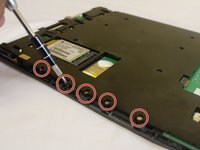
  10. Amazon Kindle DX LCD Replacement: шаг 10, изображение 1 из 2 Amazon Kindle DX LCD Replacement: шаг 10, изображение 2 из 2
    • Unscrew the 30 mm screws using a Phillips #000 screwdriver as demonstrated in the picture.

    Спросите у FixBot

    Добавить комментарий

  11. Amazon Kindle DX LCD Replacement: шаг 11, изображение 1 из 1
    • Remove the black case to reveal the mother board.

    Спросите у FixBot

    Добавить комментарий

  12. Amazon Kindle DX LCD Replacement: шаг 12, изображение 1 из 1
    • Remove the motherboard from the display assembly.

    Спросите у FixBot

    Добавить комментарий

Заключение

To reassemble your device, follow these instructions in reverse order.

Отменить: Я не выполнил это руководство.

Lori White

Участник с: 09/28/16

589 Репутация

Автор 3 руководств

Команда

USF Tampa, Team 1-5, Cagle Fall 2016 Участник USF Tampa, Team 1-5, Cagle Fall 2016

USFT-CAGLE-F16S1G5

3 членов

Автор 10 руководств

3 Комментарии к руководству

Guide is incomplete :(

Robert Rogers - Ответить Поделиться

I can follow and understand up to step 11.

Steps 12 and 13 loose me, why would one need to remove the metal protection lid / shield? There does not seem to be any screws covered by the lids that need to be removed.

one would need to unclip the screen from the motherboard the lead off board from the wireless card to aerial and unscrew the remaining motherboard screws at least before you could remove the motherboard to access the screen to replace it.

Terry Mummery - Ответить Поделиться

Guide is useless and should be removed or replaced.

golan.benoni - Ответить Поделиться

Добавить комментарий

Статистика просмотров:

За последние 24 часов: 5

За последние 7 дней: 31

За последние 30 дней: 74

За всё время: 4,364