Перейти к основному содержанию
Присоединяйся к сообществу ремонтников - Создай аккаунт

Anker Soundcore Select Pro A 3126 Button Panel Replacement

Выберете то, что вам нужно

  1. Anker Soundcore Select Pro A 3126 Button Panel Replacement, Button Panel: шаг 1, изображение 1 из 2 Anker Soundcore Select Pro A 3126 Button Panel Replacement, Button Panel: шаг 1, изображение 2 из 2
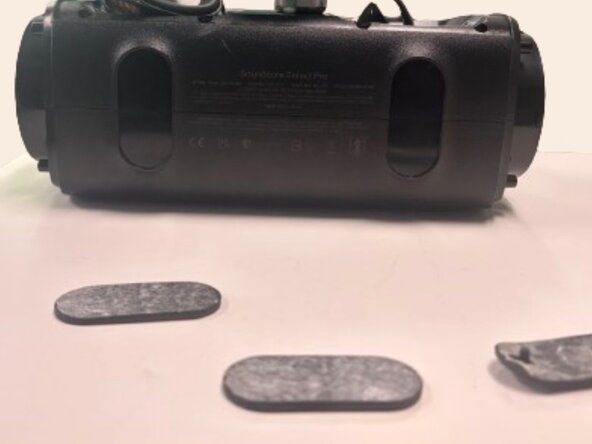
    • Use a spudger to remove each side speaker cover by inserting it in the crevice and using moderate force to pry them off.

    Спросите у FixBot

    Добавить комментарий

  2. Anker Soundcore Select Pro A 3126 Button Panel Replacement: шаг 2, изображение 1 из 2 Anker Soundcore Select Pro A 3126 Button Panel Replacement: шаг 2, изображение 2 из 2
    • Insert a spudger into the space between the grille and speaker frame to pry the mesh grille covering the front speakers.

    Спросите у FixBot

    Добавить комментарий

  3. Anker Soundcore Select Pro A 3126 Button Panel Replacement: шаг 3, изображение 1 из 1
    • Use a Phillips #1 screwdriver to remove the eight 12.7 mm screws securing the front cover.

    Спросите у FixBot

    Добавить комментарий

  4. Anker Soundcore Select Pro A 3126 Button Panel Replacement: шаг 4, изображение 1 из 1
    • Using a Phillips #1 screwdriver, remove the eight 8.75 mm screws around the corners of each speaker.

    Спросите у FixBot

    Добавить комментарий

  5. Anker Soundcore Select Pro A 3126 Button Panel Replacement: шаг 5, изображение 1 из 1
    • Flip the speaker so you have access to the bottom of the device.

    • Use a spudger to remove both rubber pads that protect the bottom of the device.

    Спросите у FixBot

    Добавить комментарий

  6. Anker Soundcore Select Pro A 3126 Button Panel Replacement: шаг 6, изображение 1 из 1
    • Using a spudger remove the rubber pad on the top handle to expose 3 screws underneath.

    • Using a Phillips #1 screwdriver, remove the three 6.75 mm screws.

    Спросите у FixBot

    Добавить комментарий

  7. Anker Soundcore Select Pro A 3126 Button Panel Replacement: шаг 7, изображение 1 из 3 Anker Soundcore Select Pro A 3126 Button Panel Replacement: шаг 7, изображение 2 из 3 Anker Soundcore Select Pro A 3126 Button Panel Replacement: шаг 7, изображение 3 из 3
    • Using a spudger, pry open the front half of the speaker.

    • The front and back halves of the speaker are connected by several cables. Open the speaker slowly and avoid pulling on the cables, as they can be damaged easily.

    Спросите у FixBot

    Добавить комментарий

  8. Anker Soundcore Select Pro A 3126 Button Panel Replacement: шаг 8, изображение 1 из 1
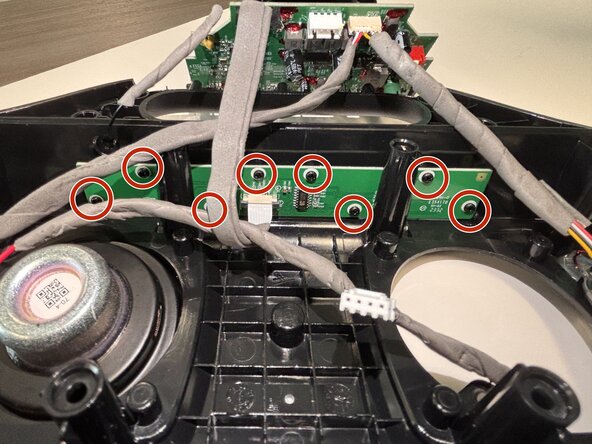
    • Use a Phillips #1 screwdriver to remove the eight 6.5 mm screws securing the button board.

    Спросите у FixBot

    Добавить комментарий

  9. Anker Soundcore Select Pro A 3126 Button Panel Replacement: шаг 9, изображение 1 из 2 Anker Soundcore Select Pro A 3126 Button Panel Replacement: шаг 9, изображение 2 из 2
    • Use the tip of the spudger to push the black plastic locking tab away from the socket.

    • Pull the ribbon cable straight out of the socket.

    • Remove the old button board.

    Спросите у FixBot

    Добавить комментарий

Заключение

To reassemble your device, follow these instructions in reverse order.

Отменить: Я не выполнил это руководство.

Matthew Garza

Участник с: 02/24/26

387 Репутация

Автор 2 руководств

Команда

Austin Community College, Team 49-1, Cox Spring 2026 Участник Austin Community College, Team 49-1, Cox Spring 2026

AUSTINCC-COX-S26S49G1

3 членов

Автор 3 руководств

0 Комментарии к руководству

Добавить комментарий

Статистика просмотров:

За последние 24 часов: 0

За последние 7 дней: 26

За последние 30 дней: 34

За всё время: 57