Этот перевод был сделан машиной и пока не проверен человеком. Говорите на этом языке? Просмотрите его.
Введение
Если USB-порты на задней панели вашего дисплея не распознают подключенные устройства или не подают на них питание, возможно, вам потребуется заменить сам USB-порт. Это относительно простой ремонт. Для работы вам понадобятся пластиковая лопатка (spudger) и отвертка Phillips №2.
Выберете то, что вам нужно
-
-
-
Перед началом убедитесь, что дисплей ОТКЛЮЧЕН ОТ СЕТИ. Несоблюдение этого требования может привести к поражению электрическим током и серьезным травмам.
-
Переверните Cinema Display экраном вниз так, чтобы ножки были направлены от вас.
-
С помощью отвертки Phillips №2 (PH 2) открутите три винта крепления ножки (9,52 x 4,43 мм).
-
Снимите заднюю ножку с шарнирного крепления, осторожно потянув её вверх.
 Спросите у FixBot
-
-
-
Открутите винты задней крышки (5,25 x 4,43 мм) с помощью отвертки Phillips PH 2.
-
После того как винты выкручены, снимите заднюю крышку с дисплея.
-
Полностью снимите заднюю крышку и отложите ее в сторону.
-
-
-
-
Открутите винт крепления USB-кабеля (8 x 2,72 мм) с помощью отвертки PH 2.
-
-
-
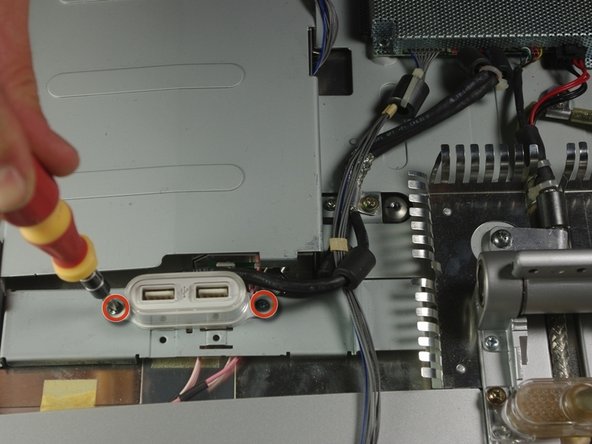
С помощью отвертки Phillips PH 2 открутите два винта (4,85 x 2,94 мм) на разъемах USB.
-
-




Для сборки устройства выполните эти действия в обратном порядке.

Команда

Cal Poly, Team 10-41, Forte Spring 2011 Участник Cal Poly, Team 10-41, Forte Spring 2011
CPSU-FORTE-S11S10G41
5 членов
Автор 72 руководств
