Перейти к основному содержанию
Присоединяйся к сообществу ремонтников - Создай аккаунт

Asus Eee PC 1005PEB RAM Replacement

Выберете то, что вам нужно

  1. Asus Eee PC 1005PEB RAM Replacement, RAM: шаг 1, изображение 1 из 2 Asus Eee PC 1005PEB RAM Replacement, RAM: шаг 1, изображение 2 из 2
    • Start by having the laptop upside down on a hard flat surface.

    • Find and unscrew the 6.65 mm Phillips #1 screw.

    • The screw will not detach from the RAM cover.

    Спросите у FixBot

    Добавить комментарий

  2. Asus Eee PC 1005PEB RAM Replacement: шаг 2, изображение 1 из 2 Asus Eee PC 1005PEB RAM Replacement: шаг 2, изображение 2 из 2
    • Carefully remove the cover by lifting it with your fingers.

    • Make sure that you do not pull the cover to quickly or too hard as this could damage the plastic pins that hold the cover on.

    Спросите у FixBot

    Добавить комментарий

  3. Asus Eee PC 1005PEB RAM Replacement: шаг 3, изображение 1 из 2 Asus Eee PC 1005PEB RAM Replacement: шаг 3, изображение 2 из 2
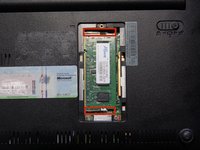
    • Identify the pins on both sides of the RAM.

    • Using both hands, pull the pins apart from each other to release the RAM.

    • The RAM will "pop" up on its own after the pins are pressed.

    Спросите у FixBot

    Добавить комментарий

  4. Asus Eee PC 1005PEB RAM Replacement: шаг 4, изображение 1 из 1
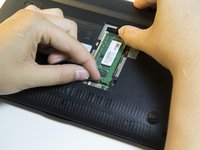
    • Grab the RAM stick with two fingers and gently pull it out of its slot.

    Спросите у FixBot

    Добавить комментарий

Заключение

To reassemble your device, follow these instructions in reverse order.

Отменить: Я не выполнил это руководство.

Еще один человек закончил это руководство.

Aaron Arenas

Участник с: 04/20/14

751 Репутация

Автор 5 руководств

Команда

Cal Poly, Team 13-32, Maness Spring 2014 Участник Cal Poly, Team 13-32, Maness Spring 2014

CPSU-MANESS-S14S13G32

5 членов

Автор 5 руководств

1 Комментарий к руководству

Everything I've read says you can only upgrade from the 1gb ram to a 2gig. Here's what I just installed: http://amzn.to/2x0flty and so far its working great...I notice a difference in speed, although this thing is still slow.

Dan Fowler - Ответить Поделиться

Добавить комментарий

Статистика просмотров:

За последние 24 часов: 0

За последние 7 дней: 6

За последние 30 дней: 37

За всё время: 1,391