Перейти к основному содержанию
Присоединяйся к сообществу ремонтников - Создай аккаунт

Asus Eee PC 900 Keyboard Replacement

Выберете то, что вам нужно

  1. Asus Eee PC 900 Keyboard Replacement, Battery: шаг 1, изображение 1 из 3 Asus Eee PC 900 Keyboard Replacement, Battery: шаг 1, изображение 2 из 3 Asus Eee PC 900 Keyboard Replacement, Battery: шаг 1, изображение 3 из 3
    • Slide the battery's locking tabs from the locked position to unlocked positions.

    • The right tab is unlocked when a red dot is showing.

    • The left tab will have to be held in the unlocked position in order to release the battery.

    Спросите у FixBot

    Добавить комментарий

  2. Asus Eee PC 900 Keyboard Replacement: шаг 2, изображение 1 из 1
    • Slide the battery out while holding the left locking tab in the unlocked position.

    Спросите у FixBot

    Добавить комментарий

  3. Asus Eee PC 900 Keyboard Replacement, Keyboard: шаг 3, изображение 1 из 2 Asus Eee PC 900 Keyboard Replacement, Keyboard: шаг 3, изображение 2 из 2
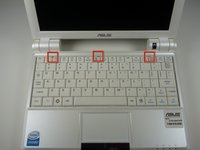
    • Caution Follow this step to detach the upper portion of the keyboard, but do not remove it from the laptop. Damage to the keyboard's ribbon cable may result if improperly executed.

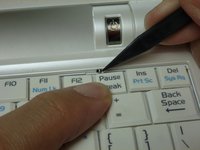
    • Identify the three metal tabs holding down the laptop's keyboard.

    • Using a spudger, depress each metal tab to remove the keyboard.

    • The upper part of the keyboard should "pop up" from its holder.

    Спросите у FixBot

    Добавить комментарий

  4. Asus Eee PC 900 Keyboard Replacement: шаг 4, изображение 1 из 2 Asus Eee PC 900 Keyboard Replacement: шаг 4, изображение 2 из 2
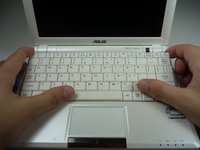
    • Clips hold the bottom portion of the keyboard to the laptop. Gently lift the upper portion of the keyboard and then move the entire keyboard towards the computer's screen until the ribbon cable is visible.

    Спросите у FixBot

    Добавить комментарий

  5. Asus Eee PC 900 Keyboard Replacement: шаг 5, изображение 1 из 1
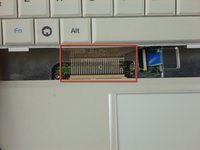
    • Using a spudger, gently push the two black pins holding the ribbon cable towards the computer's screen.

    • Slide the keyboard's ribbon cable from the connector.

    Спросите у FixBot

    Добавить комментарий

  6. Asus Eee PC 900 Keyboard Replacement: шаг 6, изображение 1 из 1
    • Remove the keyboard by lifting upwards.

    Спросите у FixBot

    Добавить комментарий

Заключение

To reassemble your device, follow these instructions in reverse order.

Отменить: Я не выполнил это руководство.

14 человек успешно провели ремонт по этому руководству.

Sheldon Chu

Участник с: 01/24/12

1 176 Репутация

Автор 3 руководств

Команда

Cal Poly, Team 3-27, Amido Winter 2012 Участник Cal Poly, Team 3-27, Amido Winter 2012

CPSU-AMIDO-W12S3G27

4 членов

Автор 16 руководств

0 Комментарии к руководству

Добавить комментарий

Статистика просмотров:

За последние 24 часов: 1

За последние 7 дней: 6

За последние 30 дней: 35

За всё время: 10,643