Перейти к основному содержанию
Присоединяйся к сообществу ремонтников - Создай аккаунт

Asus Padfone X Mini Camera Replacement

Выберете то, что вам нужно

    1. Asus Padfone X Mini Camera Replacement, Speaker: шаг 1, изображение 1 из 1
      • With the phone facing down, look at the bottom right side corner and there should be a groove. Use a plastic opening tool and lift up to remove outside cover.

      • This is not the cover with the speaker attached.

      Спросите у FixBot

      Добавить комментарий

    2. Asus Padfone X Mini Camera Replacement: шаг 2, изображение 1 из 1
      • Lift the battery out from the top of the device.

      Спросите у FixBot

      Добавить комментарий

    3. Asus Padfone X Mini Camera Replacement: шаг 3, изображение 1 из 1
      • Around the perimeter, there should be 10 2 mm T5 Torx screws. Take them out.

      • Remove the cover.

      Спросите у FixBot

      Добавить комментарий

    4. Asus Padfone X Mini Camera Replacement: шаг 4, изображение 1 из 1
      • Turn the cover over.

      • The speaker is attached to the inside of the cover and to the right of the camera hole.

      Спросите у FixBot

      Добавить комментарий

    5. Asus Padfone X Mini Camera Replacement: шаг 5, изображение 1 из 1
      Инструмент, используемый на этом этапе:
      Tweezers
      $4.99
      • Remove speaker with standard tweezers to minimize damage, and replace.

      Спросите у FixBot

      Добавить комментарий

    1. Asus Padfone X Mini Camera Replacement, Screen: шаг 6, изображение 1 из 1
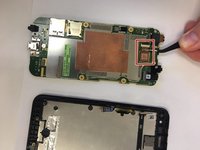
      • Detach the black connector on the left hand side of the motherboard.

      • Don't completely remove the black connector.

      Спросите у FixBot

      Добавить комментарий

    2. Asus Padfone X Mini Camera Replacement: шаг 7, изображение 1 из 1
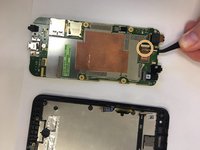
      • Disconnect silver connector from the motherboard. It is located on the left hand side above the black connector.

      Спросите у FixBot

      Добавить комментарий

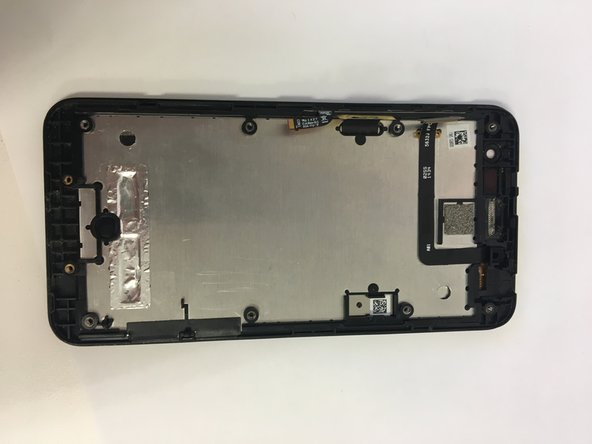
    3. Asus Padfone X Mini Camera Replacement: шаг 8, изображение 1 из 2 Asus Padfone X Mini Camera Replacement: шаг 8, изображение 2 из 2
      • Remove motherboard and replace screen.

      Спросите у FixBot

      Добавить комментарий

    1. Asus Padfone X Mini Camera Replacement, Camera: шаг 9, изображение 1 из 1
      • Turn over the motherboard.

      Спросите у FixBot

      Добавить комментарий

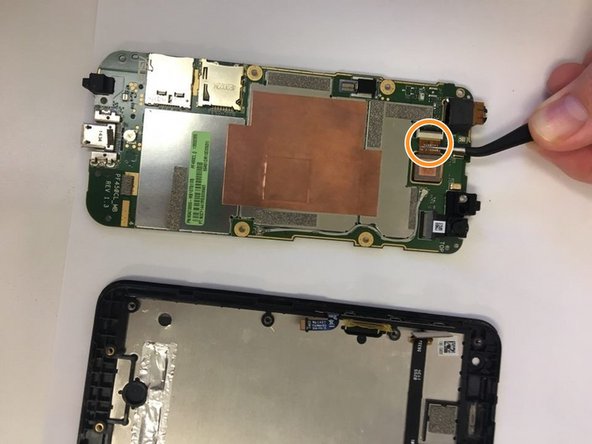
    2. Asus Padfone X Mini Camera Replacement: шаг 10, изображение 1 из 1
      Инструмент, используемый на этом этапе:
      Tweezers
      $4.99
      • Using tweezers pull out the connector that connects the camera to the motherboard.

      Спросите у FixBot

      Добавить комментарий

    3. Asus Padfone X Mini Camera Replacement: шаг 11, изображение 1 из 2 Asus Padfone X Mini Camera Replacement: шаг 11, изображение 2 из 2
      • Take out the camera.

      • Put in the new camera by sliding the camera connector into the receiver.

      Спросите у FixBot

      Добавить комментарий

Заключение

To reassemble your device, follow these instructions in reverse order.

Отменить: Я не выполнил это руководство.

James Jackson

Участник с: 09/18/18

97 Репутация

1 руководство автора

Команда

University of North Texas, Team S4-G2, Raign Fall 2018 Участник University of North Texas, Team S4-G2, Raign Fall 2018

UNT-RAIGN-F18S4G2

4 членов

Автор 32 руководств

0 Комментарии к руководству

Добавить комментарий

Статистика просмотров:

За последние 24 часов: 1

За последние 7 дней: 7

За последние 30 дней: 23

За всё время: 524