Этот перевод был сделан машиной и пока не проверен человеком. Говорите на этом языке? Просмотрите его.
Введение
Это руководство поможет вам заменить плату, которая отвечает за работу физических кнопок устройства. Если вы подозреваете, что кнопки физически не сломаны (то есть они нажимаются нормально и издают щелчок), но все равно не работают, замена платы модуля кнопок может помочь. Будьте осторожны, чтобы не сломать хрупкие пластиковые защелки при снятии задней крышки устройства, и постарайтесь избежать воздействия статического электричества на чувствительные платы устройства.
Выберете то, что вам нужно
-
-
-
Отсоедините клавиатуру от экрана, нажав на серебристую кнопку на шарнире и потянув планшет вверх.
 Спросите у FixBot
-
-
-
Вставьте лопатку за пластиковую заднюю панель планшета, затем проведите лопаткой по периметру планшета, аккуратно высвобождая все внутренние защелки.
-
-
-
-
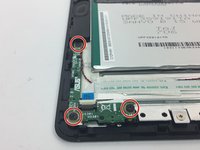
Найдите модуль кнопки.
-
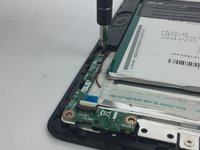
Открутите три черных винта Phillips длиной 3,5 мм.
-
-
Инструмент, используемый на этом этапе:Tweezers$3.99
-
Поднимите фиксатор, удерживающий белый шлейф, с помощью изогнутого пинцета.
-
Аккуратно потяните белый шлейф, чтобы отсоединить его от модуля кнопки.
-
-




Для сборки устройства выполните эти инструкции в обратном порядке.

Команда

USF Tampa, Team 4-3, Passmore Fall 2016 Участник USF Tampa, Team 4-3, Passmore Fall 2016
USFT-PASSMORE-F16S4G3
4 членов
Автор 55 руководств
