Перейти к основному содержанию
Присоединяйся к сообществу ремонтников - Создай аккаунт

Asus X751L Wireless Card Replacement

Выберете то, что вам нужно

    1. Asus X751L Wireless Card Replacement, Keyboard: шаг 1, изображение 1 из 1
      • With the screen closed, place your laptop upside-down with the front facing you.

      • Remove the six 14.6mm Phillips #00 screws.

      • Remove the four 6.6mm Phillips #00 screws.

      Спросите у FixBot

      Добавить комментарий

    2. Asus X751L Wireless Card Replacement: шаг 2, изображение 1 из 1
      • Flip the laptop over and open the lid.

      • Pry around the edges of the laptop base using the plastic opening tool.

      • Prying too hard can break the plastic clips.

      Спросите у FixBot

      Добавить комментарий

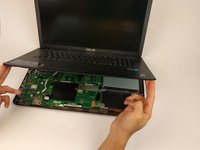
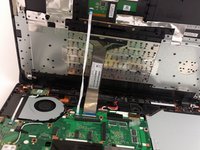
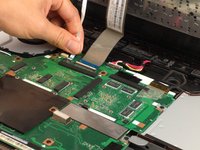
    3. Asus X751L Wireless Card Replacement: шаг 3, изображение 1 из 3 Asus X751L Wireless Card Replacement: шаг 3, изображение 2 из 3 Asus X751L Wireless Card Replacement: шаг 3, изображение 3 из 3
      • Carefully lift the keyboard up.

      • Be very careful when lifting the keyboard up. Two zero insertion force (ZIF) cables are between the keyboard assembly and the motherboard. Do not lift the assembly too high.

      • Disconnect the two ZIF connectors from the motherboard using your fingernail to lift the cream-colored tab.

      Спросите у FixBot

      Добавить комментарий

    1. Asus X751L Wireless Card Replacement, Wireless Card: шаг 4, изображение 1 из 1
      • Remove the single 4.7mm PH00 screw holding the wireless card to the motherboard.

      Спросите у FixBot

      Добавить комментарий

    2. Asus X751L Wireless Card Replacement: шаг 5, изображение 1 из 1
      • Using your fingers, lightly lift up on the black and white antenna cords.

      Спросите у FixBot

      Добавить комментарий

    3. Asus X751L Wireless Card Replacement: шаг 6, изображение 1 из 1
      • With your fingers lightly pull the wireless card out of the slot.

      • Make sure to keep the card parallel with the motherboard when removing from the slot.

      Спросите у FixBot

      Добавить комментарий

Заключение

To reassemble your device, follow these instructions in reverse order.

Отменить: Я не выполнил это руководство.

3 человек успешно провели ремонт по этому руководству.

Matthew Martin

Участник с: 02/02/17

217 Репутация

1 руководство автора

Команда

USF Tampa, Team 17-2, Blackwell Spring 2017 Участник USF Tampa, Team 17-2, Blackwell Spring 2017

USFT-BLACKWELL-S17S17G2

4 членов

Автор 35 руководств

1 Комментарий к руководству

I feel the existing WiFi card is not very good. Is there is better one I can get for the Asus X751L?

July 3, 2023.


cookbake2 - Ответить Поделиться

Добавить комментарий

Статистика просмотров:

За последние 24 часов: 1

За последние 7 дней: 3

За последние 30 дней: 33

За всё время: 2,834