Перейти к основному содержанию
Присоединяйся к сообществу ремонтников - Создай аккаунт

BLU Dash JR D140 Digitizer Replacement

Выберете то, что вам нужно

    1. BLU Dash JR D140 Digitizer Replacement, Battery: шаг 1, изображение 1 из 1
      • Turn off the phone first. Press the power button continuously for 2-3 seconds to shut down the phone.

      • Using a plastic opening tool, pry open the back cover from the slit on the bottom right corner of the phone.

      Спросите у FixBot

      Добавить комментарий

    2. BLU Dash JR D140 Digitizer Replacement: шаг 2, изображение 1 из 1
      • Using a plastic opening tool or finger, pull out the battery.

      Спросите у FixBot

      Добавить комментарий

    1. BLU Dash JR D140 Digitizer Replacement, Digitizer: шаг 3, изображение 1 из 1
      • Remove the four 4.0mm Phillips #1 screws.

      Спросите у FixBot

      Добавить комментарий

    2. BLU Dash JR D140 Digitizer Replacement: шаг 4, изображение 1 из 1
      • Starting from a corner, separate the panel from the frame using the plastic opening tool.

      • The volume button will pop out.

      Спросите у FixBot

      Добавить комментарий

    3. BLU Dash JR D140 Digitizer Replacement: шаг 5, изображение 1 из 1
      • Unscrew the 3.6mm Phillips #0 screw from the motherboard.

      Спросите у FixBot

      Добавить комментарий

    4. BLU Dash JR D140 Digitizer Replacement: шаг 6, изображение 1 из 1
      • Using a spudger, lift the black ZIF connector at the top left corner of the phone.

      Спросите у FixBot

      Добавить комментарий

    5. BLU Dash JR D140 Digitizer Replacement: шаг 7, изображение 1 из 1
      • Pull the ribbon cable out of the ZIF connector.

      Спросите у FixBot

      Добавить комментарий

    6. BLU Dash JR D140 Digitizer Replacement: шаг 8, изображение 1 из 1
      • When the ribbon cable is removed from the ZIF connector, peel off the power, sticky button using a plastic opening tool.

      Спросите у FixBot

      Добавить комментарий

    7. BLU Dash JR D140 Digitizer Replacement: шаг 9, изображение 1 из 1
      • Peel off the volume sticky button.

      Спросите у FixBot

      Добавить комментарий

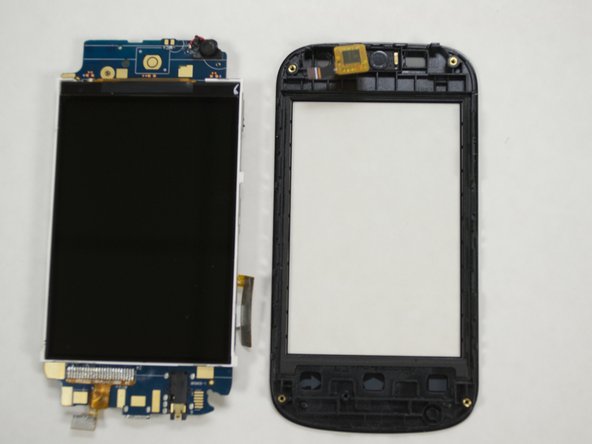
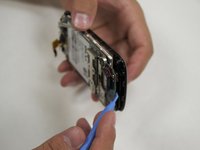
    8. BLU Dash JR D140 Digitizer Replacement: шаг 10, изображение 1 из 2 BLU Dash JR D140 Digitizer Replacement: шаг 10, изображение 2 из 2
      • Separate the screen cover from the motherboard using the plastic opening tool. And don't forget that your phone can mess up if u separate the motherboard from the screen cover

      • Make sure that the LCD screen stays attached to the motherboard while doing this.

      Спросите у FixBot

      Добавить комментарий

Заключение

To reassemble your device, follow these instructions in reverse order.

Отменить: Я не выполнил это руководство.

5 человек успешно провели ремонт по этому руководству.

Nathanael

Участник с: 07/23/15

233 Репутация

1 руководство автора

0 Комментарии к руководству

Добавить комментарий

Статистика просмотров:

За последние 24 часов: 1

За последние 7 дней: 7

За последние 30 дней: 28

За всё время: 1,497