Введение
A common issue with the Bose Soundlink Flex is its speaker. Over time, wear and tear degrade the quality of the sound the speaker produces. This guide will provide the necessary steps in replacing this component. If the speaker is in good condition, but the audio is not playing, be sure to check the Bluetooth connnection and reboot if necessary. If the Bluetooth is not working, be sure the speaker is turned on and in pair mode by going into the device settings on the device you wish to pair.
Выберете то, что вам нужно
-
-
-
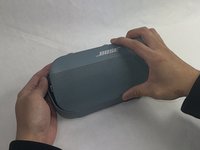
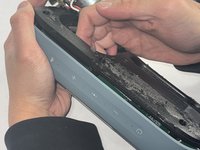
Use an iFixit opening tool to pop off the eight clips on the grille.
-
-
-
-
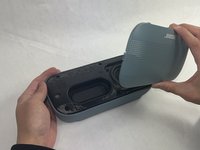
Apply minimal force and the grille should pop right off the device.
-
-
-
-
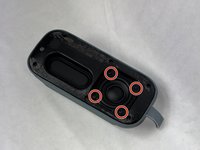
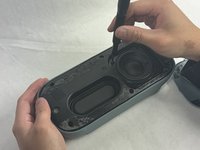
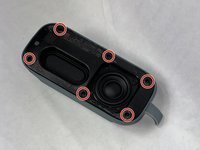
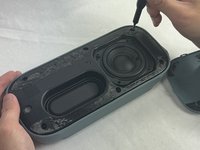
Remove the four 2.3 mm screws holding the driver in place using a TR8 Torx screwdriver.
-
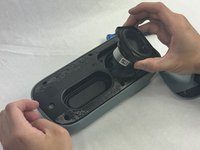
Lift the driver out, being cautious of the wires still connected to the device.
-
-
-
Remove the six 2.3 mm screws around the edge with a TR8 Torx screwdriver.
-
Pull the back panel off exposing the motherboard.
-
-
-
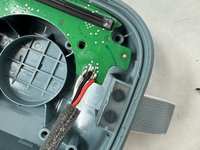
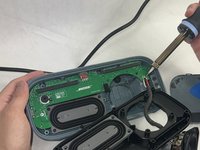
Desolder the joints that are connecting the speaker to the motherboard.
-
-

 Спросите у FixBot








To reassemble your device, follow these instructions in reverse order.

Команда

UMass Dartmouth, Team 4-1, Shaddix Spring 2024 Участник UMass Dartmouth, Team 4-1, Shaddix Spring 2024
UMASSD-SHADDIX-S24S4G1
3 членов
Автор 20 руководств
