Введение
Thrustmaster sells spare part through their online Eshop.
You can also contact Thrsutmaster technical support to get spare part if not available in your region.
Выберете то, что вам нужно
-
-
Unscrew the 5 screws shown in the first image
-
Unscrew the 4 screws shown in the second image
-
Turn the handle over and remove the black cover shown in the 3rd image.
 Спросите у FixBot
-
-
-
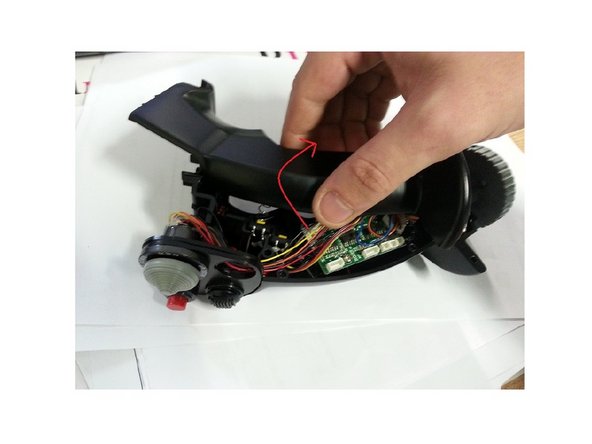
Slowly pull the top half of the stick and rotate it. (Be careful not to damage the wires inside).
-
-
-
-
Disconnect the wires from CMS connector, they are highlighted in red.
-
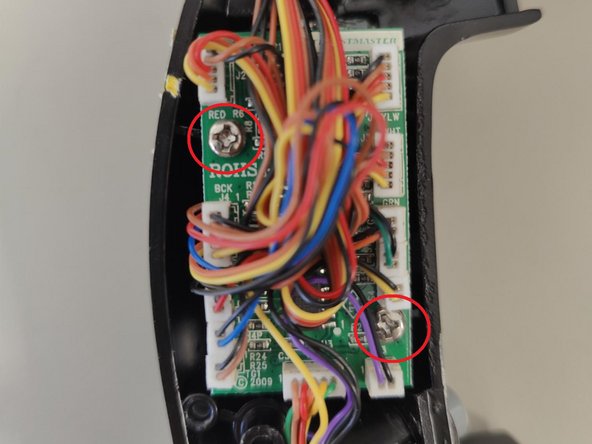
Remove the screws so that you could detach the PCB.
-
-
-
Hold down the CMS clip which will allow you to remove the switch. If necessary, you can force it out or brake it.
-
Once the old CMS is removed, you can insert the new one
-





To reassemble your device, follow these instructions in reverse order. Be careful not to damage the wires when reattaching the two halves of the joystick handle.
Отменить: Я не выполнил это руководство.
Еще один человек закончил это руководство.
Особая благодарность этим переводчикам:
100%


Эти переводчики помогают нам починить мир! Хотите внести свой вклад?
Начните переводить ›
Прикрепленные документы

2 Комментарии к руководству
Merci pour ces tuto qui peuvent se révéler bien pratique, mais une question demeure, où trouver les pièces de rechanges ! rien sur le site de TM ! ;)
if anyone needs this part, contact thrustmaster support with photos of the joystick and serial number. the support team will reach out about purchasing a new part
