Перейти к основному содержанию
Присоединяйся к сообществу ремонтников - Создай аккаунт

Canon PowerShot A460 Front Lens Replacement

Выберете то, что вам нужно

    1. Canon PowerShot A460 Front Lens Replacement, Battery: шаг 1, изображение 1 из 1
      • Slide the switch on the battery cover labeled "CARD/BATT. OPEN." to the right.

      • While still holding the switch, pull the cover down, allowing it to release and open.

      Спросите у FixBot

      Добавить комментарий

    2. Canon PowerShot A460 Front Lens Replacement: шаг 2, изображение 1 из 1
      • Tilt the camera slightly to allow the batteries to fall out.

      Спросите у FixBot

      Добавить комментарий

    3. Canon PowerShot A460 Front Lens Replacement: шаг 3, изображение 1 из 1
      • Press on and release the memory card to eject it.

      Спросите у FixBot

      Добавить комментарий

    1. Canon PowerShot A460 Front Lens Replacement, Front Casing: шаг 4, изображение 1 из 1
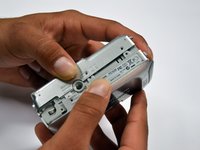
      • Unscrew the 5mm Phillips #00 screw from the bottom of the camera.

      • Make sure to keep the different size screws organized to make reassembling the camera simpler.

      Спросите у FixBot

      Добавить комментарий

    2. Canon PowerShot A460 Front Lens Replacement: шаг 5, изображение 1 из 1
      • Unscrew the three 2mm Phillips #00 screws that are located on the bottom of the camera.

      Спросите у FixBot

      Добавить комментарий

    3. Canon PowerShot A460 Front Lens Replacement: шаг 6, изображение 1 из 1
      • Remove the 4mm Phillips #00 screw that is located on the left side of the camera, if the display screen is facing you.

      Спросите у FixBot

      Добавить комментарий

    4. Canon PowerShot A460 Front Lens Replacement: шаг 7, изображение 1 из 1
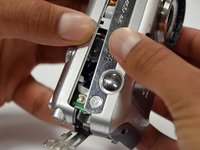
      • Take out the 4mm Phillips #00 screw under the rubber flap on the right end of the camera.

      Спросите у FixBot

      Добавить комментарий

    5. Canon PowerShot A460 Front Lens Replacement: шаг 8, изображение 1 из 2 Canon PowerShot A460 Front Lens Replacement: шаг 8, изображение 2 из 2
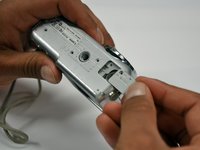
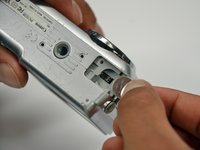
      • Remove the second battery cover on the bottom of camera.

      • Take the silver battery out of the camera.

      Спросите у FixBot

      Добавить комментарий

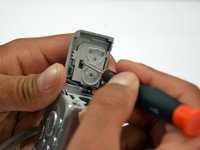
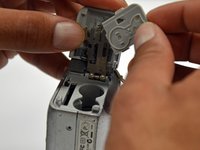
    6. Canon PowerShot A460 Front Lens Replacement: шаг 9, изображение 1 из 3 Canon PowerShot A460 Front Lens Replacement: шаг 9, изображение 2 из 3 Canon PowerShot A460 Front Lens Replacement: шаг 9, изображение 3 из 3
      • Remove the 4mm Phillips #00 screw on the inside of the flap that hides the battery and memory card slots.

      • Remove the light grey, plastic piece.

      • Remove the plastic portion of the battery flap cover. The metal piece will remain attached.

      Спросите у FixBot

      Добавить комментарий

    7. Canon PowerShot A460 Front Lens Replacement: шаг 10, изображение 1 из 3 Canon PowerShot A460 Front Lens Replacement: шаг 10, изображение 2 из 3 Canon PowerShot A460 Front Lens Replacement: шаг 10, изображение 3 из 3
      • Slightly pull on each side of the camera. It should loosen up and come apart.

      • If it does not pull apart right away, use a little more force.

      • Do not give up!

      Спросите у FixBot

      Добавить комментарий

    1. Canon PowerShot A460 Front Lens Replacement, Back Casing: шаг 11, изображение 1 из 1
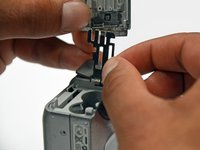
      • Remove the back case of the camera by pulling from the top.

      • Be careful when pulling off the case. There is a delicate gold ribbon connecting the bottom of the camera to the back case.

      Спросите у FixBot

      Добавить комментарий

    1. Canon PowerShot A460 Front Lens Replacement, LCD Screen: шаг 12, изображение 1 из 1
      • Remove the 4mm Phillips #00 screw from above the ribbon.

      Спросите у FixBot

      Добавить комментарий

    2. Canon PowerShot A460 Front Lens Replacement: шаг 13, изображение 1 из 1
      • Gently peel off the blue tape on the top of the LCD screen.

      Спросите у FixBot

      Добавить комментарий

    3. Canon PowerShot A460 Front Lens Replacement: шаг 14, изображение 1 из 1
      • Remove the 4mm Phillips #00 screw previously concealed by the blue tape.

      Спросите у FixBot

      Добавить комментарий

    4. Canon PowerShot A460 Front Lens Replacement: шаг 15, изображение 1 из 1
      • Gently lift the LCD screen off of the front casing by pulling up a tab on the side of the camera.

      Спросите у FixBot

      Добавить комментарий

    5. Canon PowerShot A460 Front Lens Replacement: шаг 16, изображение 1 из 1
      • Using a spudger, lift the grey tabs to allow the ribbon to slide out.

      Спросите у FixBot

      Добавить комментарий

    6. Canon PowerShot A460 Front Lens Replacement: шаг 17, изображение 1 из 1
      • Since the tabs have been lifted, the ribbon should now slide out out easily.

      • Be careful not to distort the ribbon in any way.

      Спросите у FixBot

      Добавить комментарий

    1. Canon PowerShot A460 Front Lens Replacement, Motherboard: шаг 18, изображение 1 из 1
      • Remove the 5mm Phillips #00 screw located above the small black piece on the right side of the mother board.

      Спросите у FixBot

      Добавить комментарий

    2. Canon PowerShot A460 Front Lens Replacement: шаг 19, изображение 1 из 2 Canon PowerShot A460 Front Lens Replacement: шаг 19, изображение 2 из 2
      • Remove the 4mm Phillips #00 screw at the bottom of the black piece.

      • Detach the black piece that the screws previously held in place.

      Спросите у FixBot

      Добавить комментарий

    3. Canon PowerShot A460 Front Lens Replacement: шаг 20, изображение 1 из 1
      • Remove the 5mm Phillips #00 screw in the middle of the motherboard.

      Спросите у FixBot

      Добавить комментарий

    4. Canon PowerShot A460 Front Lens Replacement: шаг 21, изображение 1 из 1
      • Remove the 5mm Phillips #00 screw that holds the metal piece to the bottom of the camera .

      Спросите у FixBot

      Добавить комментарий

    5. Canon PowerShot A460 Front Lens Replacement: шаг 22, изображение 1 из 1
      • Remove the 5mm Phillips #00 screw that is located on the top of camera.

      Спросите у FixBot

      Добавить комментарий

    6. Canon PowerShot A460 Front Lens Replacement: шаг 23, изображение 1 из 1
      • Remove the 2mm Phillips #00 screw that is located on the far left of the motherboard.

      • Be careful not to damage the multiple adjacent orange ribbons.

      Спросите у FixBot

      Добавить комментарий

    7. Canon PowerShot A460 Front Lens Replacement: шаг 24, изображение 1 из 1
      • Remove the 5mm Phillips #00 screw near the bottom left of the motherboard.

      Спросите у FixBot

      Добавить комментарий

    8. Canon PowerShot A460 Front Lens Replacement: шаг 25, изображение 1 из 2 Canon PowerShot A460 Front Lens Replacement: шаг 25, изображение 2 из 2
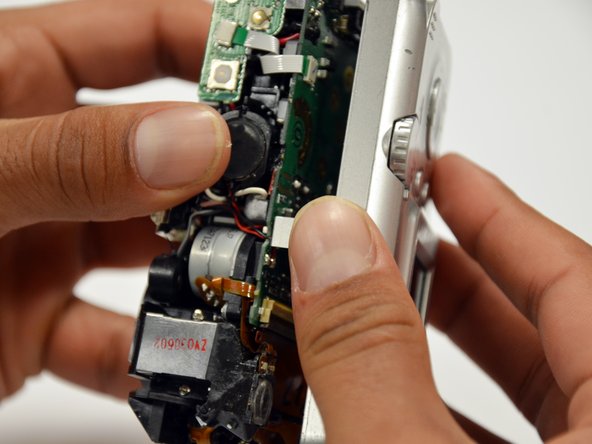
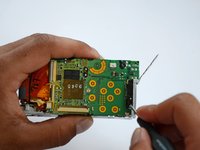
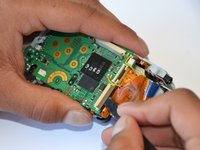
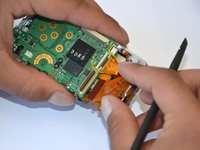
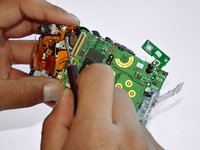
      • Using a spudger, unlock the locking mechanism that holds the lower orange ribbon in place.

      • Once unlocked, slide out the ribbon.

      Спросите у FixBot

      Добавить комментарий

    9. Canon PowerShot A460 Front Lens Replacement: шаг 26, изображение 1 из 1
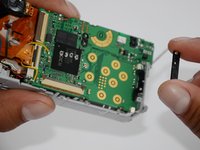
      • Using a spudger, unlock the locking mechanism that holds the upper orange ribbon in place.

      • Once unlocked, slide out the ribbon.

      Спросите у FixBot

      Добавить комментарий

    10. Canon PowerShot A460 Front Lens Replacement: шаг 27, изображение 1 из 1
      • All that is required is to unsolder the few remaining wires. Then, the motherboard will be ready to be replaced!

      Спросите у FixBot

      Добавить комментарий

    1. Canon PowerShot A460 Front Lens Replacement, Front Lens: шаг 28, изображение 1 из 1
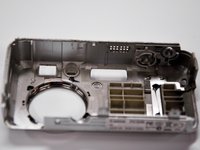
      • Remove the six 2mm Phillips #00 screws that are located under the motherboard.

      Спросите у FixBot

      Добавить комментарий

    2. Canon PowerShot A460 Front Lens Replacement: шаг 29, изображение 1 из 2 Canon PowerShot A460 Front Lens Replacement: шаг 29, изображение 2 из 2
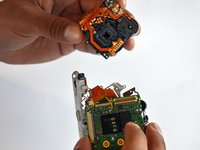
      • Remove the 4mm Phillips #00 screw that is located under the now disconnected top orange ribbon.

      • The lens piece can now be removed from the camera.

      Спросите у FixBot

      Добавить комментарий

    3. Canon PowerShot A460 Front Lens Replacement: шаг 30, изображение 1 из 1
      • Remove the 5mm Phillips #00 screw on the back of the lens piece.

      Спросите у FixBot

      Добавить комментарий

    4. Canon PowerShot A460 Front Lens Replacement: шаг 31, изображение 1 из 1
      • Remove the 2mm Phillips #00 screw on the bottom of the lens piece.

      Спросите у FixBot

      Добавить комментарий

    5. Canon PowerShot A460 Front Lens Replacement: шаг 32, изображение 1 из 1
      • Remove the two 2mm Phillips #00 screws on the top of the lens piece.

      Спросите у FixBot

      Добавить комментарий

    6. Canon PowerShot A460 Front Lens Replacement: шаг 33, изображение 1 из 1
      • Gently slide off the black piece surrounding the lens. The lens is now disassembled!

      Спросите у FixBot

      Добавить комментарий

Заключение

To reassemble your device, follow these instructions in reverse order.

Отменить: Я не выполнил это руководство.

4 человек успешно провели ремонт по этому руководству.

Tanner Coleman

Участник с: 01/18/13

61 Репутация

Автор 2 руководств

Команда

Cal Poly, Team 19-42, Regan Winter 2013 Участник Cal Poly, Team 19-42, Regan Winter 2013

CPSU-REGAN-W13S19G42

4 членов

Автор 12 руководств

1 Комментарий к руководству

please put a big warning note on the step after removing the blue tape from the lens. and the next on is where you lift something on the mother board with a spluger..something like that. well i used a screwdriver and got such a big electrical shock.... scared the crapola out of me. please make a note .... can get electrical shock....

Gaby - Ответить Поделиться

Добавить комментарий

Статистика просмотров:

За последние 24 часов: 3

За последние 7 дней: 24

За последние 30 дней: 80

За всё время: 5,674