Перейти к основному содержанию
Присоединяйся к сообществу ремонтников - Создай аккаунт

Canon PowerShot S400 LCD Screen Replacement

Выберете то, что вам нужно

    1. Canon PowerShot S400 LCD Screen Replacement, LCD Screen: шаг 1, изображение 1 из 2 Canon PowerShot S400 LCD Screen Replacement, LCD Screen: шаг 1, изображение 2 из 2
      • Unless stated otherwise, use a Phillips #00 screwdriver to remove all screws.

      • On the backside of the camera, remove the 4.75 mm screw that sits at the top right corner.

      • Remove the four 4.75 mm screws that sit at the bottom of the camera.

      Спросите у FixBot

      Добавить комментарий

    2. Canon PowerShot S400 LCD Screen Replacement: шаг 2, изображение 1 из 1
      • On the side of the camera, remove the two 4.75 mm screws that sit near the USB digital terminal.

      Спросите у FixBot

      Добавить комментарий

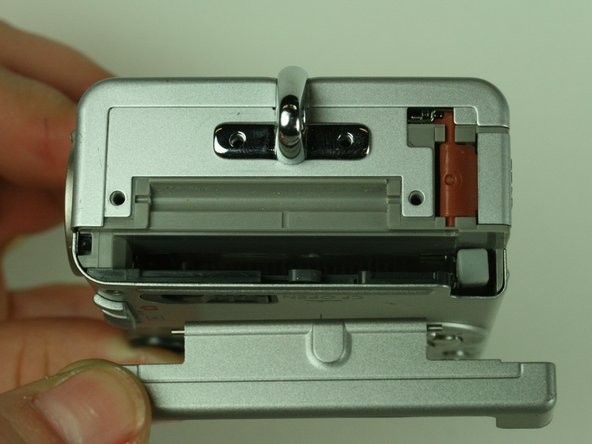
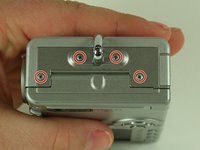
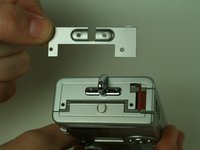
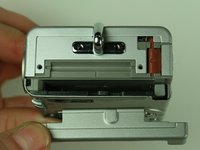
    3. Canon PowerShot S400 LCD Screen Replacement: шаг 3, изображение 1 из 3 Canon PowerShot S400 LCD Screen Replacement: шаг 3, изображение 2 из 3 Canon PowerShot S400 LCD Screen Replacement: шаг 3, изображение 3 из 3
      • On the side of the camera, remove the four 4.75 mm screws that sit near the wrist strap mount.

      • Remove the two small metal plates, which the four screws hold in place.

      Спросите у FixBot

      Добавить комментарий

    4. Canon PowerShot S400 LCD Screen Replacement: шаг 4, изображение 1 из 2 Canon PowerShot S400 LCD Screen Replacement: шаг 4, изображение 2 из 2
      Инструмент, используемый на этом этапе:
      Tweezers
      $4.99
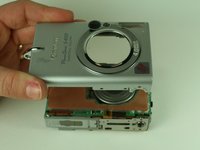
      • When removing the casing, do not drop the small black plastic piece. This piece sits in a small gap above the lens, to the left of the flash, and underneath the camera case.

      • Remove the small black plastic piece and set it aside. If necessary, use tweezers to remove the small black plastic piece.

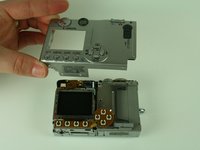
      • Detach the front case and back case.

      Спросите у FixBot

      Добавить комментарий

    5. Canon PowerShot S400 LCD Screen Replacement: шаг 5, изображение 1 из 1
      • Do not remove the metal plate this step refers to. Removal at this step may damage the ribbon cable. Wait until the next step to remove the plate.

      • Remove the 3.5 mm screw that sits on the metal plate at the bottom of the camera.

      • Remove the two other 3.5 mm screws that sit on the side, to the left of the screw you just removed.

      • In the image, we have already removed some of the screws.

      Спросите у FixBot

      Добавить комментарий

    6. Canon PowerShot S400 LCD Screen Replacement: шаг 6, изображение 1 из 3 Canon PowerShot S400 LCD Screen Replacement: шаг 6, изображение 2 из 3 Canon PowerShot S400 LCD Screen Replacement: шаг 6, изображение 3 из 3
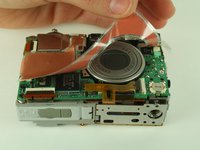
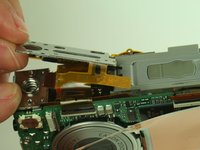
      • A ribbon cable attaches to the metal plate and to the main circuit board, on the front of the camera.

      • Gently release the black latch.

      • Remove the ribbon cable and metal plate assembly.

      Спросите у FixBot

      Добавить комментарий

    7. Canon PowerShot S400 LCD Screen Replacement: шаг 7, изображение 1 из 2 Canon PowerShot S400 LCD Screen Replacement: шаг 7, изображение 2 из 2
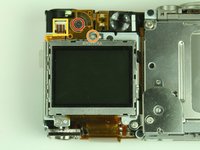
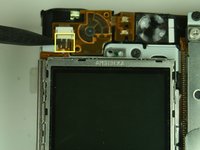
      • On the backside of the camera, remove the 3.5 mm screw that sits to the left of the viewfinder and above the LCD screen.

      • Remove the second 3.5 mm screw that sits directly above the LCD screen.

      • Gently detach the ribbon cable.

      Спросите у FixBot

      Добавить комментарий

    8. Canon PowerShot S400 LCD Screen Replacement: шаг 8, изображение 1 из 1
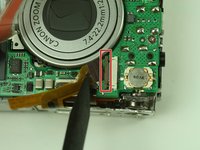
      • Locate the ribbon cable on the main circuit board, which sits below the lens.

      • Gently release the black latch on the ribbon cable connector and detach the ribbon cable.

      Спросите у FixBot

      Добавить комментарий

    9. Canon PowerShot S400 LCD Screen Replacement: шаг 9, изображение 1 из 2 Canon PowerShot S400 LCD Screen Replacement: шаг 9, изображение 2 из 2
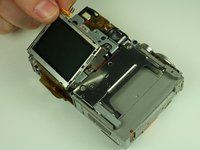
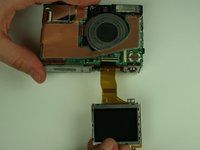
      • Remove the LCD screen and set it aside.

      Спросите у FixBot

      Добавить комментарий

Заключение

To reassemble your device, follow these instructions in reverse order.

Отменить: Я не выполнил это руководство.

Еще один человек закончил это руководство.

Ross Bryan

Участник с: 01/21/11

375 Репутация

Автор 3 руководств

Команда

Cal Poly, Team 5-19, Amido Winter 2011 Участник Cal Poly, Team 5-19, Amido Winter 2011

CPSU-AMIDO-W11S5G19

4 членов

Автор 6 руководств

0 Комментарии к руководству

Добавить комментарий

Статистика просмотров:

За последние 24 часов: 2

За последние 7 дней: 11

За последние 30 дней: 40

За всё время: 3,809