Перейти к основному содержанию
Присоединяйся к сообществу ремонтников - Создай аккаунт

Canon PowerShot SD1200 IS Function Button Board Replacement

Выберете то, что вам нужно

  1. Canon PowerShot SD1200 IS Function Button Board Replacement, Front and Rear Covers: шаг 1, изображение 1 из 1
    • Remove the battery.

    Спросите у FixBot
  2. Canon PowerShot SD1200 IS Function Button Board Replacement: шаг 2, изображение 1 из 3 Canon PowerShot SD1200 IS Function Button Board Replacement: шаг 2, изображение 2 из 3 Canon PowerShot SD1200 IS Function Button Board Replacement: шаг 2, изображение 3 из 3
    • Remove the two screws from the side of the camera casing with the strap. (4mm Phillips 00)

    • Remove the two screws from the bottom of the camera. (4mm Phillips 00)

    • Remove the two screws from the right side of the camera opposite the strap. (2mm Phillips 00)

    Спросите у FixBot
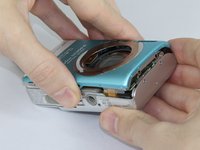
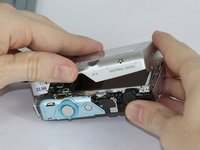
  3. Canon PowerShot SD1200 IS Function Button Board Replacement: шаг 3, изображение 1 из 2 Canon PowerShot SD1200 IS Function Button Board Replacement: шаг 3, изображение 2 из 2
    • Pull off the front cover.

    • If the top of the cover sticks, use gentle downward pressure on the retention clips above the lens to release.

    • Remove the back cover.

    Спросите у FixBot
  4. Canon PowerShot SD1200 IS Function Button Board Replacement, Function Buttons: шаг 4, изображение 1 из 1
    • Use the spudger to lift the tab on the Zero Insertion Force (ZIF) connector located at the top of the function button board.

    • Be sure you are prying up on the hinged retaining flap, not the connector itself.

    • Slide out the ribbon cable from the connector.

    Спросите у FixBot
  5. Canon PowerShot SD1200 IS Function Button Board Replacement: шаг 5, изображение 1 из 1
    • Remove the top screw from the function button board. (3.5mm Phillips 00)

    • Remove the bottom screw from the function button board. (2.5mm Phillips 00)

    Спросите у FixBot
  6. Canon PowerShot SD1200 IS Function Button Board Replacement: шаг 6, изображение 1 из 1
    • Lift out the function button board.

    Спросите у FixBot
Заключение

To reassemble your device, follow these instructions in reverse order.

Jeff Casper

Участник с: 09/15/16

897 Репутация

Автор 7 руководств

Команда

USF Tampa, Team 17-5, Blackwell Fall 2016 Участник USF Tampa, Team 17-5, Blackwell Fall 2016

USFT-BLACKWELL-F16S17G5

3 членов

Автор 7 руководств

0 Комментарии к руководству

Добавить комментарий

Статистика просмотров:

За последние 24 часов: 3

За последние 7 дней: 10

За последние 30 дней: 42

За всё время: 519